-
-
[原创]chromium 的启动
-
发表于: 2025-11-4 21:07 3113
-


简单串一下浏览器启动的整个流程. 这样可以将 chromium 的框架串起来, 作者志大才疏, 有写的不好地方还请指出.
Chromium 的入口文件设计是不同系统有各自的入口文件, 最终都会汇总到统一的核心启动逻辑:
这个最短:
该文件仅用于 Linux 等类 Unix 系统, 是基于 Aura 界面框架的入口实现, 其核心是直接调用 ChromeMain(argc, argv), 无需中间 DLL 加载层, 与 Windows 需通过 chrome.dll 启动的逻辑完全不同.
贴出主要部分:
主要是在通过 dlopen 动态加载框架, 从加载的框架中查找并调用 ChromeMain 函数, 传入命令行参数, 最终通过 exit 退出以保证栈回溯完整性
只贴出主要的 main 函数:
初始化命令行, 设置工作目录, 各种奔溃处理..., 实际上是 loader->Launch 在进一步加载, 进入 chrome\app\main_dll_loader_win.cc:
仍然是用进入 ChromeMain 函数.
又是各种乱七八糟的不同平台的参数处理, 初始化等等, 值得注意的是在这里处理了无头模式, 然后调用 ContentMain 进一步启动, 来到 content\public\app\content_main.h:
在跟入默认实现 content\app\content_main.cc:
又是初始化一堆, 接着跟入 content_main_runner->Run, 来到 content\app\content_main_runner_impl.cc:
主进程启动时不携带 --type 参数, 则 process_type.empty() 是 true, 所以我们先不管子进程, 也就是 if (!process_type.empty()) 中的逻辑.
注册一下这三种进程的回调类:
这段代码, 初始化了 Mojo, 用于进程通信, 然后又初始化一大堆, 可以自己读读. 在跟入 RunBrowserProcessMain:
delegate->RunProcess 对一些平台做了些处理, 不太重要, 继续跟入 BrowserMain, 来到 content\browser\browser_main.cc:
这个就是生命周期控制函数,
首先看下 main_runner->Initialize, 跟入, 来到 content\browser\browser_main_runner_impl.cc:
可以看到这里初始化一大堆, 什么 ui, font, skia..., 再跟入 main_runner->Run:
在跟入 RunMainMessageLoop:
不管三七二十一, 跟入 main_run_loop->Run, 来到了 base\task\sequence_manager\thread_controller_with_message_pump_impl.cc:
在跟入 pump_->Run, 发现不同平台还是有不同的实现:
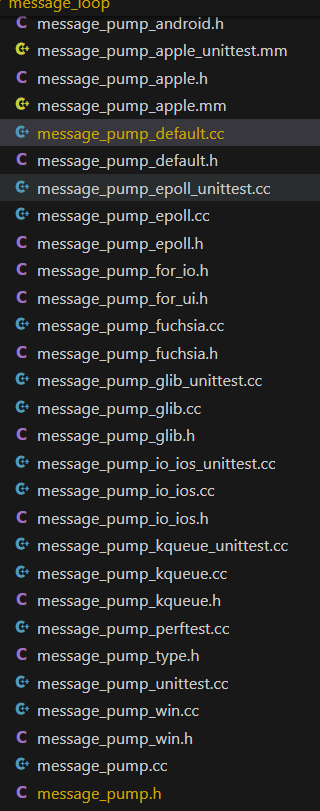
我们看 base\message_loop\message_pump_default.cc 中的:
大体上就是一套任务队列机制, 所有任务(UI 事件, 网络回调, 延迟任务, 空闲任务等)最终都会被放入任务队列中, 消息泵循环的核心就是"从队列取任务→执行→再取"的循环, 这是整套机制的底层基础.
回到最开始 ContentMainRunnerImpl::Run, 还记得有一个主进程子进程的分流吗, 我们从这里开始看, 跟人 RunOtherNamedProcessTypeMain 来到 content\app\content_main_runner_impl.cc:
一个个来看.
仍然是启动子进程加入消息队列. 等待主进程派发任务.
好了, 到此为止吧.
#include "build/build_config.h"extern "C" {int ChromeMain(int argc, const char** argv);}int main(int argc, const char** argv) { return ChromeMain(argc, argv);}#include "build/build_config.h"extern "C" {int ChromeMain(int argc, const char** argv);}int main(int argc, const char** argv) { return ChromeMain(argc, argv);}// 定义对外可见的main函数, 作为程序入口点// 参数: argc - 命令行参数数量; argv - 命令行参数数组__attribute__((visibility("default"))) int main(int argc, char* argv[]) { // 早期注册PartitionAlloc内存分配器的malloc区域(初始化内存分配器) partition_alloc::EarlyMallocZoneRegistration(); uint32_t exec_path_size = 0; // 用于存储可执行文件路径的长度 // 第一次调用_NSGetExecutablePath获取路径长度(传入NULL时仅返回所需长度) int rv = _NSGetExecutablePath(NULL, &exec_path_size); if (rv != -1) { // 正常情况下应返回-1(表示需要分配缓冲区), 否则报错 FatalError("_NSGetExecutablePath: get length failed."); } // 根据获取的长度分配缓冲区存储可执行文件路径 std::unique_ptr<char[]> exec_path(new char[exec_path_size]); // 第二次调用_NSGetExecutablePath获取实际路径 rv = _NSGetExecutablePath(exec_path.get(), &exec_path_size); if (rv != 0) { // 返回0表示成功, 非0则路径获取失败 FatalError("_NSGetExecutablePath: get path failed."); }#if defined(HELPER_EXECUTABLE) // 如果是辅助可执行程序(Helper) // 创建沙箱服务端并解析启动参数(macOS沙箱机制) sandbox::SeatbeltExecServer::CreateFromArgumentsResult seatbelt = sandbox::SeatbeltExecServer::CreateFromArguments(exec_path.get(), argc, argv); if (seatbelt.sandbox_required) { // 如果需要启用沙箱 if (!seatbelt.server) { // 沙箱服务端创建失败 FatalError("Failed to create seatbelt sandbox server."); } if (!seatbelt.server->InitializeSandbox()) { // 沙箱初始化失败 FatalError("Failed to initialize sandbox."); } } // 辅助程序位于版本化框架目录中, 通过相对路径定位主框架 const char rel_path[] = "../../../../" PRODUCT_FULLNAME_STRING " Framework";#else // 非辅助程序(主程序) // 主程序通过相对路径定位框架(版本化路径, 包含版本号) const char rel_path[] = "../Frameworks/" PRODUCT_FULLNAME_STRING " Framework.framework/Versions/" CHROME_VERSION_STRING "/" PRODUCT_FULLNAME_STRING " Framework";#endif // defined(HELPER_EXECUTABLE) // 从可执行文件路径中提取父目录, 拼接相对路径得到框架完整路径 const char* parent_dir = dirname(exec_path.get()); // 获取父目录路径 if (!parent_dir) { // dirname失败(如路径无效) FatalError("dirname %s: %s.", exec_path.get(), strerror(errno)); } // 计算拼接路径所需的缓冲区大小 const size_t parent_dir_len = strlen(parent_dir); // 父目录长度 const size_t rel_path_len = strlen(rel_path); // 相对路径长度 // +2 用于容纳路径分隔符'/'和字符串结束符'\0' const size_t framework_path_size = parent_dir_len + rel_path_len + 2; // 分配缓冲区存储框架完整路径 std::unique_ptr<char[]> framework_path(new char[framework_path_size]); // 拼接父目录和相对路径, 生成框架的完整路径 snprintf(framework_path.get(), framework_path_size, "%s/%s", parent_dir, rel_path); // 加载框架动态库(RTLD_LAZY: 延迟绑定;RTLD_LOCAL: 符号仅本模块可见;RTLD_FIRST: 优先从该库查找符号) void* library = dlopen(framework_path.get(), RTLD_LAZY | RTLD_LOCAL | RTLD_FIRST); if (!library) { // 动态库加载失败 FatalError("dlopen %s: %s.", framework_path.get(), dlerror()); } // 从加载的动态库中查找"ChromeMain"符号(核心启动函数) const ChromeMainPtr chrome_main = reinterpret_cast<ChromeMainPtr>(dlsym(library, "ChromeMain")); if (!chrome_main) { // 未找到ChromeMain函数 FatalError("dlsym ChromeMain: %s.", dlerror()); } // 调用ChromeMain函数, 传入命令行参数, 执行核心启动逻辑 rv = chrome_main(argc, argv); // 使用exit而非return, 避免尾调用优化导致main函数从栈回溯中消失 exit(rv);}// 定义对外可见的main函数, 作为程序入口点// 参数: argc - 命令行参数数量; argv - 命令行参数数组__attribute__((visibility("default"))) int main(int argc, char* argv[]) { // 早期注册PartitionAlloc内存分配器的malloc区域(初始化内存分配器) partition_alloc::EarlyMallocZoneRegistration(); uint32_t exec_path_size = 0; // 用于存储可执行文件路径的长度 // 第一次调用_NSGetExecutablePath获取路径长度(传入NULL时仅返回所需长度) int rv = _NSGetExecutablePath(NULL, &exec_path_size); if (rv != -1) { // 正常情况下应返回-1(表示需要分配缓冲区), 否则报错 FatalError("_NSGetExecutablePath: get length failed."); } // 根据获取的长度分配缓冲区存储可执行文件路径 std::unique_ptr<char[]> exec_path(new char[exec_path_size]); // 第二次调用_NSGetExecutablePath获取实际路径 rv = _NSGetExecutablePath(exec_path.get(), &exec_path_size); if (rv != 0) { // 返回0表示成功, 非0则路径获取失败 FatalError("_NSGetExecutablePath: get path failed."); }#if defined(HELPER_EXECUTABLE) // 如果是辅助可执行程序(Helper) // 创建沙箱服务端并解析启动参数(macOS沙箱机制) sandbox::SeatbeltExecServer::CreateFromArgumentsResult seatbelt = sandbox::SeatbeltExecServer::CreateFromArguments(exec_path.get(), argc, argv); if (seatbelt.sandbox_required) { // 如果需要启用沙箱 if (!seatbelt.server) { // 沙箱服务端创建失败 FatalError("Failed to create seatbelt sandbox server."); } if (!seatbelt.server->InitializeSandbox()) { // 沙箱初始化失败 FatalError("Failed to initialize sandbox."); } } // 辅助程序位于版本化框架目录中, 通过相对路径定位主框架 const char rel_path[] = "../../../../" PRODUCT_FULLNAME_STRING " Framework";#else // 非辅助程序(主程序) // 主程序通过相对路径定位框架(版本化路径, 包含版本号) const char rel_path[] = "../Frameworks/" PRODUCT_FULLNAME_STRING " Framework.framework/Versions/" CHROME_VERSION_STRING "/" PRODUCT_FULLNAME_STRING " Framework";#endif // defined(HELPER_EXECUTABLE) // 从可执行文件路径中提取父目录, 拼接相对路径得到框架完整路径 const char* parent_dir = dirname(exec_path.get()); // 获取父目录路径 if (!parent_dir) { // dirname失败(如路径无效) FatalError("dirname %s: %s.", exec_path.get(), strerror(errno)); } // 计算拼接路径所需的缓冲区大小 const size_t parent_dir_len = strlen(parent_dir); // 父目录长度 const size_t rel_path_len = strlen(rel_path); // 相对路径长度 // +2 用于容纳路径分隔符'/'和字符串结束符'\0' const size_t framework_path_size = parent_dir_len + rel_path_len + 2; // 分配缓冲区存储框架完整路径 std::unique_ptr<char[]> framework_path(new char[framework_path_size]); // 拼接父目录和相对路径, 生成框架的完整路径 snprintf(framework_path.get(), framework_path_size, "%s/%s", parent_dir, rel_path); // 加载框架动态库(RTLD_LAZY: 延迟绑定;RTLD_LOCAL: 符号仅本模块可见;RTLD_FIRST: 优先从该库查找符号) void* library = dlopen(framework_path.get(), RTLD_LAZY | RTLD_LOCAL | RTLD_FIRST); if (!library) { // 动态库加载失败 FatalError("dlopen %s: %s.", framework_path.get(), dlerror()); } // 从加载的动态库中查找"ChromeMain"符号(核心启动函数) const ChromeMainPtr chrome_main = reinterpret_cast<ChromeMainPtr>(dlsym(library, "ChromeMain")); if (!chrome_main) { // 未找到ChromeMain函数 FatalError("dlsym ChromeMain: %s.", dlerror()); } // 调用ChromeMain函数, 传入命令行参数, 执行核心启动逻辑 rv = chrome_main(argc, argv); // 使用exit而非return, 避免尾调用优化导致main函数从栈回溯中消失 exit(rv);}// 根据是否为控制台应用, 选择不同的程序入口函数#if !defined(WIN_CONSOLE_APP)// GUI应用入口:wWinMain(宽字符版本)int APIENTRY wWinMain(HINSTANCE instance, HINSTANCE prev, wchar_t*, int) {#else // 控制台应用入口:mainint main() { HINSTANCE instance = GetModuleHandle(nullptr); // 获取当前模块实例句柄#endif // !defined(WIN_CONSOLE_APP)// 32位构建专用:纤程切换逻辑(扩大主线程栈空间)#if defined(ARCH_CPU_32_BITS) enum class FiberStatus { kConvertFailed, kCreateFiberFailed, kSuccess }; FiberStatus fiber_status = FiberStatus::kSuccess; DWORD fiber_error = ERROR_SUCCESS; // 纤程操作失败时的错误码 if (!::IsThreadAFiber()) { // 当前线程未转换为纤程, 执行转换逻辑 constexpr size_t kStackSize = 4 * 1024 * 1024; // 大栈空间大小(4MiB, 对标64位的8MiB) // 将主线程转换为纤程(FIBER_FLAG_FLOAT_SWITCH支持浮点寄存器切换) LPVOID original_fiber = ::ConvertThreadToFiberEx(nullptr, FIBER_FLAG_FLOAT_SWITCH); if (original_fiber) { FiberState fiber_state = {instance, original_fiber}; // 初始化纤程状态 // 创建大栈纤程, 绑定启动函数FiberBinder和状态参数 LPVOID big_stack_fiber = ::CreateFiberEx( 0, kStackSize, FIBER_FLAG_FLOAT_SWITCH, FiberBinder, &fiber_state); if (big_stack_fiber) { ::SwitchToFiber(big_stack_fiber); // 切换到大栈纤程执行 // 执行完成后清理纤程资源(避免TLS相关的关闭崩溃) ::DeleteFiber(big_stack_fiber); ::ConvertFiberToThread(); return fiber_state.fiber_result; // 返回纤程执行结果 } fiber_status = FiberStatus::kCreateFiberFailed; // 大栈纤程创建失败 } else { fiber_status = FiberStatus::kConvertFailed; // 线程转纤程失败 } // 记录错误码(供崩溃报告分析) fiber_error = ::GetLastError(); base::debug::Alias(&fiber_error); } // 若已为纤程, 直接继续执行#endif // defined(ARCH_CPU_32_BITS) // 1. 设置浏览器进程的工作目录 SetCwdForBrowserProcess(); // 2. 从主模块初始化安装信息(如版本, 渠道) install_static::InitializeFromPrimaryModule(); // 3. 信号通知:初始化崩溃报告机制 SignalInitializeCrashReporting(); // 4. 浏览器进程禁用延迟加载失败钩子(避免启动时钩子干扰) if (IsBrowserProcess()) chrome::DisableDelayLoadFailureHooksForMainExecutable(); // 5. 32位构建:检查纤程切换是否成功, 失败则崩溃#if defined(ARCH_CPU_32_BITS) CHECK_EQ(fiber_status, FiberStatus::kSuccess);#endif // defined(ARCH_CPU_32_BITS) // 启用内存不足时的终止机制(确保OOM错误正确通知系统) base::EnableTerminationOnOutOfMemory(); // 注册Abseil库的崩溃钩子(统一崩溃处理) logging::RegisterAbslAbortHook(); // 初始化命令行单例(从环境变量解析命令行) base::CommandLine::Init(0, nullptr); const base::CommandLine* command_line = base::CommandLine::ForCurrentProcess(); // 获取进程类型(如浏览器进程, 渲染进程, Crashpad进程等) const std::string process_type = command_line->GetSwitchValueASCII(switches::kProcessType);// 非组件构建且启用DCHECK时的特殊处理#if !defined(COMPONENT_BUILD) && DCHECK_IS_ON() // 禁用FeatureList的默认访问(避免chrome.exe中未初始化的FeatureList被误访问) base::FeatureList::FailOnFeatureAccessWithoutFeatureList(); // 修补IAT(导入地址表), 检测第三方代码对Chrome句柄的篡改 base::debug::HandleHooks::AddIATPatch(CURRENT_MODULE());#endif // !defined(COMPONENT_BUILD) && DCHECK_IS_ON() // 验证非浏览器进程是否包含有效的/prefetch参数(确保预加载正确) DCHECK(process_type.empty() || HasValidWindowsPrefetchArgument(*command_line)); // 分支1:当前为Crashpad崩溃处理进程 if (process_type == crash_reporter::switches::kCrashpadHandler) { std::unique_ptr<ExitCodeWatcher> exit_code_watcher; // 进程退出码监视器 // 初始化备用崩溃处理 crash_reporter::SetupFallbackCrashHandling(*command_line); // 非周期性任务进程(监控浏览器进程, 而非其他Crashpad进程) if (!command_line->HasSwitch("no-periodic-tasks")) { // 从命令行解析初始客户端数据(获取父进程信息) crashpad::InitialClientData initial_client_data; if (initial_client_data.InitializeFromString( command_line->GetSwitchValueASCII("initial-client-data"))) { // 复制父进程句柄(用于监控退出状态) HANDLE duplicate_handle = INVALID_HANDLE_VALUE; if (DuplicateHandle( ::GetCurrentProcess(), initial_client_data.client_process(), ::GetCurrentProcess(), &duplicate_handle, PROCESS_QUERY_INFORMATION, FALSE, DUPLICATE_SAME_ACCESS)) { base::Process parent_process(duplicate_handle); // 创建并启动退出码监视器 exit_code_watcher = std::make_unique<ExitCodeWatcher>(); if (exit_code_watcher->Initialize(std::move(parent_process))) { exit_code_watcher->StartWatching(); } } } } // 强制检查命令行是否包含用户数据目录参数(Crashpad必需) DCHECK(command_line->HasSwitch(switches::kUserDataDir)); // 获取用户数据目录, 启动Crashpad处理器 base::FilePath user_data_dir = command_line->GetSwitchValuePath(switches::kUserDataDir); int crashpad_status = crash_reporter::RunAsCrashpadHandler( *base::CommandLine::ForCurrentProcess(), user_data_dir, switches::kProcessType, switches::kUserDataDir); // 若Crashpad初始化失败, 停止监视器以正常退出 if (crashpad_status != 0 && exit_code_watcher) { exit_code_watcher->StopWatching(); } return crashpad_status; } // 分支2:当前为备用崩溃处理进程 else if (process_type == crash_reporter::switches::kFallbackCrashHandler) { return RunFallbackCrashHandler(*command_line); } // 记录程序入口时间戳(用于启动性能分析) const base::TimeTicks exe_entry_point_ticks = base::TimeTicks::Now(); // 信号通知ChromeElf模块:Chrome开始启动(安全模块初始化) SignalChromeElf(); // 初始化退出管理器(负责单例对象的析构) base::AtExitManager exit_manager; // 尝试快速通知已运行的Chrome(单实例逻辑), 成功则直接退出 if (AttemptFastNotify(*command_line)) return 0; // 加载并启动chrome.dll(核心逻辑均在DLL中实现) VLOG(1) << "About to load main DLL."; MainDllLoader* loader = MakeMainDllLoader(); // 创建DLL加载器 // 启动DLL, 传入实例句柄和入口时间戳 int rc = loader->Launch(instance, exe_entry_point_ticks); // 检查是否需要重启Chrome(如版本更新后) loader->RelaunchChromeBrowserWithNewCommandLineIfNeeded(); delete loader; // 释放加载器资源 // 工具进程(UtilityProcess)直接强制终止(避免关闭时崩溃, 更安全高效) if (process_type == switches::kUtilityProcess) { base::Process::TerminateCurrentProcessImmediately(rc); } return rc; // 返回退出码}// 根据是否为控制台应用, 选择不同的程序入口函数#if !defined(WIN_CONSOLE_APP)// GUI应用入口:wWinMain(宽字符版本)int APIENTRY wWinMain(HINSTANCE instance, HINSTANCE prev, wchar_t*, int) {#else // 控制台应用入口:mainint main() { HINSTANCE instance = GetModuleHandle(nullptr); // 获取当前模块实例句柄#endif // !defined(WIN_CONSOLE_APP)// 32位构建专用:纤程切换逻辑(扩大主线程栈空间)#if defined(ARCH_CPU_32_BITS) enum class FiberStatus { kConvertFailed, kCreateFiberFailed, kSuccess }; FiberStatus fiber_status = FiberStatus::kSuccess; DWORD fiber_error = ERROR_SUCCESS; // 纤程操作失败时的错误码 if (!::IsThreadAFiber()) { // 当前线程未转换为纤程, 执行转换逻辑 constexpr size_t kStackSize = 4 * 1024 * 1024; // 大栈空间大小(4MiB, 对标64位的8MiB) // 将主线程转换为纤程(FIBER_FLAG_FLOAT_SWITCH支持浮点寄存器切换) LPVOID original_fiber = ::ConvertThreadToFiberEx(nullptr, FIBER_FLAG_FLOAT_SWITCH); if (original_fiber) { FiberState fiber_state = {instance, original_fiber}; // 初始化纤程状态 // 创建大栈纤程, 绑定启动函数FiberBinder和状态参数 LPVOID big_stack_fiber = ::CreateFiberEx( 0, kStackSize, FIBER_FLAG_FLOAT_SWITCH, FiberBinder, &fiber_state); if (big_stack_fiber) { ::SwitchToFiber(big_stack_fiber); // 切换到大栈纤程执行 // 执行完成后清理纤程资源(避免TLS相关的关闭崩溃) ::DeleteFiber(big_stack_fiber); ::ConvertFiberToThread(); return fiber_state.fiber_result; // 返回纤程执行结果 } fiber_status = FiberStatus::kCreateFiberFailed; // 大栈纤程创建失败 } else { fiber_status = FiberStatus::kConvertFailed; // 线程转纤程失败 } // 记录错误码(供崩溃报告分析) fiber_error = ::GetLastError(); base::debug::Alias(&fiber_error); } // 若已为纤程, 直接继续执行#endif // defined(ARCH_CPU_32_BITS) // 1. 设置浏览器进程的工作目录 SetCwdForBrowserProcess(); // 2. 从主模块初始化安装信息(如版本, 渠道) install_static::InitializeFromPrimaryModule(); // 3. 信号通知:初始化崩溃报告机制 SignalInitializeCrashReporting(); // 4. 浏览器进程禁用延迟加载失败钩子(避免启动时钩子干扰) if (IsBrowserProcess()) chrome::DisableDelayLoadFailureHooksForMainExecutable(); // 5. 32位构建:检查纤程切换是否成功, 失败则崩溃#if defined(ARCH_CPU_32_BITS) CHECK_EQ(fiber_status, FiberStatus::kSuccess);#endif // defined(ARCH_CPU_32_BITS) // 启用内存不足时的终止机制(确保OOM错误正确通知系统) base::EnableTerminationOnOutOfMemory(); // 注册Abseil库的崩溃钩子(统一崩溃处理) logging::RegisterAbslAbortHook(); // 初始化命令行单例(从环境变量解析命令行) base::CommandLine::Init(0, nullptr); const base::CommandLine* command_line = base::CommandLine::ForCurrentProcess(); // 获取进程类型(如浏览器进程, 渲染进程, Crashpad进程等) const std::string process_type = command_line->GetSwitchValueASCII(switches::kProcessType);// 非组件构建且启用DCHECK时的特殊处理#if !defined(COMPONENT_BUILD) && DCHECK_IS_ON() // 禁用FeatureList的默认访问(避免chrome.exe中未初始化的FeatureList被误访问) base::FeatureList::FailOnFeatureAccessWithoutFeatureList(); // 修补IAT(导入地址表), 检测第三方代码对Chrome句柄的篡改 base::debug::HandleHooks::AddIATPatch(CURRENT_MODULE());#endif // !defined(COMPONENT_BUILD) && DCHECK_IS_ON() // 验证非浏览器进程是否包含有效的/prefetch参数(确保预加载正确) DCHECK(process_type.empty() || HasValidWindowsPrefetchArgument(*command_line)); // 分支1:当前为Crashpad崩溃处理进程 if (process_type == crash_reporter::switches::kCrashpadHandler) { std::unique_ptr<ExitCodeWatcher> exit_code_watcher; // 进程退出码监视器 // 初始化备用崩溃处理 crash_reporter::SetupFallbackCrashHandling(*command_line); // 非周期性任务进程(监控浏览器进程, 而非其他Crashpad进程) if (!command_line->HasSwitch("no-periodic-tasks")) { // 从命令行解析初始客户端数据(获取父进程信息) crashpad::InitialClientData initial_client_data; if (initial_client_data.InitializeFromString( command_line->GetSwitchValueASCII("initial-client-data"))) { // 复制父进程句柄(用于监控退出状态) HANDLE duplicate_handle = INVALID_HANDLE_VALUE; if (DuplicateHandle( ::GetCurrentProcess(), initial_client_data.client_process(), ::GetCurrentProcess(), &duplicate_handle, PROCESS_QUERY_INFORMATION, FALSE, DUPLICATE_SAME_ACCESS)) { base::Process parent_process(duplicate_handle); // 创建并启动退出码监视器 exit_code_watcher = std::make_unique<ExitCodeWatcher>(); if (exit_code_watcher->Initialize(std::move(parent_process))) { exit_code_watcher->StartWatching(); } } } } // 强制检查命令行是否包含用户数据目录参数(Crashpad必需) DCHECK(command_line->HasSwitch(switches::kUserDataDir)); // 获取用户数据目录, 启动Crashpad处理器 base::FilePath user_data_dir = command_line->GetSwitchValuePath(switches::kUserDataDir); int crashpad_status = crash_reporter::RunAsCrashpadHandler( *base::CommandLine::ForCurrentProcess(), user_data_dir, switches::kProcessType, switches::kUserDataDir); // 若Crashpad初始化失败, 停止监视器以正常退出 if (crashpad_status != 0 && exit_code_watcher) { exit_code_watcher->StopWatching(); } return crashpad_status; } // 分支2:当前为备用崩溃处理进程 else if (process_type == crash_reporter::switches::kFallbackCrashHandler) { return RunFallbackCrashHandler(*command_line); } // 记录程序入口时间戳(用于启动性能分析) const base::TimeTicks exe_entry_point_ticks = base::TimeTicks::Now(); // 信号通知ChromeElf模块:Chrome开始启动(安全模块初始化) SignalChromeElf(); // 初始化退出管理器(负责单例对象的析构) base::AtExitManager exit_manager; // 尝试快速通知已运行的Chrome(单实例逻辑), 成功则直接退出 if (AttemptFastNotify(*command_line)) return 0; // 加载并启动chrome.dll(核心逻辑均在DLL中实现) VLOG(1) << "About to load main DLL."; MainDllLoader* loader = MakeMainDllLoader(); // 创建DLL加载器 // 启动DLL, 传入实例句柄和入口时间戳 int rc = loader->Launch(instance, exe_entry_point_ticks); // 检查是否需要重启Chrome(如版本更新后) loader->RelaunchChromeBrowserWithNewCommandLineIfNeeded(); delete loader; // 释放加载器资源 // 工具进程(UtilityProcess)直接强制终止(避免关闭时崩溃, 更安全高效) if (process_type == switches::kUtilityProcess) { base::Process::TerminateCurrentProcessImmediately(rc); } return rc; // 返回退出码}// 启动逻辑核心:加载对应DLL并调用其入口函数// 派生类可通过重写OnBeforeLaunch回调函数添加自定义逻辑int MainDllLoader::Launch(HINSTANCE instance, base::TimeTicks exe_entry_point_ticks) { // 获取当前进程的命令行对象(用于解析参数) const base::CommandLine& cmd_line = *base::CommandLine::ForCurrentProcess(); // 从命令行读取进程类型(如浏览器进程, 渲染进程等, 空字符串表示浏览器进程) process_type_ = cmd_line.GetSwitchValueASCII(switches::kProcessType); // 初始化沙箱接口信息(默认所有字段为空) sandbox::SandboxInterfaceInfo sandbox_info = {nullptr}; const bool is_browser = process_type_.empty(); // 判断是否为浏览器进程 // 判断是否启用沙箱:通过命令行解析沙箱类型, 非"无沙箱"模式即为启用 // 注:此处不使用IsUnsandboxedSandboxType(), 因该函数依赖尚未初始化的特性标志 const bool is_sandboxed = sandbox::policy::SandboxTypeFromCommandLine(cmd_line) != sandbox::mojom::Sandbox::kNoSandbox; // 浏览器进程或启用沙箱的子进程, 初始化沙箱信息 if (is_browser || is_sandboxed) { // 非沙箱子进程无需初始化沙箱信息, 否则会被误判为沙箱代理(类似浏览器进程) content::InitializeSandboxInfo( &sandbox_info, // 若设置了扩展点禁用, 添加对应沙箱缓解措施;否则为0 IsExtensionPointDisableSet() ? sandbox::MITIGATION_EXTENSION_POINT_DISABLE : 0); } // 记录DLL预读取的开始和结束时间戳(用于性能分析) base::TimeTicks preread_begin_ticks; base::TimeTicks preread_end_ticks; base::FilePath file; // 存储加载的DLL文件路径 // 加载核心DLL(chrome.dll), 传入命令行, 是否为浏览器进程及时间戳参数 dll_ = Load(&file, cmd_line, is_browser, preread_begin_ticks, preread_end_ticks); if (!dll_) // DLL加载失败, 返回"缺失数据"错误码 return CHROME_RESULT_CODE_MISSING_DATA; // 非浏览器进程:设置进程关闭优先级(确保浏览器退出后子进程优先被系统终止) if (!is_browser) { // 浏览器进程默认关闭优先级为0x280, 子进程优先级设为更高(数值更大), 实现"先杀子进程" // SHUTDOWN_NORETRY:关闭时不重试, 避免注销/关机时出现无效标签页 ::SetProcessShutdownParameters(kNonBrowserShutdownPriority - 1, SHUTDOWN_NORETRY); } // 启动前回调:允许派生类注入自定义逻辑(如参数修改, 环境配置) OnBeforeLaunch(process_type_, file); // 从加载的DLL中获取ChromeMain函数地址(DLL的核心入口点) DLL_MAIN chrome_main = reinterpret_cast<DLL_MAIN>(::GetProcAddress(dll_, "ChromeMain")); // 调用ChromeMain启动核心逻辑, 传入实例句柄, 沙箱信息和时间戳(转换为内部值) int rc = chrome_main(instance, &sandbox_info, exe_entry_point_ticks.ToInternalValue(), preread_begin_ticks.ToInternalValue(), preread_end_ticks.ToInternalValue()); return rc; // 返回ChromeMain的执行结果(退出码)}// 启动逻辑核心:加载对应DLL并调用其入口函数// 派生类可通过重写OnBeforeLaunch回调函数添加自定义逻辑int MainDllLoader::Launch(HINSTANCE instance, base::TimeTicks exe_entry_point_ticks) { // 获取当前进程的命令行对象(用于解析参数) const base::CommandLine& cmd_line = *base::CommandLine::ForCurrentProcess(); // 从命令行读取进程类型(如浏览器进程, 渲染进程等, 空字符串表示浏览器进程) process_type_ = cmd_line.GetSwitchValueASCII(switches::kProcessType); // 初始化沙箱接口信息(默认所有字段为空) sandbox::SandboxInterfaceInfo sandbox_info = {nullptr}; const bool is_browser = process_type_.empty(); // 判断是否为浏览器进程 // 判断是否启用沙箱:通过命令行解析沙箱类型, 非"无沙箱"模式即为启用 // 注:此处不使用IsUnsandboxedSandboxType(), 因该函数依赖尚未初始化的特性标志 const bool is_sandboxed = sandbox::policy::SandboxTypeFromCommandLine(cmd_line) != sandbox::mojom::Sandbox::kNoSandbox; // 浏览器进程或启用沙箱的子进程, 初始化沙箱信息 if (is_browser || is_sandboxed) { // 非沙箱子进程无需初始化沙箱信息, 否则会被误判为沙箱代理(类似浏览器进程) content::InitializeSandboxInfo( &sandbox_info, // 若设置了扩展点禁用, 添加对应沙箱缓解措施;否则为0 IsExtensionPointDisableSet() ? sandbox::MITIGATION_EXTENSION_POINT_DISABLE : 0); } // 记录DLL预读取的开始和结束时间戳(用于性能分析) base::TimeTicks preread_begin_ticks; base::TimeTicks preread_end_ticks; base::FilePath file; // 存储加载的DLL文件路径 // 加载核心DLL(chrome.dll), 传入命令行, 是否为浏览器进程及时间戳参数 dll_ = Load(&file, cmd_line, is_browser, preread_begin_ticks, preread_end_ticks); if (!dll_) // DLL加载失败, 返回"缺失数据"错误码 return CHROME_RESULT_CODE_MISSING_DATA; // 非浏览器进程:设置进程关闭优先级(确保浏览器退出后子进程优先被系统终止) if (!is_browser) { // 浏览器进程默认关闭优先级为0x280, 子进程优先级设为更高(数值更大), 实现"先杀子进程" // SHUTDOWN_NORETRY:关闭时不重试, 避免注销/关机时出现无效标签页 ::SetProcessShutdownParameters(kNonBrowserShutdownPriority - 1, SHUTDOWN_NORETRY); } // 启动前回调:允许派生类注入自定义逻辑(如参数修改, 环境配置) OnBeforeLaunch(process_type_, file); // 从加载的DLL中获取ChromeMain函数地址(DLL的核心入口点) DLL_MAIN chrome_main = reinterpret_cast<DLL_MAIN>(::GetProcAddress(dll_, "ChromeMain")); // 调用ChromeMain启动核心逻辑, 传入实例句柄, 沙箱信息和时间戳(转换为内部值) int rc = chrome_main(instance, &sandbox_info, exe_entry_point_ticks.ToInternalValue(), preread_begin_ticks.ToInternalValue(), preread_end_ticks.ToInternalValue()); return rc; // 返回ChromeMain的执行结果(退出码)}// 跨平台Chrome核心入口函数:根据操作系统定义不同签名#if BUILDFLAG(IS_WIN) // Windows平台// 导出ChromeMain函数(供exe调用), 参数包含实例句柄, 沙箱信息和时间戳DLLEXPORT int __cdecl ChromeMain(HINSTANCE instance, sandbox::SandboxInterfaceInfo* sandbox_info, int64_t exe_entry_point_ticks, // 程序入口时间戳(内部值) int64_t preread_begin_ticks, // 预读取开始时间戳(内部值) int64_t preread_end_ticks) { // 预读取结束时间戳(内部值)#elif BUILDFLAG(IS_POSIX) // POSIX兼容平台(Linux, macOS等)// 入口函数签名:接收命令行参数int ChromeMain(int argc, const char** argv) {#else#error Unknown platform. // 未识别的平台, 编译报错#endif#if BUILDFLAG(IS_LINUX) // Linux平台专用:可能从可执行文件路径推断Chrome渠道(如稳定版, 测试版) PossiblyDetermineFallbackChromeChannel(argv[0]);#endif#if BUILDFLAG(IS_WIN) // Windows平台初始化逻辑 // 从主模块初始化安装信息(版本, 渠道等) install_static::InitializeFromPrimaryModule(); // 非组件构建且启用DCHECK时:修补IAT(导入地址表), 检测第三方代码篡改Chrome句柄 // 注:exe的IAT修补在chrome_exe_main_win.cc中单独处理#if !defined(COMPONENT_BUILD) && DCHECK_IS_ON() base::debug::HandleHooks::AddIATPatch(CURRENT_MODULE());#endif // !defined(COMPONENT_BUILD) && DCHECK_IS_ON() // 构造启动时间戳结构体(将内部值转换为TimeTicks类型) StartupTimestamps timestamps{ base::TimeTicks::FromInternalValue(exe_entry_point_ticks), base::TimeTicks::FromInternalValue(preread_begin_ticks), base::TimeTicks::FromInternalValue(preread_end_ticks)}; // 创建Chrome主委托对象(封装Chrome的启动配置和回调) ChromeMainDelegate chrome_main_delegate(timestamps);#else // 非Windows平台:创建主委托对象, 仅记录程序入口时间戳 ChromeMainDelegate chrome_main_delegate( {.exe_entry_point_ticks = base::TimeTicks::Now()});#endif // 初始化Content模块参数(Content是Chromium的核心内容模块, 传入主委托对象) content::ContentMainParams params(&chrome_main_delegate);#if BUILDFLAG(IS_WIN) // Windows平台专用配置 // 设置进程异常终止时崩溃(正常返回时自动重置该配置) auto crash_on_detach_resetter = base::ScopedClosureRunner( base::BindOnce(&base::win::SetShouldCrashOnProcessDetach, base::win::ShouldCrashOnProcessDetach())); base::win::SetShouldCrashOnProcessDetach(true); // 配置崩溃报告的终止行为(确保崩溃信息完整) base::win::SetAbortBehaviorForCrashReporting(); // 给Content参数赋值:实例句柄和沙箱信息 params.instance = instance; params.sandbox_info = sandbox_info; // 设置无崩溃转储函数(使用chrome_elf模块通过加载时动态链接解析的函数) base::debug::SetDumpWithoutCrashingFunction(&DumpProcessWithoutCrash); // 验证chrome_elf模块与当前chrome.dll版本是否一致, 不一致则触发无崩溃转储 if (install_static::InstallDetails::Get().VersionMismatch()) base::debug::DumpWithoutCrashing();#else // 非Windows平台:给Content参数赋值命令行参数 params.argc = argc; params.argv = argv; // 初始化命令行单例(从参数解析) base::CommandLine::Init(params.argc, params.argv);#endif // BUILDFLAG(IS_WIN) // 初始化命令行单例(若未初始化, 此处兜底) base::CommandLine::Init(0, nullptr); // 获取当前进程的命令行对象([[maybe_unused]]避免未使用警告) [[maybe_unused]] base::CommandLine* command_line( base::CommandLine::ForCurrentProcess());#if BUILDFLAG(IS_WIN) // Windows平台:若命令行带--raise-timer-frequency, 提高定时器中断频率(1ms) if (base::CommandLine::ForCurrentProcess()->HasSwitch( ::switches::kRaiseTimerFrequency)) { timeBeginPeriod(1); }#endif#if BUILDFLAG(IS_MAC) // macOS平台:设置Bundle覆盖(处理资源路径等) SetUpBundleOverrides();#endif#if BUILDFLAG(IS_LINUX) // Linux平台:向命令行追加额外参数 AppendExtraArgumentsToCommandLine(command_line);#endif // 初始化泊松分配采样器(用于内存分配采样分析) // 需在主线程栈采样分析器之前初始化, 避免TLS插槽分配导致的重入问题 base::PoissonAllocationSampler::Init(); // 无头模式(Headless)处理:无GUI的Chrome运行模式 std::unique_ptr<headless::HeadlessModeHandle> headless_mode_handle; if (headless::IsHeadlessMode()) { // 检测是否启用无头模式 // 无头模式不支持多个目标参数, 否则报错 if (command_line->GetArgs().size() > 1) { LOG(ERROR) << "Multiple targets are not supported in headless mode."; return CHROME_RESULT_CODE_UNSUPPORTED_PARAM; } // 初始化无头模式, 失败则输出错误并退出 auto init_headless_mode = headless::InitHeadlessMode(); if (!init_headless_mode.has_value()) { LOG(ERROR) << init_headless_mode.error(); return EXIT_FAILURE; } // 保存无头模式句柄(管理无头模式生命周期) headless_mode_handle = std::move(init_headless_mode.value()); } else { // 非无头模式:处理旧版无头模式提示#ifdef ENABLE_OLD_HEADLESS_INFO if (headless::IsOldHeadlessMode()) { ShowOldHeadlessInfoMaybe(command_line); // 显示旧版无头模式提示信息 return EXIT_FAILURE; }#endif // ENABLE_OLD_HEADLESS_INFO }#if BUILDFLAG(IS_MAC) // macOS平台:若辅助程序被系统或第三方应用意外启动, 优雅退出 if (IsHelperAppLaunchedBySystemOrThirdPartyApplication()) { return 0; }#endif // 启动Content模块主逻辑(Chromium核心启动入口), 传入参数并获取返回值 int rv = content::ContentMain(std::move(params)); // 若返回码为正常结果, 统一返回Content模块的正常退出码;否则返回原始返回码 if (IsNormalResultCode(static_cast<ResultCode>(rv))) { return content::RESULT_CODE_NORMAL_EXIT; } return rv;}// 跨平台Chrome核心入口函数:根据操作系统定义不同签名#if BUILDFLAG(IS_WIN) // Windows平台// 导出ChromeMain函数(供exe调用), 参数包含实例句柄, 沙箱信息和时间戳DLLEXPORT int __cdecl ChromeMain(HINSTANCE instance, sandbox::SandboxInterfaceInfo* sandbox_info, int64_t exe_entry_point_ticks, // 程序入口时间戳(内部值) int64_t preread_begin_ticks, // 预读取开始时间戳(内部值) int64_t preread_end_ticks) { // 预读取结束时间戳(内部值)#elif BUILDFLAG(IS_POSIX) // POSIX兼容平台(Linux, macOS等)// 入口函数签名:接收命令行参数int ChromeMain(int argc, const char** argv) {#else#error Unknown platform. // 未识别的平台, 编译报错#endif#if BUILDFLAG(IS_LINUX) // Linux平台专用:可能从可执行文件路径推断Chrome渠道(如稳定版, 测试版) PossiblyDetermineFallbackChromeChannel(argv[0]);#endif#if BUILDFLAG(IS_WIN) // Windows平台初始化逻辑 // 从主模块初始化安装信息(版本, 渠道等) install_static::InitializeFromPrimaryModule(); // 非组件构建且启用DCHECK时:修补IAT(导入地址表), 检测第三方代码篡改Chrome句柄 // 注:exe的IAT修补在chrome_exe_main_win.cc中单独处理#if !defined(COMPONENT_BUILD) && DCHECK_IS_ON() base::debug::HandleHooks::AddIATPatch(CURRENT_MODULE());#endif // !defined(COMPONENT_BUILD) && DCHECK_IS_ON() // 构造启动时间戳结构体(将内部值转换为TimeTicks类型) StartupTimestamps timestamps{ base::TimeTicks::FromInternalValue(exe_entry_point_ticks), base::TimeTicks::FromInternalValue(preread_begin_ticks), base::TimeTicks::FromInternalValue(preread_end_ticks)}; // 创建Chrome主委托对象(封装Chrome的启动配置和回调) ChromeMainDelegate chrome_main_delegate(timestamps);#else // 非Windows平台:创建主委托对象, 仅记录程序入口时间戳 ChromeMainDelegate chrome_main_delegate( {.exe_entry_point_ticks = base::TimeTicks::Now()});#endif // 初始化Content模块参数(Content是Chromium的核心内容模块, 传入主委托对象) content::ContentMainParams params(&chrome_main_delegate);#if BUILDFLAG(IS_WIN) // Windows平台专用配置 // 设置进程异常终止时崩溃(正常返回时自动重置该配置) auto crash_on_detach_resetter = base::ScopedClosureRunner( base::BindOnce(&base::win::SetShouldCrashOnProcessDetach, base::win::ShouldCrashOnProcessDetach())); base::win::SetShouldCrashOnProcessDetach(true); // 配置崩溃报告的终止行为(确保崩溃信息完整) base::win::SetAbortBehaviorForCrashReporting(); // 给Content参数赋值:实例句柄和沙箱信息 params.instance = instance; params.sandbox_info = sandbox_info; // 设置无崩溃转储函数(使用chrome_elf模块通过加载时动态链接解析的函数) base::debug::SetDumpWithoutCrashingFunction(&DumpProcessWithoutCrash); // 验证chrome_elf模块与当前chrome.dll版本是否一致, 不一致则触发无崩溃转储 if (install_static::InstallDetails::Get().VersionMismatch()) base::debug::DumpWithoutCrashing();#else // 非Windows平台:给Content参数赋值命令行参数 params.argc = argc; params.argv = argv; // 初始化命令行单例(从参数解析) base::CommandLine::Init(params.argc, params.argv);#endif // BUILDFLAG(IS_WIN) // 初始化命令行单例(若未初始化, 此处兜底) base::CommandLine::Init(0, nullptr); // 获取当前进程的命令行对象([[maybe_unused]]避免未使用警告) [[maybe_unused]] base::CommandLine* command_line( base::CommandLine::ForCurrentProcess());#if BUILDFLAG(IS_WIN) // Windows平台:若命令行带--raise-timer-frequency, 提高定时器中断频率(1ms) if (base::CommandLine::ForCurrentProcess()->HasSwitch( ::switches::kRaiseTimerFrequency)) { timeBeginPeriod(1); }#endif#if BUILDFLAG(IS_MAC) // macOS平台:设置Bundle覆盖(处理资源路径等) SetUpBundleOverrides();#endif#if BUILDFLAG(IS_LINUX) // Linux平台:向命令行追加额外参数 AppendExtraArgumentsToCommandLine(command_line);#endif // 初始化泊松分配采样器(用于内存分配采样分析) // 需在主线程栈采样分析器之前初始化, 避免TLS插槽分配导致的重入问题 base::PoissonAllocationSampler::Init(); // 无头模式(Headless)处理:无GUI的Chrome运行模式 std::unique_ptr<headless::HeadlessModeHandle> headless_mode_handle; if (headless::IsHeadlessMode()) { // 检测是否启用无头模式 // 无头模式不支持多个目标参数, 否则报错 if (command_line->GetArgs().size() > 1) { LOG(ERROR) << "Multiple targets are not supported in headless mode."; return CHROME_RESULT_CODE_UNSUPPORTED_PARAM; } // 初始化无头模式, 失败则输出错误并退出 auto init_headless_mode = headless::InitHeadlessMode(); if (!init_headless_mode.has_value()) { LOG(ERROR) << init_headless_mode.error(); return EXIT_FAILURE; } // 保存无头模式句柄(管理无头模式生命周期) headless_mode_handle = std::move(init_headless_mode.value()); } else { // 非无头模式:处理旧版无头模式提示#ifdef ENABLE_OLD_HEADLESS_INFO if (headless::IsOldHeadlessMode()) { ShowOldHeadlessInfoMaybe(command_line); // 显示旧版无头模式提示信息 return EXIT_FAILURE; }#endif // ENABLE_OLD_HEADLESS_INFO }#if BUILDFLAG(IS_MAC) // macOS平台:若辅助程序被系统或第三方应用意外启动, 优雅退出 if (IsHelperAppLaunchedBySystemOrThirdPartyApplication()) { return 0; }#endif // 启动Content模块主逻辑(Chromium核心启动入口), 传入参数并获取返回值 int rv = content::ContentMain(std::move(params)); // 若返回码为正常结果, 统一返回Content模块的正常退出码;否则返回原始返回码 if (IsNormalResultCode(static_cast<ResultCode>(rv))) { return content::RESULT_CODE_NORMAL_EXIT; } return rv;}#if BUILDFLAG(IS_ANDROID) // Android平台专用声明// 说明:Android平台中, Content模块的启动入口是ContentMain.java(Java层)// 该函数提供了一种方式, 为ContentMainRunner设置ContentMainDelegate委托对象// 调用限制:必须在ContentMainRunner实际运行之前调用, 且仅能调用一次// 内存 ownership:|delegate|的所有权会转移给ContentMainRunner(调用方无需再管理其生命周期)CONTENT_EXPORT void SetContentMainDelegate(ContentMainDelegate* delegate);#else // 非Android平台(Windows, Linux, macOS等)// 说明:ContentMain需由嵌入者(如Chrome)的main()函数调用, 完成每个进程的初始化设置// 定制能力:嵌入者可通过ContentMainDelegate接口自定义启动流程// 可选委托:若嵌入者无需覆盖默认启动逻辑, 可传入nullptr作为|delegate|参数// 返回值:返回进程退出码(标识启动结果或运行状态)CONTENT_EXPORT int ContentMain(ContentMainParams params);#endif#if BUILDFLAG(IS_ANDROID) // Android平台专用声明// 说明:Android平台中, Content模块的启动入口是ContentMain.java(Java层)// 该函数提供了一种方式, 为ContentMainRunner设置ContentMainDelegate委托对象// 调用限制:必须在ContentMainRunner实际运行之前调用, 且仅能调用一次// 内存 ownership:|delegate|的所有权会转移给ContentMainRunner(调用方无需再管理其生命周期)CONTENT_EXPORT void SetContentMainDelegate(ContentMainDelegate* delegate);#else // 非Android平台(Windows, Linux, macOS等)// 说明:ContentMain需由嵌入者(如Chrome)的main()函数调用, 完成每个进程的初始化设置// 定制能力:嵌入者可通过ContentMainDelegate接口自定义启动流程// 可选委托:若嵌入者无需覆盖默认启动逻辑, 可传入nullptr作为|delegate|参数// 返回值:返回进程退出码(标识启动结果或运行状态)CONTENT_EXPORT int ContentMain(ContentMainParams params);#endifNO_STACK_PROTECTOR int ContentMain(ContentMainParams params) { // 创建ContentMainRunner实例(Content模块的核心运行器, 负责进程启动和生命周期管理) auto runner = ContentMainRunner::Create(); // 执行内容进程启动逻辑:传入参数和runner实例, 返回进程退出码 return RunContentProcess(std::move(params), runner.get());}NO_STACK_PROTECTOR int RunContentProcess( ContentMainParams params, ContentMainRunner* content_main_runner) { // 未初始化FeatureList时访问特性直接失败(避免默认行为导致的隐藏问题) base::FeatureList::FailOnFeatureAccessWithoutFeatureList(); int exit_code = -1; // 进程退出码, 默认初始化为-1(表示未正常启动)#if BUILDFLAG(IS_MAC) // macOS平台:创建自动释放池(管理Objective-C对象生命周期) base::apple::ScopedNSAutoreleasePool autorelease_pool;#endif // 标记是否已初始化的静态变量:Android平台可能不重启进程而重新运行Main(), 需避免重复初始化 static bool is_initialized = false;#if !BUILDFLAG(IS_ANDROID) // 非Android平台强制检查:确保仅初始化一次(DCHECK断言失败会崩溃) DCHECK(!is_initialized);#endif // 已初始化:重新初始化参数(适用于Android平台进程复用场景) if (is_initialized) { content_main_runner->ReInitializeParams(std::move(params)); } // 未初始化:执行首次初始化流程 else { is_initialized = true; // 标记为已初始化#if BUILDFLAG(IS_APPLE) && PA_BUILDFLAG(USE_ALLOCATOR_SHIM) // Apple平台且启用分配器垫片:初始化垫片 allocator_shim::InitializeAllocatorShim();#endif // 启用内存不足时的终止机制(确保OOM错误正确通知系统) base::EnableTerminationOnOutOfMemory(); // 注册Abseil库的崩溃钩子(统一崩溃处理流程) logging::RegisterAbslAbortHook();#if BUILDFLAG(IS_LINUX) || BUILDFLAG(IS_CHROMEOS) // Linux/ChromeOS平台:禁用DBUS自动启动 // 未设置DBUS_SESSION_BUS_ADDRESS时, 强制设为"disabled:", 避免自动启动导致的hang问题 // 如需恢复自动启动, 可在启动前设置环境变量为"autolaunch:" const int kNoOverrideIfAlreadySet = 0; setenv("DBUS_SESSION_BUS_ADDRESS", "disabled:", kNoOverrideIfAlreadySet);#endif#if BUILDFLAG(IS_WIN) // Windows平台专用初始化 // 注册无效参数处理函数(捕获CRT库的无效参数错误) base::win::RegisterInvalidParamHandler(); // 创建ATL模块(支持UI组件的COM对象) ui::win::CreateATLModuleIfNeeded();#endif // BUILDFLAG(IS_WIN)#if !BUILDFLAG(IS_ANDROID) // 非Android平台:初始化命令行 // Android平台在库加载时已初始化命令行, 无需重复处理 int argc = 0; const char** argv = nullptr;#if !BUILDFLAG(IS_WIN) // 非Windows平台:从参数获取命令行(Windows平台忽略argc/argv) argc = params.argc; argv = params.argv;#endif // 初始化命令行单例 base::CommandLine::Init(argc, argv);#if BUILDFLAG(IS_POSIX) // POSIX平台:从文件描述符表填充文件描述符存储 PopulateFileDescriptorStoreFromFdTable();#endif // 启用堆损坏时的终止机制(检测堆篡改并崩溃) base::EnableTerminationOnHeapCorruption(); // 根据命令行设置进程标题 base::SetProcessTitleFromCommandLine(argv);#endif // !BUILDFLAG(IS_ANDROID) // 初始化Unix时间戳基准(确保TimeTicks与Unix时间戳对齐) InitTimeTicksAtUnixEpoch();// POSIX平台(排除Android):设置区域和信号处理#if BUILDFLAG(IS_POSIX) && !BUILDFLAG(IS_ANDROID) // 设置C库区域为系统默认:确保命令行解析和文件名编码正确 setlocale(LC_ALL, ""); // 强制数字区域为"C" locale:避免区域敏感的数字格式转换(UI数字转换通过ICU处理) setlocale(LC_NUMERIC, "C"); // 设置信号处理器(如捕获崩溃信号生成栈跟踪) SetupSignalHandlers();#endif#if BUILDFLAG(IS_WIN) // Windows平台:初始化CRT(C运行时库) base::win::SetupCRT(*base::CommandLine::ForCurrentProcess());#endif#if BUILDFLAG(IS_MAC) // macOS平台专用初始化 // 将自动释放池赋值给参数(供后续主循环刷新) params.autorelease_pool = &autorelease_pool; // 初始化macOS平台相关配置(如安全设置, 资源路径) InitializeMac();#endif#if BUILDFLAG(IS_IOS) // iOS平台专用配置 base::CommandLine* command_line = base::CommandLine::ForCurrentProcess(); // 启用视口支持和移动User-Agent command_line->AppendSwitch(switches::kEnableViewport); command_line->AppendSwitch(embedder_support::kUseMobileUserAgent);#if BUILDFLAG(IS_IOS_TVOS) // tvOS平台:默认启用单进程模式和空间导航 command_line->AppendSwitch(switches::kSingleProcess); command_line->AppendSwitch(switches::kEnableSpatialNavigation);#endif#endif#if (BUILDFLAG(IS_CHROMEOS) || BUILDFLAG(IS_LINUX)) && !defined(COMPONENT_BUILD) // ChromeOS/Linux非组件构建:启用文件描述符所有权强制检查(安全机制) base::subtle::EnableFDOwnershipEnforcement(true);#endif // 注册UI路径提供器(供资源加载时解析路径) ui::RegisterPathProvider(); // 初始化ContentMainRunner(传入参数, 返回退出码) exit_code = content_main_runner->Initialize(std::move(params)); // 初始化失败(退出码>=0):直接返回结果(不执行后续运行逻辑) if (exit_code >= 0) { return exit_code; }#if BUILDFLAG(IS_WIN) // Windows平台:路由标准输入输出到控制台 base::CommandLine* command_line = base::CommandLine::ForCurrentProcess(); if (command_line->HasSwitch(switches::kHeadless)) { // 无头模式:路由stdio到控制台(不自动创建控制台) base::RouteStdioToConsole(/*create_console_if_not_found*/ false); } else if (command_line->HasSwitch(switches::kEnableLogging)) { // 启用日志:根据参数决定是否创建控制台(避免子进程重复创建) bool create_console = command_line->GetSwitchValueASCII( switches::kEnableLogging) != "handle"; base::RouteStdioToConsole(create_console); }#endif // 添加跟踪启用状态观察者 base::trace_event::TraceLog::GetInstance()->AddOwnedEnabledStateObserver( base::WrapUnique(new TracingEnabledStateObserver)); } // 子进程:执行通用子进程初始化 if (IsSubprocess()) CommonSubprocessInit(); // 运行ContentMainRunner(启动核心逻辑, 如主循环, 进程任务) exit_code = content_main_runner->Run();#if !BUILDFLAG(IS_ANDROID) && !BUILDFLAG(IS_IOS) // 非Android/iOS平台:执行关闭清理 content_main_runner->Shutdown();#endif return exit_code; // 返回进程退出码}NO_STACK_PROTECTOR int ContentMain(ContentMainParams params) { // 创建ContentMainRunner实例(Content模块的核心运行器, 负责进程启动和生命周期管理) auto runner = ContentMainRunner::Create(); // 执行内容进程启动逻辑:传入参数和runner实例, 返回进程退出码 return RunContentProcess(std::move(params), runner.get());}NO_STACK_PROTECTOR int RunContentProcess( ContentMainParams params, ContentMainRunner* content_main_runner) { // 未初始化FeatureList时访问特性直接失败(避免默认行为导致的隐藏问题) base::FeatureList::FailOnFeatureAccessWithoutFeatureList(); int exit_code = -1; // 进程退出码, 默认初始化为-1(表示未正常启动)#if BUILDFLAG(IS_MAC) // macOS平台:创建自动释放池(管理Objective-C对象生命周期) base::apple::ScopedNSAutoreleasePool autorelease_pool;#endif // 标记是否已初始化的静态变量:Android平台可能不重启进程而重新运行Main(), 需避免重复初始化 static bool is_initialized = false;#if !BUILDFLAG(IS_ANDROID) // 非Android平台强制检查:确保仅初始化一次(DCHECK断言失败会崩溃) DCHECK(!is_initialized);#endif // 已初始化:重新初始化参数(适用于Android平台进程复用场景) if (is_initialized) { content_main_runner->ReInitializeParams(std::move(params)); } // 未初始化:执行首次初始化流程 else { is_initialized = true; // 标记为已初始化#if BUILDFLAG(IS_APPLE) && PA_BUILDFLAG(USE_ALLOCATOR_SHIM) // Apple平台且启用分配器垫片:初始化垫片 allocator_shim::InitializeAllocatorShim();#endif // 启用内存不足时的终止机制(确保OOM错误正确通知系统) base::EnableTerminationOnOutOfMemory(); // 注册Abseil库的崩溃钩子(统一崩溃处理流程) logging::RegisterAbslAbortHook();#if BUILDFLAG(IS_LINUX) || BUILDFLAG(IS_CHROMEOS) // Linux/ChromeOS平台:禁用DBUS自动启动 // 未设置DBUS_SESSION_BUS_ADDRESS时, 强制设为"disabled:", 避免自动启动导致的hang问题 // 如需恢复自动启动, 可在启动前设置环境变量为"autolaunch:" const int kNoOverrideIfAlreadySet = 0; setenv("DBUS_SESSION_BUS_ADDRESS", "disabled:", kNoOverrideIfAlreadySet);#endif#if BUILDFLAG(IS_WIN) // Windows平台专用初始化 // 注册无效参数处理函数(捕获CRT库的无效参数错误) base::win::RegisterInvalidParamHandler(); // 创建ATL模块(支持UI组件的COM对象) ui::win::CreateATLModuleIfNeeded();#endif // BUILDFLAG(IS_WIN)#if !BUILDFLAG(IS_ANDROID) // 非Android平台:初始化命令行 // Android平台在库加载时已初始化命令行, 无需重复处理 int argc = 0; const char** argv = nullptr;#if !BUILDFLAG(IS_WIN) // 非Windows平台:从参数获取命令行(Windows平台忽略argc/argv) argc = params.argc; argv = params.argv;#endif // 初始化命令行单例 base::CommandLine::Init(argc, argv);#if BUILDFLAG(IS_POSIX) // POSIX平台:从文件描述符表填充文件描述符存储 PopulateFileDescriptorStoreFromFdTable();#endif // 启用堆损坏时的终止机制(检测堆篡改并崩溃) base::EnableTerminationOnHeapCorruption(); // 根据命令行设置进程标题 base::SetProcessTitleFromCommandLine(argv);#endif // !BUILDFLAG(IS_ANDROID) // 初始化Unix时间戳基准(确保TimeTicks与Unix时间戳对齐) InitTimeTicksAtUnixEpoch();// POSIX平台(排除Android):设置区域和信号处理#if BUILDFLAG(IS_POSIX) && !BUILDFLAG(IS_ANDROID) // 设置C库区域为系统默认:确保命令行解析和文件名编码正确 setlocale(LC_ALL, ""); // 强制数字区域为"C" locale:避免区域敏感的数字格式转换(UI数字转换通过ICU处理) setlocale(LC_NUMERIC, "C"); // 设置信号处理器(如捕获崩溃信号生成栈跟踪) SetupSignalHandlers();#endif#if BUILDFLAG(IS_WIN) // Windows平台:初始化CRT(C运行时库) base::win::SetupCRT(*base::CommandLine::ForCurrentProcess());#endif#if BUILDFLAG(IS_MAC) // macOS平台专用初始化 // 将自动释放池赋值给参数(供后续主循环刷新) params.autorelease_pool = &autorelease_pool; // 初始化macOS平台相关配置(如安全设置, 资源路径) InitializeMac();#endif#if BUILDFLAG(IS_IOS) // iOS平台专用配置 base::CommandLine* command_line = base::CommandLine::ForCurrentProcess(); // 启用视口支持和移动User-Agent command_line->AppendSwitch(switches::kEnableViewport); command_line->AppendSwitch(embedder_support::kUseMobileUserAgent);#if BUILDFLAG(IS_IOS_TVOS) // tvOS平台:默认启用单进程模式和空间导航 command_line->AppendSwitch(switches::kSingleProcess); command_line->AppendSwitch(switches::kEnableSpatialNavigation);#endif#endif#if (BUILDFLAG(IS_CHROMEOS) || BUILDFLAG(IS_LINUX)) && !defined(COMPONENT_BUILD) // ChromeOS/Linux非组件构建:启用文件描述符所有权强制检查(安全机制) base::subtle::EnableFDOwnershipEnforcement(true);#endif // 注册UI路径提供器(供资源加载时解析路径) ui::RegisterPathProvider(); // 初始化ContentMainRunner(传入参数, 返回退出码) exit_code = content_main_runner->Initialize(std::move(params)); // 初始化失败(退出码>=0):直接返回结果(不执行后续运行逻辑) if (exit_code >= 0) { return exit_code; }#if BUILDFLAG(IS_WIN) // Windows平台:路由标准输入输出到控制台 base::CommandLine* command_line = base::CommandLine::ForCurrentProcess(); if (command_line->HasSwitch(switches::kHeadless)) { // 无头模式:路由stdio到控制台(不自动创建控制台) base::RouteStdioToConsole(/*create_console_if_not_found*/ false); } else if (command_line->HasSwitch(switches::kEnableLogging)) { // 启用日志:根据参数决定是否创建控制台(避免子进程重复创建) bool create_console = command_line->GetSwitchValueASCII( switches::kEnableLogging) != "handle"; base::RouteStdioToConsole(create_console); }#endif // 添加跟踪启用状态观察者 base::trace_event::TraceLog::GetInstance()->AddOwnedEnabledStateObserver( base::WrapUnique(new TracingEnabledStateObserver)); } // 子进程:执行通用子进程初始化 if (IsSubprocess()) CommonSubprocessInit(); // 运行ContentMainRunner(启动核心逻辑, 如主循环, 进程任务) exit_code = content_main_runner->Run();#if !BUILDFLAG(IS_ANDROID) && !BUILDFLAG(IS_IOS) // 非Android/iOS平台:执行关闭清理 content_main_runner->Shutdown();#endif return exit_code; // 返回进程退出码}NO_STACK_PROTECTOR int ContentMainRunnerImpl::Run() { // 断言校验:确保已初始化, 参数有效, 未执行关闭操作(DCHECK失败会崩溃, 仅调试模式生效) DCHECK(is_initialized_); DCHECK(content_main_params_); DCHECK(!is_shutdown_); // 获取当前进程的命令行对象, 解析进程类型(如浏览器进程, 渲染进程, GPU进程等) const base::CommandLine* command_line = base::CommandLine::ForCurrentProcess(); std::string process_type = command_line->GetSwitchValueASCII(switches::kProcessType); // 空字符串表示浏览器主进程#if defined(ADDRESS_SANITIZER) // 启用地址 sanitizer(内存检测工具)时 // 初始化ASAN服务, 注册错误回调函数(用于上报进程信息, 辅助内存错误调试) base::debug::AsanService::GetInstance()->Initialize(); base::debug::AsanService::GetInstance()->AddErrorCallback(AsanProcessInfoCB);#endif // 子进程(非浏览器主进程)专属初始化逻辑 bool needs_startup_tracing_after_sandbox_init = false; // 标记是否需在沙箱初始化后启动跟踪 if (!process_type.empty()) { // 排除Zygote进程(进程孵化器, 无需以下初始化) if (process_type != switches::kZygoteProcess) { // 委托对象决定是否创建特性列表:初始化实验特性和字段试用配置 if (delegate_->ShouldCreateFeatureList( ContentMainDelegate::InvokedInChildProcess())) { InitializeFieldTrialAndFeatureList(); }#if BUILDFLAG(IS_LINUX) || BUILDFLAG(IS_CHROMEOS) // Linux/ChromeOS平台:初始化跟踪系统 if (process_type == switches::kGpuProcess) { // GPU进程:初始化跟踪(禁用消费者, 支持线程重启跟踪) tracing::InitTracingPostFeatureList(/*enable_consumer=*/false, /*will_trace_thread_restart=*/true); } else { // 其他子进程:标记需在沙箱初始化后启动跟踪 needs_startup_tracing_after_sandbox_init = true; }#else // 非Linux/ChromeOS平台:初始化跟踪(禁用消费者, 不支持线程重启跟踪) tracing::InitTracingPostFeatureList(/*enable_consumer=*/false, /*will_trace_thread_restart=*/false);#endif // 委托对象决定是否初始化Mojo核心(进程间通信框架) if (delegate_->ShouldInitializeMojo( ContentMainDelegate::InvokedInChildProcess())) { InitializeMojoCore(); } // 委托对象执行早期初始化后回调(子进程专属后续配置) delegate_->PostEarlyInitialization( ContentMainDelegate::InvokedInChildProcess()); // 根据进程类型重新配置分区分配器(内存分配优化) base::allocator::PartitionAllocSupport::Get() ->ReconfigureAfterFeatureListInit(process_type); } } // 构造主函数参数对象(传递给具体进程类型的启动逻辑) MainFunctionParams main_params(command_line); // 传递UI任务, 创建主组件的回调函数, 沙箱后跟踪标记 main_params.ui_task = std::move(content_main_params_->ui_task); main_params.created_main_parts_closure = std::move(content_main_params_->created_main_parts_closure); main_params.needs_startup_tracing_after_sandbox_init = needs_startup_tracing_after_sandbox_init;#if BUILDFLAG(IS_WIN) // Windows平台:传递沙箱信息 main_params.sandbox_info = content_main_params_->sandbox_info;#elif BUILDFLAG(IS_MAC) // macOS平台:传递自动释放池 main_params.autorelease_pool = content_main_params_->autorelease_pool;#endif // 标记是否启用最小浏览器模式(仅加载核心组件, 用于轻量场景) const bool start_minimal_browser = content_main_params_->minimal_browser_mode; // 释放ContentMainParams资源(后续不再复用) // 注:因MainFunctionParams位于common目录, 无法直接依赖ContentMainParams, 故通过逐个字段传递 content_main_params_.reset(); // 注册主线程工厂(用于创建主线程相关组件, 如消息循环) RegisterMainThreadFactories(); // 进程类型为空(浏览器主进程):执行浏览器进程启动逻辑 if (process_type.empty()) return RunBrowser(std::move(main_params), start_minimal_browser); // 子进程:执行对应类型进程的启动逻辑(如渲染进程, GPU进程等) return RunOtherNamedProcessTypeMain(process_type, std::move(main_params), delegate_);}NO_STACK_PROTECTOR int ContentMainRunnerImpl::Run() { // 断言校验:确保已初始化, 参数有效, 未执行关闭操作(DCHECK失败会崩溃, 仅调试模式生效) DCHECK(is_initialized_); DCHECK(content_main_params_); DCHECK(!is_shutdown_); // 获取当前进程的命令行对象, 解析进程类型(如浏览器进程, 渲染进程, GPU进程等) const base::CommandLine* command_line = base::CommandLine::ForCurrentProcess(); std::string process_type = command_line->GetSwitchValueASCII(switches::kProcessType); // 空字符串表示浏览器主进程#if defined(ADDRESS_SANITIZER) // 启用地址 sanitizer(内存检测工具)时 // 初始化ASAN服务, 注册错误回调函数(用于上报进程信息, 辅助内存错误调试) base::debug::AsanService::GetInstance()->Initialize(); base::debug::AsanService::GetInstance()->AddErrorCallback(AsanProcessInfoCB);#endif // 子进程(非浏览器主进程)专属初始化逻辑 bool needs_startup_tracing_after_sandbox_init = false; // 标记是否需在沙箱初始化后启动跟踪 if (!process_type.empty()) { // 排除Zygote进程(进程孵化器, 无需以下初始化) if (process_type != switches::kZygoteProcess) { // 委托对象决定是否创建特性列表:初始化实验特性和字段试用配置 if (delegate_->ShouldCreateFeatureList( ContentMainDelegate::InvokedInChildProcess())) { InitializeFieldTrialAndFeatureList(); }#if BUILDFLAG(IS_LINUX) || BUILDFLAG(IS_CHROMEOS) // Linux/ChromeOS平台:初始化跟踪系统 if (process_type == switches::kGpuProcess) { // GPU进程:初始化跟踪(禁用消费者, 支持线程重启跟踪) tracing::InitTracingPostFeatureList(/*enable_consumer=*/false, /*will_trace_thread_restart=*/true); } else { // 其他子进程:标记需在沙箱初始化后启动跟踪 needs_startup_tracing_after_sandbox_init = true; }#else // 非Linux/ChromeOS平台:初始化跟踪(禁用消费者, 不支持线程重启跟踪) tracing::InitTracingPostFeatureList(/*enable_consumer=*/false, /*will_trace_thread_restart=*/false);#endif // 委托对象决定是否初始化Mojo核心(进程间通信框架) if (delegate_->ShouldInitializeMojo( ContentMainDelegate::InvokedInChildProcess())) { InitializeMojoCore(); } // 委托对象执行早期初始化后回调(子进程专属后续配置) delegate_->PostEarlyInitialization( ContentMainDelegate::InvokedInChildProcess()); // 根据进程类型重新配置分区分配器(内存分配优化) base::allocator::PartitionAllocSupport::Get() ->ReconfigureAfterFeatureListInit(process_type); } } // 构造主函数参数对象(传递给具体进程类型的启动逻辑) MainFunctionParams main_params(command_line); // 传递UI任务, 创建主组件的回调函数, 沙箱后跟踪标记 main_params.ui_task = std::move(content_main_params_->ui_task); main_params.created_main_parts_closure = std::move(content_main_params_->created_main_parts_closure); main_params.needs_startup_tracing_after_sandbox_init = needs_startup_tracing_after_sandbox_init;#if BUILDFLAG(IS_WIN) // Windows平台:传递沙箱信息 main_params.sandbox_info = content_main_params_->sandbox_info;#elif BUILDFLAG(IS_MAC) // macOS平台:传递自动释放池 main_params.autorelease_pool = content_main_params_->autorelease_pool;#endif // 标记是否启用最小浏览器模式(仅加载核心组件, 用于轻量场景) const bool start_minimal_browser = content_main_params_->minimal_browser_mode; // 释放ContentMainParams资源(后续不再复用) // 注:因MainFunctionParams位于common目录, 无法直接依赖ContentMainParams, 故通过逐个字段传递 content_main_params_.reset(); // 注册主线程工厂(用于创建主线程相关组件, 如消息循环) RegisterMainThreadFactories(); // 进程类型为空(浏览器主进程):执行浏览器进程启动逻辑 if (process_type.empty()) return RunBrowser(std::move(main_params), start_minimal_browser); // 子进程:执行对应类型进程的启动逻辑(如渲染进程, GPU进程等) return RunOtherNamedProcessTypeMain(process_type, std::move(main_params), delegate_);}static void RegisterMainThreadFactories() { UtilityProcessHost::RegisterUtilityMainThreadFactory( CreateInProcessUtilityThread); RenderProcessHostImpl::RegisterRendererMainThreadFactory( CreateInProcessRendererThread); content::RegisterGpuMainThreadFactory(CreateInProcessGpuThread);}// utilityUtilityMainThreadFactoryFunction g_utility_main_thread_factory = nullptr;void UtilityProcessHost::RegisterUtilityMainThreadFactory( UtilityMainThreadFactoryFunction create) { g_utility_main_thread_factory = create;}base::Thread* CreateInProcessUtilityThread( const InProcessChildThreadParams& params) { return new InProcessUtilityThread(params);}// rendererRendererMainThreadFactoryFunction g_renderer_main_thread_factory = nullptr;void RenderProcessHostImpl::RegisterRendererMainThreadFactory( RendererMainThreadFactoryFunction create) { g_renderer_main_thread_factory = create;}base::Thread* CreateInProcessRendererThread( const InProcessChildThreadParams& params, int32_t renderer_client_id) { return new InProcessRendererThread(params, renderer_client_id);}// gpuGpuMainThreadFactoryFunction g_gpu_main_thread_factory = nullptr;void RegisterGpuMainThreadFactory(GpuMainThreadFactoryFunction create) { g_gpu_main_thread_factory = create;}base::Thread* CreateInProcessGpuThread( const InProcessChildThreadParams& params, const gpu::GpuPreferences& gpu_preferences) { return new InProcessGpuThread(params, gpu_preferences);}static void RegisterMainThreadFactories() { UtilityProcessHost::RegisterUtilityMainThreadFactory( CreateInProcessUtilityThread); RenderProcessHostImpl::RegisterRendererMainThreadFactory( CreateInProcessRendererThread); content::RegisterGpuMainThreadFactory(CreateInProcessGpuThread);}// utilityUtilityMainThreadFactoryFunction g_utility_main_thread_factory = nullptr;void UtilityProcessHost::RegisterUtilityMainThreadFactory( UtilityMainThreadFactoryFunction create) { g_utility_main_thread_factory = create;}base::Thread* CreateInProcessUtilityThread( const InProcessChildThreadParams& params) { return new InProcessUtilityThread(params);}// rendererRendererMainThreadFactoryFunction g_renderer_main_thread_factory = nullptr;void RenderProcessHostImpl::RegisterRendererMainThreadFactory( RendererMainThreadFactoryFunction create) { g_renderer_main_thread_factory = create;}base::Thread* CreateInProcessRendererThread( const InProcessChildThreadParams& params, int32_t renderer_client_id) { return new InProcessRendererThread(params, renderer_client_id);}// gpuGpuMainThreadFactoryFunction g_gpu_main_thread_factory = nullptr;void RegisterGpuMainThreadFactory(GpuMainThreadFactoryFunction create) { g_gpu_main_thread_factory = create;}base::Thread* CreateInProcessGpuThread( const InProcessChildThreadParams& params, const gpu::GpuPreferences& gpu_preferences) { return new InProcessGpuThread(params, gpu_preferences);}int ContentMainRunnerImpl::RunBrowser(MainFunctionParams main_params, bool start_minimal_browser) { TRACE_EVENT_INSTANT0("startup", "ContentMainRunnerImpl::RunBrowser(begin)", TRACE_EVENT_SCOPE_THREAD); // 检查浏览器主循环是否已启动, 避免重复执行 if (is_browser_main_loop_started_) return -1; // 非单进程模式下(默认多进程):禁用Mojo同步调用中断 // 多进程场景下需要稳定的IPC通信, 防止同步调用被中断 if (!base::CommandLine::ForCurrentProcess()->HasSwitch( switches::kSingleProcess)) { mojo::SyncCallRestrictions::DisableSyncCallInterrupts(); } // 可能解压Variations状态文件(Variations是Chrome的A/B测试框架) // 加载测试配置, 功能开关等信息 variations::MaybeUnpackVariationsStateFile(); // 如果Mojo IPC支持未初始化(首次进入), 执行初始化流程 if (!mojo_ipc_support_) { // 标记当前是否在浏览器进程中执行(区分测试/正式环境) const ContentMainDelegate::InvokedInBrowserProcess invoked_in_browser{ .is_running_test = !main_params.ui_task.is_null()}; // 委托类判断是否需要创建功能列表(FeatureList管理所有功能开关) if (delegate_->ShouldCreateFeatureList(invoked_in_browser)) { // 初始化字段试验列表和功能列表, 故意泄漏对象(进程生命周期内持续使用) // 无需在进程退出时清理, 无性能损失 base::FieldTrialList* leaked_field_trial_list = SetUpFieldTrialsAndFeatureList().release(); // 标记对象为泄漏(避免内存检测工具误报) ANNOTATE_LEAKING_OBJECT_PTR(leaked_field_trial_list); // 忽略未使用变量警告(实际已通过泄漏方式使用) std::ignore = leaked_field_trial_list; } // 委托类判断是否需要初始化Mojo(IPC通信核心) if (delegate_->ShouldInitializeMojo(invoked_in_browser)) { InitializeMojoCore(); // 初始化Mojo核心服务 } // 创建浏览器内存消费者注册表(用于内存使用监控和分析) browser_memory_consumer_registry_ = std::make_unique< base::ScopedMemoryConsumerRegistry<BrowserMemoryConsumerRegistry>>(); // 执行浏览器主流程前的预处理(委托给子类实现, 如初始化第三方组件) std::optional<int> pre_browser_main_exit_code = delegate_->PreBrowserMain(); // 如果预处理返回退出码, 直接终止流程(如预处理失败) if (pre_browser_main_exit_code.has_value()) return pre_browser_main_exit_code.value();#if BUILDFLAG(IS_WIN) // Windows平台特有处理 // 如果未设置区域覆盖(locale), 使用用户首选的UI语言覆盖区域设置 // 测试环境会手动设置locale, 避免此处覆盖(保证测试一致性) if (l10n_util::GetLocaleOverrides().empty()) { l10n_util::OverrideLocaleWithUILanguageList(); }#endif // 注册浏览器线程的任务执行器(TaskExecutor) // 注意:在此之前不能向BrowserThreads投递任务(线程未初始化) // 作用:初始化主线程的UI消息循环(后续在BrowserMainLoop中标记为BrowserThread::UI) BrowserTaskExecutor::Create(); // 创建Variations ID提供器(用于A/B测试标识分配) auto* provider = delegate_->CreateVariationsIdsProvider(); if (!provider) { // 委托未创建时, 使用默认实现(基于登录状态分配ID) variations::VariationsIdsProvider::CreateInstance( variations::VariationsIdsProvider::Mode::kUseSignedInState); } // 早期初始化后的后续处理(委托给子类, 如初始化扩展服务) std::optional<int> post_early_initialization_exit_code = delegate_->PostEarlyInitialization(invoked_in_browser); // 若返回退出码, 终止流程 if (post_early_initialization_exit_code.has_value()) return post_early_initialization_exit_code.value(); // 启动挂起监控器(HangWatcher):需在功能列表可用, IO线程启动前初始化 // 用于检测主线程/IO线程挂起, 收集堆栈信息辅助调试 if (base::HangWatcher::IsEnabled()) { base::HangWatcher::CreateHangWatcherInstance(); // 创建挂起监控实例 // 注册主线程到挂起监控器, 且不取消注册(监控器为泄漏对象, 进程生命周期有效) base::ScopedClosureRunner unregister_thread_closure( base::HangWatcher::RegisterThread( base::HangWatcher::ThreadType::kMainThread)); // 释放闭包所有权(避免自动取消注册) std::ignore = unregister_thread_closure.Release(); base::HangWatcher::GetInstance()->Start(); // 启动挂起监控 }#if BUILDFLAG(IS_ANDROID) // Android平台特有:初始化性能追踪(Perfetto) // WebView可能已初始化Perfetto, 由委托判断是否需要在此处初始化 if (delegate_->ShouldInitializePerfetto(invoked_in_browser)) { tracing::InitTracingPostFeatureList( /*enable_consumer=*/true, // 启用追踪消费者(接收追踪数据) /*will_trace_thread_restart=*/false, // 不追踪线程重启 base::BindRepeating(&ShouldAllowSystemTracingConsumer)); // 系统追踪消费者权限判断 }#else // 非Android平台:直接初始化Perfetto追踪 tracing::InitTracingPostFeatureList( /*enable_consumer=*/true, /*will_trace_thread_restart=*/false, base::BindRepeating(&ShouldAllowSystemTracingConsumer));#endif // 启动浏览器线程池(ThreadPool):需在FeatureList创建后执行 // 线程池用于处理后台任务(如下载, 缓存清理等) StartBrowserThreadPool(); // 安装PartitionAlloc内存分配器的调度循环隔离任务观察者 // 作用:监控内存分配/释放, 处理隔离区(quarantine)逻辑, 提升内存安全性 BrowserTaskExecutor:: InstallPartitionAllocSchedulerLoopQuarantineTaskObserver(); // 初始化电源监控器(PowerMonitor):精简模式下也需要 // BrowserMainLoop会判断是否已初始化, 避免重复执行 // 参数1:电源监控设备源(获取设备电源状态) // 参数2:是否发送全局事件(通知其他模块电源状态变化) base::PowerMonitor::GetInstance()->Initialize( MakePowerMonitorDeviceSource(), /*emit_global_event=*/true); // 确保进程可见性追踪器在主线程创建(单例模式) // 用于监控浏览器进程是否处于前台/后台状态 ProcessVisibilityTracker::GetInstance();#if BUILDFLAG(IS_ANDROID) // Android平台特有:初始化性能/电池指标 SetupCpuTimeMetrics(); // 配置CPU时间指标收集 // 创建Android电池指标实例(依赖PowerMonitor已初始化) AndroidBatteryMetrics::CreateInstance();#endif // 通知浏览器客户端:设置是否为最小化模式 GetContentClient()->browser()->SetIsMinimalMode(start_minimal_browser); if (start_minimal_browser) { ForceInProcessNetworkService(); // 强制启用进程内网络服务(最小化模式简化架构) // 最小化模式不通过常规方式初始化First-Party Sets(第一方集合) // 手动初始化:使用空路径和本地集合声明 content::FirstPartySetsHandlerImpl::GetInstance()->Init( base::FilePath(), net::LocalSetDeclaration()); } // 创建可释放共享内存管理器 // 用于管理可回收的共享内存(如渲染进程间共享的缓存数据) discardable_shared_memory_manager_ = std::make_unique<discardable_memory::DiscardableSharedMemoryManager>(); // 初始化Mojo IPC支持:创建IO线程并绑定 // Mojo IPC的核心线程, 负责跨进程通信的IO操作 mojo_ipc_support_ = std::make_unique<MojoIpcSupport>(BrowserTaskExecutor::CreateIOThread()); // 绑定浏览器控制接口:处理Mojo邀请(跨进程通信初始化) GetContentClient()->browser()->BindBrowserControlInterface( MaybeAcceptMojoInvitation()); // 为下载模块设置IO线程任务执行器 // 下载任务需在IO线程执行(网络请求, 文件写入等) download::SetIOTaskRunner(mojo_ipc_support_->io_thread()->task_runner()); // 初始化浏览器内存监控客户端 // 用于收集和上报浏览器进程内存使用数据 InitializeBrowserMemoryInstrumentationClient();#if BUILDFLAG(IS_ANDROID) // Android平台特有:最小化模式启动完成通知 if (start_minimal_browser) { // 向主线程任务队列投递"最小化浏览器启动完成"任务 base::SingleThreadTaskRunner::GetCurrentDefault()->PostTask( FROM_HERE, base::BindOnce(&MinimalBrowserStartupComplete)); }#endif } // 未指定进程类型时, 默认为浏览器进程 // 初始化PartitionAlloc内存分配器(FeatureList初始化后) base::allocator::PartitionAllocSupport::Get() ->ReconfigureAfterFeatureListInit(""); // 初始化PartitionAlloc内存分配器(任务执行器初始化后) base::allocator::PartitionAllocSupport::Get()->ReconfigureAfterTaskRunnerInit( ""); // 最小化模式下:打印日志并返回(无需启动完整浏览器流程) if (start_minimal_browser) { DVLOG(0) << "Chrome is running in minimal browser mode."; // 日志级别0(强制输出) return -1; } // 标记浏览器主循环已启动(防止重复执行) is_browser_main_loop_started_ = true; // 创建浏览器启动数据并传入主参数(包含Mojo IPC配置等) main_params.startup_data = mojo_ipc_support_->CreateBrowserStartupData(); // 执行浏览器进程主逻辑, 返回退出码 return RunBrowserProcessMain(std::move(main_params), delegate_);}int ContentMainRunnerImpl::RunBrowser(MainFunctionParams main_params, bool start_minimal_browser) { TRACE_EVENT_INSTANT0("startup", "ContentMainRunnerImpl::RunBrowser(begin)", TRACE_EVENT_SCOPE_THREAD); // 检查浏览器主循环是否已启动, 避免重复执行 if (is_browser_main_loop_started_) return -1; // 非单进程模式下(默认多进程):禁用Mojo同步调用中断 // 多进程场景下需要稳定的IPC通信, 防止同步调用被中断 if (!base::CommandLine::ForCurrentProcess()->HasSwitch( switches::kSingleProcess)) { mojo::SyncCallRestrictions::DisableSyncCallInterrupts(); } // 可能解压Variations状态文件(Variations是Chrome的A/B测试框架) // 加载测试配置, 功能开关等信息 variations::MaybeUnpackVariationsStateFile(); // 如果Mojo IPC支持未初始化(首次进入), 执行初始化流程 if (!mojo_ipc_support_) { // 标记当前是否在浏览器进程中执行(区分测试/正式环境) const ContentMainDelegate::InvokedInBrowserProcess invoked_in_browser{ .is_running_test = !main_params.ui_task.is_null()}; // 委托类判断是否需要创建功能列表(FeatureList管理所有功能开关) if (delegate_->ShouldCreateFeatureList(invoked_in_browser)) { // 初始化字段试验列表和功能列表, 故意泄漏对象(进程生命周期内持续使用) // 无需在进程退出时清理, 无性能损失 base::FieldTrialList* leaked_field_trial_list = SetUpFieldTrialsAndFeatureList().release(); // 标记对象为泄漏(避免内存检测工具误报) ANNOTATE_LEAKING_OBJECT_PTR(leaked_field_trial_list); // 忽略未使用变量警告(实际已通过泄漏方式使用) std::ignore = leaked_field_trial_list; } // 委托类判断是否需要初始化Mojo(IPC通信核心) if (delegate_->ShouldInitializeMojo(invoked_in_browser)) { InitializeMojoCore(); // 初始化Mojo核心服务 } // 创建浏览器内存消费者注册表(用于内存使用监控和分析) browser_memory_consumer_registry_ = std::make_unique< base::ScopedMemoryConsumerRegistry<BrowserMemoryConsumerRegistry>>(); // 执行浏览器主流程前的预处理(委托给子类实现, 如初始化第三方组件) std::optional<int> pre_browser_main_exit_code = delegate_->PreBrowserMain(); // 如果预处理返回退出码, 直接终止流程(如预处理失败) if (pre_browser_main_exit_code.has_value()) return pre_browser_main_exit_code.value();#if BUILDFLAG(IS_WIN) // Windows平台特有处理 // 如果未设置区域覆盖(locale), 使用用户首选的UI语言覆盖区域设置 // 测试环境会手动设置locale, 避免此处覆盖(保证测试一致性) if (l10n_util::GetLocaleOverrides().empty()) { l10n_util::OverrideLocaleWithUILanguageList(); }#endif // 注册浏览器线程的任务执行器(TaskExecutor) // 注意:在此之前不能向BrowserThreads投递任务(线程未初始化) // 作用:初始化主线程的UI消息循环(后续在BrowserMainLoop中标记为BrowserThread::UI) BrowserTaskExecutor::Create(); // 创建Variations ID提供器(用于A/B测试标识分配) auto* provider = delegate_->CreateVariationsIdsProvider(); if (!provider) { // 委托未创建时, 使用默认实现(基于登录状态分配ID) variations::VariationsIdsProvider::CreateInstance( variations::VariationsIdsProvider::Mode::kUseSignedInState); } // 早期初始化后的后续处理(委托给子类, 如初始化扩展服务) std::optional<int> post_early_initialization_exit_code = delegate_->PostEarlyInitialization(invoked_in_browser); // 若返回退出码, 终止流程 if (post_early_initialization_exit_code.has_value()) return post_early_initialization_exit_code.value(); // 启动挂起监控器(HangWatcher):需在功能列表可用, IO线程启动前初始化 // 用于检测主线程/IO线程挂起, 收集堆栈信息辅助调试 if (base::HangWatcher::IsEnabled()) { base::HangWatcher::CreateHangWatcherInstance(); // 创建挂起监控实例 // 注册主线程到挂起监控器, 且不取消注册(监控器为泄漏对象, 进程生命周期有效) base::ScopedClosureRunner unregister_thread_closure( base::HangWatcher::RegisterThread( base::HangWatcher::ThreadType::kMainThread)); // 释放闭包所有权(避免自动取消注册) std::ignore = unregister_thread_closure.Release(); base::HangWatcher::GetInstance()->Start(); // 启动挂起监控 }#if BUILDFLAG(IS_ANDROID) // Android平台特有:初始化性能追踪(Perfetto) // WebView可能已初始化Perfetto, 由委托判断是否需要在此处初始化 if (delegate_->ShouldInitializePerfetto(invoked_in_browser)) { tracing::InitTracingPostFeatureList( /*enable_consumer=*/true, // 启用追踪消费者(接收追踪数据) /*will_trace_thread_restart=*/false, // 不追踪线程重启 base::BindRepeating(&ShouldAllowSystemTracingConsumer)); // 系统追踪消费者权限判断 }#else // 非Android平台:直接初始化Perfetto追踪 tracing::InitTracingPostFeatureList( /*enable_consumer=*/true, /*will_trace_thread_restart=*/false, base::BindRepeating(&ShouldAllowSystemTracingConsumer));#endif // 启动浏览器线程池(ThreadPool):需在FeatureList创建后执行 // 线程池用于处理后台任务(如下载, 缓存清理等) StartBrowserThreadPool(); // 安装PartitionAlloc内存分配器的调度循环隔离任务观察者 // 作用:监控内存分配/释放, 处理隔离区(quarantine)逻辑, 提升内存安全性 BrowserTaskExecutor:: InstallPartitionAllocSchedulerLoopQuarantineTaskObserver(); // 初始化电源监控器(PowerMonitor):精简模式下也需要 // BrowserMainLoop会判断是否已初始化, 避免重复执行 // 参数1:电源监控设备源(获取设备电源状态) // 参数2:是否发送全局事件(通知其他模块电源状态变化) base::PowerMonitor::GetInstance()->Initialize( MakePowerMonitorDeviceSource(), /*emit_global_event=*/true); // 确保进程可见性追踪器在主线程创建(单例模式) // 用于监控浏览器进程是否处于前台/后台状态 ProcessVisibilityTracker::GetInstance();#if BUILDFLAG(IS_ANDROID) // Android平台特有:初始化性能/电池指标 SetupCpuTimeMetrics(); // 配置CPU时间指标收集 // 创建Android电池指标实例(依赖PowerMonitor已初始化) AndroidBatteryMetrics::CreateInstance();#endif // 通知浏览器客户端:设置是否为最小化模式 GetContentClient()->browser()->SetIsMinimalMode(start_minimal_browser); if (start_minimal_browser) { ForceInProcessNetworkService(); // 强制启用进程内网络服务(最小化模式简化架构) // 最小化模式不通过常规方式初始化First-Party Sets(第一方集合) // 手动初始化:使用空路径和本地集合声明 content::FirstPartySetsHandlerImpl::GetInstance()->Init( base::FilePath(), net::LocalSetDeclaration()); } // 创建可释放共享内存管理器 // 用于管理可回收的共享内存(如渲染进程间共享的缓存数据) discardable_shared_memory_manager_ = std::make_unique<discardable_memory::DiscardableSharedMemoryManager>(); // 初始化Mojo IPC支持:创建IO线程并绑定 // Mojo IPC的核心线程, 负责跨进程通信的IO操作 mojo_ipc_support_ = std::make_unique<MojoIpcSupport>(BrowserTaskExecutor::CreateIOThread()); // 绑定浏览器控制接口:处理Mojo邀请(跨进程通信初始化) GetContentClient()->browser()->BindBrowserControlInterface( MaybeAcceptMojoInvitation()); // 为下载模块设置IO线程任务执行器 // 下载任务需在IO线程执行(网络请求, 文件写入等) download::SetIOTaskRunner(mojo_ipc_support_->io_thread()->task_runner()); // 初始化浏览器内存监控客户端 // 用于收集和上报浏览器进程内存使用数据 InitializeBrowserMemoryInstrumentationClient();#if BUILDFLAG(IS_ANDROID) // Android平台特有:最小化模式启动完成通知 if (start_minimal_browser) { // 向主线程任务队列投递"最小化浏览器启动完成"任务 base::SingleThreadTaskRunner::GetCurrentDefault()->PostTask( FROM_HERE, base::BindOnce(&MinimalBrowserStartupComplete)); }#endif } // 未指定进程类型时, 默认为浏览器进程 // 初始化PartitionAlloc内存分配器(FeatureList初始化后) base::allocator::PartitionAllocSupport::Get() ->ReconfigureAfterFeatureListInit(""); // 初始化PartitionAlloc内存分配器(任务执行器初始化后) base::allocator::PartitionAllocSupport::Get()->ReconfigureAfterTaskRunnerInit( ""); // 最小化模式下:打印日志并返回(无需启动完整浏览器流程) if (start_minimal_browser) { DVLOG(0) << "Chrome is running in minimal browser mode."; // 日志级别0(强制输出) return -1; } // 标记浏览器主循环已启动(防止重复执行) is_browser_main_loop_started_ = true; // 创建浏览器启动数据并传入主参数(包含Mojo IPC配置等) main_params.startup_data = mojo_ipc_support_->CreateBrowserStartupData(); // 执行浏览器进程主逻辑, 返回退出码 return RunBrowserProcessMain(std::move(main_params), delegate_);}int RunBrowserProcessMain(MainFunctionParams main_function_params, ContentMainDelegate* delegate) {#if BUILDFLAG(IS_WIN) // Windows平台特有:处理控制台控制事件(如Ctrl+C, 关闭控制台窗口) // 由委托判断是否需要处理控制台控制事件(浏览器进程通常需要响应此类事件以优雅退出) if (delegate->ShouldHandleConsoleControlEvents()) { // 安装控制台控制处理器, 标记当前为浏览器进程(用于区分不同进程的事件处理逻辑) InstallConsoleControlHandler(/*is_browser_process=*/true); }#endif // 委托执行进程运行逻辑:传入空字符串(表示默认进程类型, 即浏览器进程)和启动参数 // 返回值为variant类型(二选一): // 1. int类型:直接返回的进程退出码(表示进程无需继续执行核心逻辑, 直接退出) // 2. MainFunctionParams类型:经过委托处理后的启动参数(需继续执行BrowserMain核心流程) auto exit_code = delegate->RunProcess("", std::move(main_function_params)); // 检查返回值是否为int类型(即委托已决定进程退出码) if (std::holds_alternative<int>(exit_code)) { // 断言退出码非负(符合系统退出码规范:非负表示正常/指定退出, 负表示异常) DCHECK_GE(std::get<int>(exit_code), 0); // 返回委托提供的退出码, 进程终止 return std::get<int>(exit_code); } // 若返回值为MainFunctionParams类型:提取参数并执行浏览器核心主流程 return BrowserMain(std::move(std::get<MainFunctionParams>(exit_code)));}int RunBrowserProcessMain(MainFunctionParams main_function_params, ContentMainDelegate* delegate) {#if BUILDFLAG(IS_WIN) // Windows平台特有:处理控制台控制事件(如Ctrl+C, 关闭控制台窗口) // 由委托判断是否需要处理控制台控制事件(浏览器进程通常需要响应此类事件以优雅退出) if (delegate->ShouldHandleConsoleControlEvents()) { // 安装控制台控制处理器, 标记当前为浏览器进程(用于区分不同进程的事件处理逻辑) InstallConsoleControlHandler(/*is_browser_process=*/true); }#endif // 委托执行进程运行逻辑:传入空字符串(表示默认进程类型, 即浏览器进程)和启动参数 // 返回值为variant类型(二选一): // 1. int类型:直接返回的进程退出码(表示进程无需继续执行核心逻辑, 直接退出) // 2. MainFunctionParams类型:经过委托处理后的启动参数(需继续执行BrowserMain核心流程) auto exit_code = delegate->RunProcess("", std::move(main_function_params)); // 检查返回值是否为int类型(即委托已决定进程退出码) if (std::holds_alternative<int>(exit_code)) { // 断言退出码非负(符合系统退出码规范:非负表示正常/指定退出, 负表示异常) DCHECK_GE(std::get<int>(exit_code), 0); // 返回委托提供的退出码, 进程终止 return std::get<int>(exit_code); } // 若返回值为MainFunctionParams类型:提取参数并执行浏览器核心主流程 return BrowserMain(std::move(std::get<MainFunctionParams>(exit_code)));}int BrowserMain(MainFunctionParams parameters) { // 记录启动跟踪事件:标记浏览器核心主流程开始(用于性能分析, 追踪启动耗时) TRACE_EVENT_INSTANT0("startup", "BrowserMain", TRACE_EVENT_SCOPE_THREAD); // 设置当前进程类型为"浏览器进程"(标记进程角色, 供其他模块判断进程类型) base::CurrentProcess::GetInstance().SetProcessType( base::CurrentProcessType::PROCESS_BROWSER); // 创建浏览器主运行器实例(BrowserMainRunnerImpl 封装了浏览器核心运行逻辑) // 采用智能指针(std::unique_ptr)管理, 自动释放资源, 避免内存泄漏 std::unique_ptr<BrowserMainRunnerImpl> main_runner( BrowserMainRunnerImpl::Create()); // 初始化浏览器主运行器:传入启动参数, 执行初始化流程(如组件初始化, 配置加载等) int exit_code = main_runner->Initialize(std::move(parameters)); // 若初始化返回非负退出码(表示初始化失败或需要直接退出), 直接返回该退出码 if (exit_code >= 0) return exit_code; // 初始化成功(exit_code < 0), 运行浏览器主循环(进入核心业务逻辑) // 此处会阻塞直到浏览器退出(如用户关闭所有窗口, 主动退出等) exit_code = main_runner->Run(); // 记录关闭开始时间(以秒为单位), 用于问题排查(如分析进程挂起) // 可与 ReportThreadHang(), TaskAnnotator::RunTaskImpl() 等地方记录的时间对比 const int64_t shutdown_time = base::TimeTicks::Now().since_origin().InSeconds(); // 强制保留该变量在调试符号中(避免编译器优化删除, 方便调试时查看) base::debug::Alias(&shutdown_time); // 执行浏览器关闭流程:释放资源, 终止子进程, 保存配置等 main_runner->Shutdown(); // 返回浏览器运行/关闭后的最终退出码 return exit_code;}int BrowserMain(MainFunctionParams parameters) { // 记录启动跟踪事件:标记浏览器核心主流程开始(用于性能分析, 追踪启动耗时) TRACE_EVENT_INSTANT0("startup", "BrowserMain", TRACE_EVENT_SCOPE_THREAD); // 设置当前进程类型为"浏览器进程"(标记进程角色, 供其他模块判断进程类型) base::CurrentProcess::GetInstance().SetProcessType( base::CurrentProcessType::PROCESS_BROWSER); // 创建浏览器主运行器实例(BrowserMainRunnerImpl 封装了浏览器核心运行逻辑) // 采用智能指针(std::unique_ptr)管理, 自动释放资源, 避免内存泄漏 std::unique_ptr<BrowserMainRunnerImpl> main_runner( BrowserMainRunnerImpl::Create()); // 初始化浏览器主运行器:传入启动参数, 执行初始化流程(如组件初始化, 配置加载等) int exit_code = main_runner->Initialize(std::move(parameters)); // 若初始化返回非负退出码(表示初始化失败或需要直接退出), 直接返回该退出码 if (exit_code >= 0) return exit_code; // 初始化成功(exit_code < 0), 运行浏览器主循环(进入核心业务逻辑) // 此处会阻塞直到浏览器退出(如用户关闭所有窗口, 主动退出等) exit_code = main_runner->Run(); // 记录关闭开始时间(以秒为单位), 用于问题排查(如分析进程挂起) // 可与 ReportThreadHang(), TaskAnnotator::RunTaskImpl() 等地方记录的时间对比 const int64_t shutdown_time = base::TimeTicks::Now().since_origin().InSeconds(); // 强制保留该变量在调试符号中(避免编译器优化删除, 方便调试时查看) base::debug::Alias(&shutdown_time); // 执行浏览器关闭流程:释放资源, 终止子进程, 保存配置等 main_runner->Shutdown(); // 返回浏览器运行/关闭后的最终退出码 return exit_code;}int BrowserMainRunnerImpl::Initialize(MainFunctionParams parameters) { // 1. 性能指标采集:记录 BrowserMainRunnerImpl 初始化的耗时(长期计时器, 用于 UMA 统计) // UMA(User Metrics Analysis)是 Chrome 用于收集用户场景性能数据的框架, 此指标用于分析启动性能瓶颈 SCOPED_UMA_HISTOGRAM_LONG_TIMER( "Startup.BrowserMainRunnerImplInitializeLongTime"); // 2. 启动跟踪:添加 Trace 事件, 用于性能分析工具(如 chrome://tracing)标记初始化开始 TRACE_EVENT0("startup", "BrowserMainRunnerImpl::Initialize"); // 3. Android 平台特殊逻辑:防止重复初始化 // 说明:Android 通常通过 UI 线程的一系列任务分步初始化浏览器, 若初始化过程中收到 // 系统或其他应用的二次启动请求, 需避免重复执行初始化核心流程(防止资源冲突/内存泄漏) if (!initialization_started_) { initialization_started_ = true; // 标记为已开始初始化, 阻止二次进入 // 4. 初始化 Skia 图形库核心:Skia 是 Chrome 的底层图形渲染引擎(绘制 UI, 网页内容等) // 必须在所有图形相关操作前初始化, 提供绘图, 字体渲染等基础能力 SkGraphics::Init(); // 5. 调试模式支持:若命令行带 --wait-for-debugger, 等待调试器附加(超时 60 秒) // 第二个参数 true 表示允许在后台线程等待(不阻塞主线程初始化基础逻辑) if (parameters.command_line->HasSwitch(switches::kWaitForDebugger)) { base::debug::WaitForDebugger(60, true); } // 6. 调试模式扩展:若带 --browser-startup-dialog, 弹出调试等待对话框(显式提示用户) // 常用于开发/调试场景, 手动控制初始化流程的断点时机 if (parameters.command_line->HasSwitch(switches::kBrowserStartupDialog)) { WaitForDebugger("Browser"); }#if BUILDFLAG(IS_WIN) // 7. Windows 平台:启用高 DPI 支持(适配 4K/Retina 屏幕, 避免 UI 模糊) base::win::EnableHighDPISupport(); // 8. Windows 平台:初始化 OLE(对象链接与嵌入) // 必要性:Windows 8 Metro 模式下, TSF(文本服务框架, 处理输入法, 文本编辑) // 需与消息泵交互, 必须在消息泵启动前初始化 OLE ole_initializer_ = std::make_unique<ui::ScopedOleInitializer>();#endif // BUILDFLAG(IS_WIN) // 9. 初始化字体系统:加载系统字体配置, 为 UI 控件, 网页文本渲染提供字体支持 gfx::InitializeFonts(); // 10. 提取"主部件创建完成"回调:参数中携带的闭包, 将在 BrowserMainParts 创建后执行 // 用途:嵌入者(如 Chrome 浏览器)可通过此回调注入自定义逻辑(如初始化第三方组件) auto created_main_parts_closure = std::move(parameters.created_main_parts_closure); // 11. 创建 BrowserMainLoop 实例(浏览器主循环核心) // 传递启动参数和执行围栏(scoped_execution_fence_, 用于控制初始化流程的并发安全) // BrowserMainLoop 管理整个浏览器的生命周期(初始化, 运行, 关闭)和核心组件调度 main_loop_ = std::make_unique<BrowserMainLoop>( std::move(parameters), std::move(scoped_execution_fence_)); // 12. BrowserMainLoop 基础初始化:初始化内部状态, 参数解析等轻量操作 main_loop_->Init(); // 13. 执行主部件创建回调:若存在自定义闭包, 传入 BrowserMainParts 实例执行 // 此时 BrowserMainParts 已创建, 可通过其访问浏览器核心组件接口 if (created_main_parts_closure) { std::move(created_main_parts_closure).Run(main_loop_->parts()); } // 14. 早期初始化:执行核心组件的前置初始化(如沙箱, Mojo IPC, Zygote 进程等) // 返回值 >0 表示初始化失败, 需提前退出 const int early_init_error_code = main_loop_->EarlyInitialization(); if (early_init_error_code > 0) { // 失败时创建"早期关闭"专用消息循环(确保资源正常释放, 避免崩溃) main_loop_->CreateMessageLoopForEarlyShutdown(); return early_init_error_code; // 返回错误码, 终止初始化流程 } // 15. 初始化 UI 工具包(如 Aura, Views 等):必须在使用消息循环或显示 UI 前完成 // 工具包提供窗口管理, 控件渲染, 事件处理等基础 UI 能力, 初始化失败则退出 if (!main_loop_->InitializeToolkit()) { main_loop_->CreateMessageLoopForEarlyShutdown(); return 1; } // 16. 主消息循环创建前置操作:初始化消息循环依赖的组件(如线程本地存储, 任务调度器) main_loop_->PreCreateMainMessageLoop(); // 17. 创建主消息循环:启动主线程的消息泵(如 Windows 的 GetMessage, POSIX 的 epoll) // 主消息循环是浏览器的"心脏", 负责处理 UI 事件, 网络回调, 定时任务等 main_loop_->CreateMainMessageLoop(); // 18. 主消息循环创建后置操作:注册消息处理回调, 启动辅助线程等 main_loop_->PostCreateMainMessageLoop(); // 警告:若收到 WM_ENDSESSION(Windows 系统关机/注销事件), 栈上创建的对象不会被析构 // 注意:若需在关机时执行清理逻辑, 需将代码添加到 browser_shutdown::Shutdown 或 // BrowserProcess::EndSession 中(确保关机流程能触发) // 19. 初始化输入方法框架:支持输入法切换, 文本输入, 候选词显示等功能 // 必须在 UI 工具包初始化后执行, 依赖窗口系统的输入事件接口 ui::InitializeInputMethod(); } // 20. 创建启动任务队列:将后续初始化任务(如加载扩展, 恢复标签页, 启动网络服务) // 加入主消息循环的任务队列, 等待主循环启动后按顺序执行 main_loop_->CreateStartupTasks(); // 21. 获取初始化结果码:若结果码 >0 表示存在启动错误, 直接返回 int result_code = main_loop_->GetResultCode(); if (result_code > 0) { return result_code; } // 返回 -1 表示初始化成功, 无早期终止(符合 BrowserMain 的判断逻辑:负数值表示继续执行) return -1;}int BrowserMainRunnerImpl::Initialize(MainFunctionParams parameters) { // 1. 性能指标采集:记录 BrowserMainRunnerImpl 初始化的耗时(长期计时器, 用于 UMA 统计) // UMA(User Metrics Analysis)是 Chrome 用于收集用户场景性能数据的框架, 此指标用于分析启动性能瓶颈 SCOPED_UMA_HISTOGRAM_LONG_TIMER( "Startup.BrowserMainRunnerImplInitializeLongTime"); // 2. 启动跟踪:添加 Trace 事件, 用于性能分析工具(如 chrome://tracing)标记初始化开始 TRACE_EVENT0("startup", "BrowserMainRunnerImpl::Initialize"); // 3. Android 平台特殊逻辑:防止重复初始化 // 说明:Android 通常通过 UI 线程的一系列任务分步初始化浏览器, 若初始化过程中收到 // 系统或其他应用的二次启动请求, 需避免重复执行初始化核心流程(防止资源冲突/内存泄漏) if (!initialization_started_) { initialization_started_ = true; // 标记为已开始初始化, 阻止二次进入 // 4. 初始化 Skia 图形库核心:Skia 是 Chrome 的底层图形渲染引擎(绘制 UI, 网页内容等) // 必须在所有图形相关操作前初始化, 提供绘图, 字体渲染等基础能力 SkGraphics::Init(); // 5. 调试模式支持:若命令行带 --wait-for-debugger, 等待调试器附加(超时 60 秒) // 第二个参数 true 表示允许在后台线程等待(不阻塞主线程初始化基础逻辑) if (parameters.command_line->HasSwitch(switches::kWaitForDebugger)) { base::debug::WaitForDebugger(60, true); } // 6. 调试模式扩展:若带 --browser-startup-dialog, 弹出调试等待对话框(显式提示用户) // 常用于开发/调试场景, 手动控制初始化流程的断点时机 if (parameters.command_line->HasSwitch(switches::kBrowserStartupDialog)) { WaitForDebugger("Browser"); }#if BUILDFLAG(IS_WIN) // 7. Windows 平台:启用高 DPI 支持(适配 4K/Retina 屏幕, 避免 UI 模糊) base::win::EnableHighDPISupport(); // 8. Windows 平台:初始化 OLE(对象链接与嵌入) // 必要性:Windows 8 Metro 模式下, TSF(文本服务框架, 处理输入法, 文本编辑) // 需与消息泵交互, 必须在消息泵启动前初始化 OLE ole_initializer_ = std::make_unique<ui::ScopedOleInitializer>();#endif // BUILDFLAG(IS_WIN) // 9. 初始化字体系统:加载系统字体配置, 为 UI 控件, 网页文本渲染提供字体支持 gfx::InitializeFonts(); // 10. 提取"主部件创建完成"回调:参数中携带的闭包, 将在 BrowserMainParts 创建后执行 // 用途:嵌入者(如 Chrome 浏览器)可通过此回调注入自定义逻辑(如初始化第三方组件) auto created_main_parts_closure = std::move(parameters.created_main_parts_closure); // 11. 创建 BrowserMainLoop 实例(浏览器主循环核心) // 传递启动参数和执行围栏(scoped_execution_fence_, 用于控制初始化流程的并发安全) // BrowserMainLoop 管理整个浏览器的生命周期(初始化, 运行, 关闭)和核心组件调度 main_loop_ = std::make_unique<BrowserMainLoop>( std::move(parameters), std::move(scoped_execution_fence_)); // 12. BrowserMainLoop 基础初始化:初始化内部状态, 参数解析等轻量操作 main_loop_->Init(); // 13. 执行主部件创建回调:若存在自定义闭包, 传入 BrowserMainParts 实例执行 // 此时 BrowserMainParts 已创建, 可通过其访问浏览器核心组件接口 if (created_main_parts_closure) { std::move(created_main_parts_closure).Run(main_loop_->parts()); } // 14. 早期初始化:执行核心组件的前置初始化(如沙箱, Mojo IPC, Zygote 进程等) // 返回值 >0 表示初始化失败, 需提前退出 const int early_init_error_code = main_loop_->EarlyInitialization(); if (early_init_error_code > 0) { // 失败时创建"早期关闭"专用消息循环(确保资源正常释放, 避免崩溃) main_loop_->CreateMessageLoopForEarlyShutdown(); return early_init_error_code; // 返回错误码, 终止初始化流程 } // 15. 初始化 UI 工具包(如 Aura, Views 等):必须在使用消息循环或显示 UI 前完成 // 工具包提供窗口管理, 控件渲染, 事件处理等基础 UI 能力, 初始化失败则退出 if (!main_loop_->InitializeToolkit()) { main_loop_->CreateMessageLoopForEarlyShutdown(); return 1; } // 16. 主消息循环创建前置操作:初始化消息循环依赖的组件(如线程本地存储, 任务调度器) main_loop_->PreCreateMainMessageLoop(); // 17. 创建主消息循环:启动主线程的消息泵(如 Windows 的 GetMessage, POSIX 的 epoll) // 主消息循环是浏览器的"心脏", 负责处理 UI 事件, 网络回调, 定时任务等 main_loop_->CreateMainMessageLoop(); // 18. 主消息循环创建后置操作:注册消息处理回调, 启动辅助线程等 main_loop_->PostCreateMainMessageLoop(); // 警告:若收到 WM_ENDSESSION(Windows 系统关机/注销事件), 栈上创建的对象不会被析构 // 注意:若需在关机时执行清理逻辑, 需将代码添加到 browser_shutdown::Shutdown 或 // BrowserProcess::EndSession 中(确保关机流程能触发) // 19. 初始化输入方法框架:支持输入法切换, 文本输入, 候选词显示等功能 // 必须在 UI 工具包初始化后执行, 依赖窗口系统的输入事件接口 ui::InitializeInputMethod(); } // 20. 创建启动任务队列:将后续初始化任务(如加载扩展, 恢复标签页, 启动网络服务)[招生]科锐逆向工程师培训(2026年7月3日实地,远程教学同时开班, 第56期)!
赞赏
|
|
|---|---|
|
|
YYDS,向大佬学习
|
|
|
TQL
|
|
|
666
|

|
|



- [原创]LLVM: ADCEPass 1905
- [原创]llvm: InstSimplifyPass 3523
- [原创]一个 ELF 文件的运行 34573
- [原创]capstone学习: 反汇编器如何实现的 15311
- [原创]chromium 的启动 3114



