-
-
[分享]一个IDA修复结构体负偏移的插件通过IDA MicroCode
-
发表于: 2026-9-4 17:31 577
-


背景
在IDA中会遇到一个变量,先在一个正常的结构体加上一个offset, 然后访问offset前面字段时,再减去某个offset来访问,这个在正常的C语言代码里面,其实就是一个结构体,例如如在for循环这个结构中某个offset的频繁访问,经过编译器优化把这个频繁访问的字段单独定义成了一个变量,其他的字段就出现了负偏移的情况,当然也有其他情况,例如编译时使用了LLVM插件做混淆处理,也会出现。网上搜索了一圈,"IDA negative offset struct",没找到解决方案。现在通过IDA MicroCode微码做了一个简单的插件来解决这个问题。
案例
写了一个简单的C语言文件来复现这个情况:
fix_ida_negative_offset.c
#include <stdio.h>
#include <stdlib.h>

typedef struct Student {
    int id;
    int age;
    int score;
} Student;


int main()
{
    Student s1 = {
        1,
        17,
        80
    };
    Student* s = &s1;
    printf("id: %d, age: %d, score: %d\n", s->id, s->age, s->score);
    char* s2 = (char*)(void *)malloc(12);
    char *s3 = (char *)s2 + 8;
    *(int*)s3 = 90;
    *(int*)(s3 - 8) = 2;
    *(int*)(s3 - 4) = 18;
    s = (Student *)s2;
    printf("id: %d, age: %d, score: %d\n", s->id, s->age, s->score);
    free(s2);
}
使用gcc编译
gcc -o fix_ida_negative_offset fix_ida_negative_offset.c
拖到IDA里面看下:
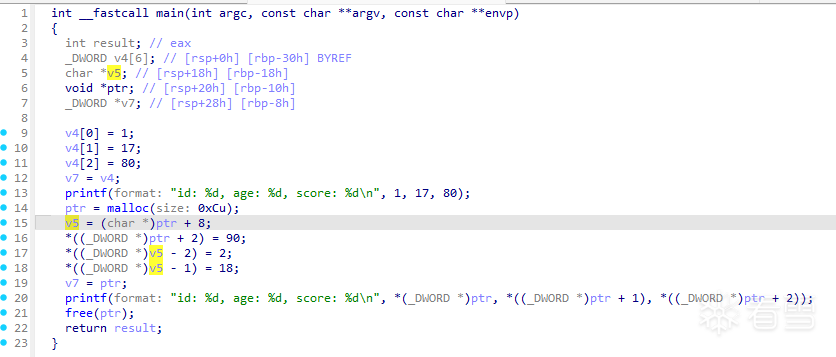
然后把Student结构体复制到IDA里面把v4和v5转换成Student结构休和Sutdent指针
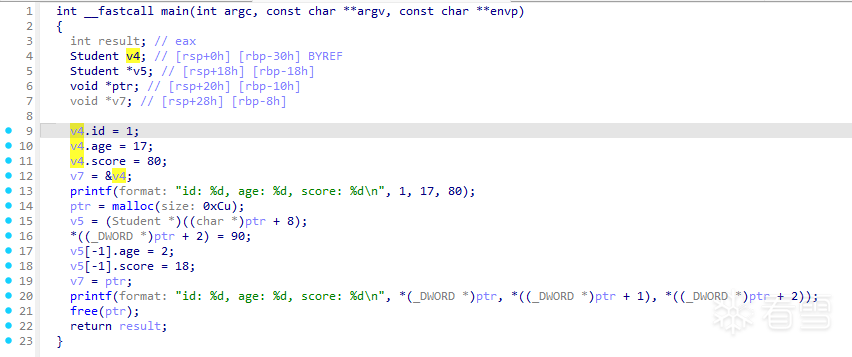
现在看由于v5变量被提前住后偏移了,导致出现这种负偏移的情况,伪代码字段名称也对不上,看着就比较影响代码语义。
*((_DWORD *)ptr + 2) = 90; // student->score = 90;
v5[-1].age = 2; // student->id = 2;
v5[-1].score = 18; // student->age = 18;
现在用选中v5插件操作一下
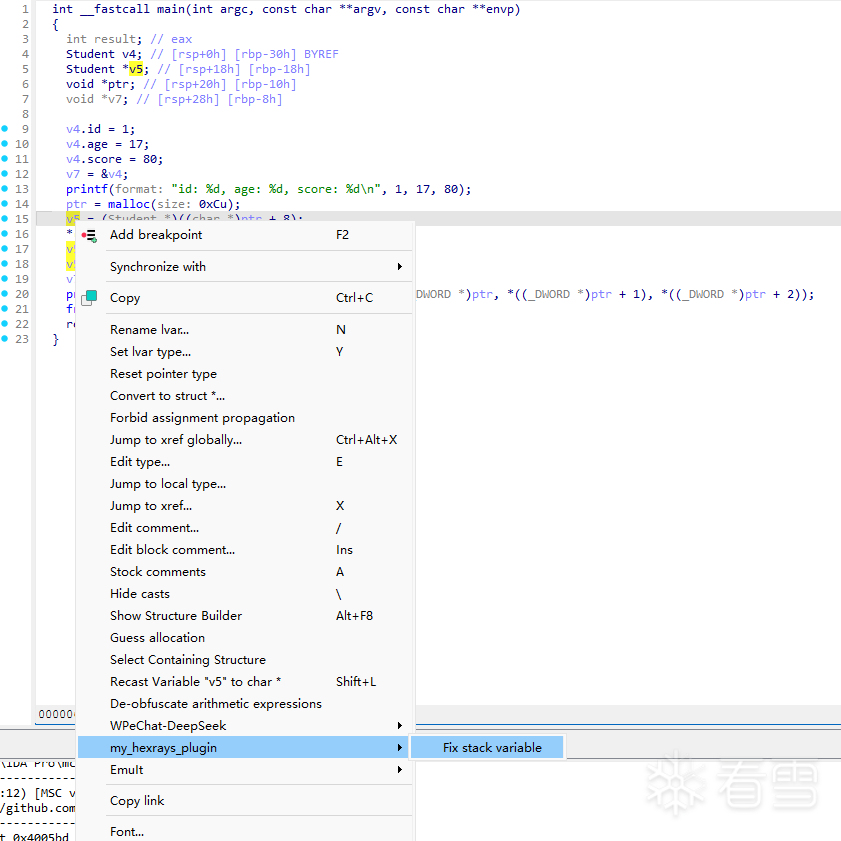
操作完把变量名称改一下
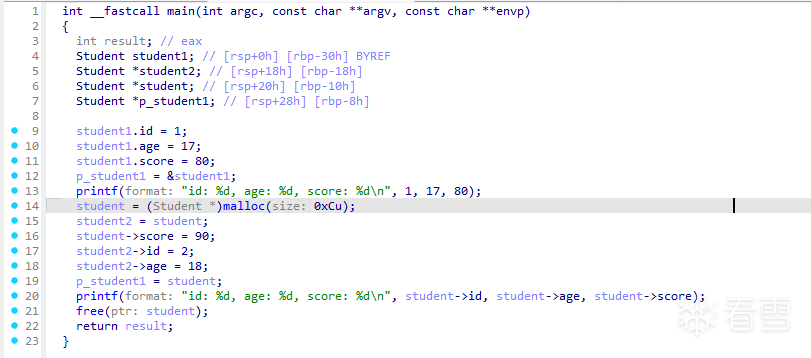
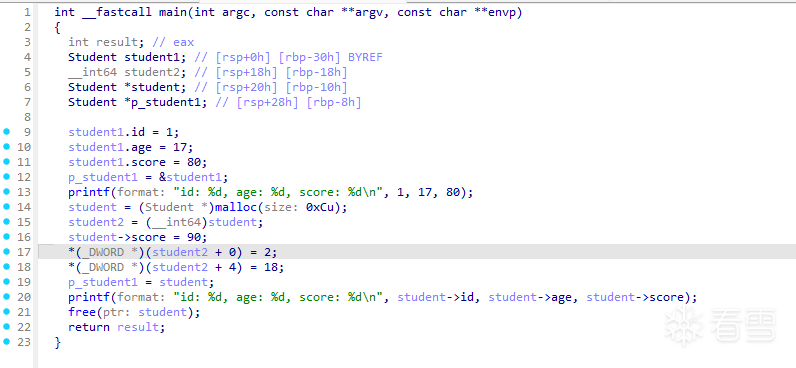
现在再看代码
  student2 = student;
  student->score = 90;
  student2->id = 2;
  student2->age = 18;
看起来是舒服多了。插件核心操作就是把原来的sutdent2 = (char *)student + 8;这句给改成了student2 = student;然后后面的偏移都减掉8就算完了。
不定义结构体的话,只修复偏移的话也是可以的,如图:
插件源码
class MinsnVisitor(ida_hexrays.minsn_visitor_t):
    def __init__(self, varname):
        super().__init__()
        self.varname = varname
        self.num = 0

    def visit_minsn(self):
        if self.varname not in self.curins.dstr():
            return 0

        if self.curins.d.t == ida_hexrays.mop_l and self.curins.d.l.var().name == self.varname:
            if self.curins.l.t == ida_hexrays.mop_l and self.curins.l.l.var().name == self.varname:
                return 0
            if self.curins.r.t == ida_hexrays.mop_n:
                self.num = self.curins.r.nnn.value
                self.curins.r.nnn.value = 0
                return 0

        signed = 0
        if self.curins.opcode == ida_hexrays.m_add:
            signed = 1
        elif self.curins.opcode == ida_hexrays.m_sub:
            signed = -1

        if signed != 0:
            if self.curins.l.t == ida_hexrays.mop_l and self.curins.l.l.var().name == self.varname:
                if self.curins.d.t == ida_hexrays.mop_l and self.curins.d.l.var().name == self.varname:
                    return 0
                if self.curins.r.t == ida_hexrays.mop_n:
                    value = self.curins.r.nnn.value + (signed * self.num)
                    if value > 0:
                        self.curins.r.nnn.value = value
                    else:
                        self.curins.r.nnn.value = -value
                        self.curins.opcode = ida_hexrays.m_add
                    return 0

        return 0
主要是这部分代码,把这个偏移修复成0,然后记下来偏移的数值,后面再对应加减一个偏移即可。其他的是菜单和基本的IDA插件框架,当然持久化图省事用的json保存一个文件,从新打开时在当前目录读取这个json文件恢复。正确做法是使用ida_netnode API存储到 i64 文件里。
插件安装
把my_hexrays_plugin.py复制到IDA的plugins目录重启即可生效。
后记
插件主要使用MicroCode对偏移做修复,可以满足大部分简单的修复偏移情况,变量为先加4,后面把加8变成加12,插件也可修复成原来的加8的情况。
[招生]科锐逆向工程师培训(2026年11月13日实地,远程教学同时开班, 第57期)
赞赏

|