首页
课程
问答
CTF
社区
招聘
峰会
发现
排行榜
知识库
工具下载
看雪20年
看雪商城
证书查询
登录
注册
首页
社区
课程
招聘
发现
问答
CTF
排行榜
知识库
工具下载
峰会
看雪商城
证书查询
社区
茶余饭后
发新帖
1
0
[原创]如何让Apollo(Sunshine)串流时自动“熄屏”,屏蔽物理键鼠;串流结束后自动锁屏
发表于: 2026-5-21 14:49
1446
[原创]如何让Apollo(Sunshine)串流时自动“熄屏”,屏蔽物理键鼠;串流结束后自动锁屏
Haohandc
2026-5-21 14:49
1446
# 如何让Sunshine串流时自动“熄屏”,屏蔽物理键鼠;串流结束后自动锁屏 - 前言 远程串流搞完了,觉得串流时电脑键鼠仍然有输入,屏幕亮着,结束后不会锁屏不安全(也不想让别人看见)。于是自己搜,再把要求给AI写了一些东西。经过实际测试使用是没有问题的。 - 说明 屏蔽键鼠使用`C#`程序,屏蔽物理`键盘/鼠标/触控板`输入,客户端串流设备的`键盘/鼠标/触控板`可以操作电脑。如果需要应急解除屏蔽,快速按3次`esc`。 使用的是Sunshine的改版Apollo,原版Sunshine未经过测试。如需要安装Apollo,需要先卸载Sunshine,重启后再安装。 - **==声明==** ==以下程序或脚本均由AI生成,如果使用过程中造成财产损失,本人概不负责。== ## 编译`C#`程序 ### 主程序 `input-blocker.cs` ```cs using System; using System.Diagnostics; using System.Runtime.InteropServices; using System.Threading; class InputBlocker { // ── Win32 imports ────────────────────────────── const int WH_KEYBOARD_LL = 13; const int WH_MOUSE_LL = 14; const uint LLKHF_INJECTED = 0x10; const uint LLMHF_INJECTED = 0x01; const uint PM_REMOVE = 1; const int VK_ESCAPE = 0x1B; delegate IntPtr LowLevelHookProc(int nCode, IntPtr wParam, IntPtr lParam); [DllImport("user32.dll")] static extern IntPtr SetWindowsHookEx(int idHook, LowLevelHookProc lpfn, IntPtr hMod, uint dwThreadId); [DllImport("user32.dll")] static extern bool UnhookWindowsHookEx(IntPtr hhk); [DllImport("user32.dll")] static extern IntPtr CallNextHookEx(IntPtr hhk, int nCode, IntPtr wParam, IntPtr lParam); [DllImport("kernel32.dll")] static extern IntPtr GetModuleHandle(string lpModuleName); [DllImport("user32.dll")] static extern bool PeekMessage(out MSG msg, IntPtr hWnd, uint wMsgFilterMin, uint wMsgFilterMax, uint wRemoveMsg); [DllImport("user32.dll")] static extern bool TranslateMessage(ref MSG msg); [DllImport("user32.dll")] static extern IntPtr DispatchMessage(ref MSG msg); [StructLayout(LayoutKind.Sequential)] struct MSG { public IntPtr hwnd; public uint message; public IntPtr wParam; public IntPtr lParam; public uint time; public int pt_x; public int pt_y; } // ── 静态字段 ─────────────────────────────────── static LowLevelHookProc kbdProc; static LowLevelHookProc mouseProc; static IntPtr hHookKbd = IntPtr.Zero; static IntPtr hHookMouse = IntPtr.Zero; static EventWaitHandle stopEvent; // ── 紧急逃生:连按 3 次 Esc(1.5 秒内)→ 解除 ── static int escCount = 0; static Stopwatch escWatch = Stopwatch.StartNew(); static long lastEscMs = 0; // ── 拦截判定:是否为物理按键按下事件 ── static bool IsPhysicalKeyDown(IntPtr wParam, IntPtr lParam, out int vkCode) { int msg = (int)wParam; // WM_KEYDOWN=0x0100, WM_SYSKEYDOWN=0x0104 if (msg != 0x0100 && msg != 0x0104) { vkCode = 0; return false; } uint flags = (uint)Marshal.ReadInt32(lParam, 8); vkCode = Marshal.ReadInt32(lParam, 0); return (flags & LLKHF_INJECTED) == 0; } // ── 钩子回调 ─────────────────────────────────── static IntPtr KbdHook(int nCode, IntPtr wParam, IntPtr lParam) { if (nCode >= 0) { int vkCode; if (!IsPhysicalKeyDown(wParam, lParam, out vkCode)) return CallNextHookEx(IntPtr.Zero, nCode, wParam, lParam); long now = escWatch.ElapsedMilliseconds; if (vkCode == VK_ESCAPE) { if (now - lastEscMs > 1500) escCount = 0; lastEscMs = now; escCount++; if (escCount >= 3) { stopEvent.Set(); return CallNextHookEx(IntPtr.Zero, nCode, wParam, lParam); } } else { escCount = 0; } return (IntPtr)1; // 拦截所有物理按键(含 Alt/Win 系统组合键) } return CallNextHookEx(IntPtr.Zero, nCode, wParam, lParam); } static IntPtr MouseHook(int nCode, IntPtr wParam, IntPtr lParam) { if (nCode >= 0) { uint flags = (uint)Marshal.ReadInt32(lParam, 12); if ((flags & LLMHF_INJECTED) == 0) return (IntPtr)1; } return CallNextHookEx(IntPtr.Zero, nCode, wParam, lParam); } // ── 消息循环 ─────────────────────────────────── static void MessageLoop(int timeoutSec) { Stopwatch loopWatch = Stopwatch.StartNew(); MSG msg; while (true) { if (timeoutSec > 0) { if (loopWatch.ElapsedMilliseconds / 1000 >= timeoutSec) break; } if (stopEvent.WaitOne(0)) break; while (PeekMessage(out msg, IntPtr.Zero, 0, 0, PM_REMOVE)) { TranslateMessage(ref msg); DispatchMessage(ref msg); } Thread.Sleep(10); } } // ── Main ─────────────────────────────────────── static void Main(string[] args) { string eventName = @"Global\ApolloInputBlock"; int timeout = 0; bool blocking = true; for (int i = 0; i < args.Length; i++) { switch (args[i]) { case "-e": case "--event": eventName = args[++i]; break; case "-t": case "--timeout": timeout = int.Parse(args[++i]); break; case "-u": case "--unblock": blocking = false; break; case "-b": case "--block": blocking = true; break; } } if (!blocking) { try { var evt = EventWaitHandle.OpenExisting(eventName); evt.Set(); Console.WriteLine("Signal sent. Input should be restored."); } catch { Console.WriteLine("No active blocking session found."); } return; } bool createdNew; using (var mutex = new Mutex(true, eventName + ".Mutex", out createdNew)) { if (!createdNew) { Console.WriteLine("Another instance is already running."); return; } try { stopEvent = EventWaitHandle.OpenExisting(eventName); stopEvent.Reset(); } catch { stopEvent = new EventWaitHandle(false, EventResetMode.ManualReset, eventName); } kbdProc = KbdHook; mouseProc = MouseHook; IntPtr hMod = GetModuleHandle(null); hHookKbd = SetWindowsHookEx(WH_KEYBOARD_LL, kbdProc, hMod, 0); hHookMouse = SetWindowsHookEx(WH_MOUSE_LL, mouseProc, hMod, 0); if (hHookKbd == IntPtr.Zero || hHookMouse == IntPtr.Zero) { Console.WriteLine(string.Format("Hook install failed. Kbd=0x{0:X} Mouse=0x{1:X}", hHookKbd, hHookMouse)); return; } Console.WriteLine("Hooks installed. Physical input BLOCKED. Timeout=" + timeout + "s"); Console.WriteLine("Emergency: press Esc 3 times within 1.5s to restore."); MessageLoop(timeout); UnhookWindowsHookEx(hHookKbd); UnhookWindowsHookEx(hHookMouse); Console.WriteLine("Hooks released. Input restored."); } } } ``` ### 编译 替换实际目录(比如替换成`E:\User\Scripts`)。如果需要不带控制台的,把`/target:exe`改为`/target:winexe` ```cmd C:\Windows\Microsoft.NET\Framework64\v4.0.30319\csc.exe /out:"实际目录\input-blocker.exe" /target:exe "实际目录\input-blocker.cs" ``` ## 使用Powershell脚本 创建以下两个Powershell脚本,存储到相应文件中。 需要把所有脚本中的`$ScriptDir`对应目录替换为实际目录。 该方案会在连接/断开的前后看到一个闪烁的控制台窗口,如果介意选择编译版本的。 ### `apollo-disable-input.ps1` ```ps1 $ScriptDir = "E:\User\Scripts" # 解除旧实例(带轮询) & "$ScriptDir\input-blocker.exe" -u 2>$null $retries = 0 while ((Get-Process -Name "input-blocker" -ErrorAction SilentlyContinue) -and $retries -lt 30) { Start-Sleep -Milliseconds 100 $retries++ } # 刷新壁纸 $RegPath = "HKCU:\Control Panel\Desktop" $wallpaper = (Get-ItemProperty -Path $RegPath -Name WallPaper -ErrorAction SilentlyContinue).WallPaper if ($wallpaper) { if (-not ([System.Management.Automation.PSTypeName]'Wallpaper').Type) { Add-Type -TypeDefinition @" using System.Runtime.InteropServices; public class Wallpaper { [DllImport("user32.dll", SetLastError = true)] public static extern bool SystemParametersInfo(int uAction, int uParam, string lpvParam, int fuWinIni); } "@ } [Wallpaper]::SystemParametersInfo(0x0014, 0, $wallpaper, 0x0002) } # 启动拦截 Start-Process "$ScriptDir\input-blocker.exe" -ArgumentList "-b" -WindowStyle Hidden Write-Host "Input blocked." ``` ### `apollo-enable-input.ps1` ```ps1 $ScriptDir = "E:\User\Scripts" # 锁屏 rundll32.exe user32.dll, LockWorkStation # 轮询检测锁屏是否已生效(LogonUI.exe 出现即表示锁屏界面已接管) $maxWait = 10 # 最多等 10 秒,避免死循环 $waited = 0 while ($waited -lt $maxWait) { if (Get-Process -Name "LogonUI" -ErrorAction SilentlyContinue) { # 锁屏界面已出现,再等 500ms 确保完全接管输入 Start-Sleep -Milliseconds 500 break } Start-Sleep -Milliseconds 200 $waited += 0.2 } # 恢复物理输入 & "$ScriptDir\input-blocker.exe" -u 2>$null ``` ## (可选版本)编译Powershell脚本为exe 需要替换以下两个脚本并编译。这样就不会产生可见控制台窗口。 ### `apollo-disable-input.ps1` ```ps1 $ScriptDir = "E:\User\Scripts" function Invoke-Silent($exe, $argStr, [switch]$NoWait) { $p = New-Object System.Diagnostics.Process $p.StartInfo.FileName = $exe $p.StartInfo.Arguments = $argStr $p.StartInfo.UseShellExecute = $false $p.StartInfo.RedirectStandardOutput = $true $p.StartInfo.RedirectStandardError = $true $p.StartInfo.CreateNoWindow = $true [void]$p.Start() if (-not $NoWait) { # 必须读完输出再等待,否则缓冲区满会死锁 [void]$p.StandardOutput.ReadToEnd() [void]$p.StandardError.ReadToEnd() $p.WaitForExit() } $p.Dispose() } # 解除旧实例 Invoke-Silent "$ScriptDir\input-blocker.exe" "-u" $retries = 0 while ((Get-Process -Name "input-blocker" -ErrorAction SilentlyContinue) -and $retries -lt 30) { Start-Sleep -Milliseconds 100 $retries++ } # 刷新壁纸 $RegPath = "HKCU:\Control Panel\Desktop" $wallpaper = (Get-ItemProperty -Path $RegPath -Name WallPaper -ErrorAction SilentlyContinue).WallPaper if ($wallpaper) { if (-not ([System.Management.Automation.PSTypeName]'Wallpaper').Type) { Add-Type -TypeDefinition @" using System.Runtime.InteropServices; public class Wallpaper { [DllImport("user32.dll", SetLastError = true)] public static extern bool SystemParametersInfo(int uAction, int uParam, string lpvParam, int fuWinIni); } "@ 2>$null } [void][Wallpaper]::SystemParametersInfo(0x0014, 0, $wallpaper, 0x0002) } # 启动拦截(不等待) Invoke-Silent "$ScriptDir\input-blocker.exe" "-b" -NoWait ``` ### `apollo-enable-input.ps1` ```ps1 $ScriptDir = "E:\User\Scripts" function Invoke-Silent($exe, $argStr) { $p = New-Object System.Diagnostics.Process $p.StartInfo.FileName = $exe $p.StartInfo.Arguments = $argStr $p.StartInfo.UseShellExecute = $false $p.StartInfo.RedirectStandardOutput = $true $p.StartInfo.RedirectStandardError = $true $p.StartInfo.CreateNoWindow = $true [void]$p.Start() [void]$p.StandardOutput.ReadToEnd() [void]$p.StandardError.ReadToEnd() $p.WaitForExit() $p.Dispose() } # 锁屏 rundll32.exe user32.dll, LockWorkStation # 轮询检测锁屏是否已生效(LogonUI.exe 出现即表示锁屏界面已接管) $maxWait = 10 $waited = 0 while ($waited -lt $maxWait) { if (Get-Process -Name "LogonUI" -ErrorAction SilentlyContinue) { Start-Sleep -Milliseconds 500 break } Start-Sleep -Milliseconds 200 $waited += 0.2 } # 恢复物理输入(静默) Invoke-Silent "$ScriptDir\input-blocker.exe" "-u" ``` ### 编译 Powershell安装<a href="elink@0bcK9s2c8@1M7s2y4Q4x3@1q4Q4x3V1k6Q4x3V1k6Y4K9i4c8Z5N6h3u0Q4x3X3g2U0L8$3#2Q4x3V1k6y4f1$3y4Z5L8$3I4@1k6i4y4Q4x3V1k6b7f1K6u0q4h3p5f1`.">ps2exe</a>(开源) ```powershell Install-Module -Name ps2exe -Scope CurrentUser ``` 启动管理员powershell,设置`Set-ExecutionPolicy -Scope CurrentUser RemoteSigned`。 ```powershell PS C:\Windows\system32> Set-ExecutionPolicy -Scope CurrentUser RemoteSigned 执行策略更改 执行策略可帮助你防止执行不信任的脚本。更改执行策略可能会产生安全风险,如 https:/go.microsoft.com/fwlink/?LinkID=135170 中的 about_Execution_Policies 帮助主题所述。是否要更改执行策略? [Y] 是(Y) [A] 全是(A) [N] 否(N) [L] 全否(L) [S] 暂停(S) [?] 帮助 (默认值为“N”): Y ``` 回车。然后执行`Import-Module ps2exe`(仅需一次)。再去编译。替换成实际目录。 ```powershell ps2exe "实际目录\apollo-disable-input.ps1" "实际目录\apollo-disable-input.exe" -noConsole ps2exe "实际目录\apollo-enable-input.ps1" "实际目录\apollo-enable-input.exe" -noConsole ``` 结束后可以重新设置`Set-ExecutionPolicy -Scope CurrentUser RemoteSigned`为`否`。 ## 修改Apollo配置 ### 配置无头模式,修改显示器输出  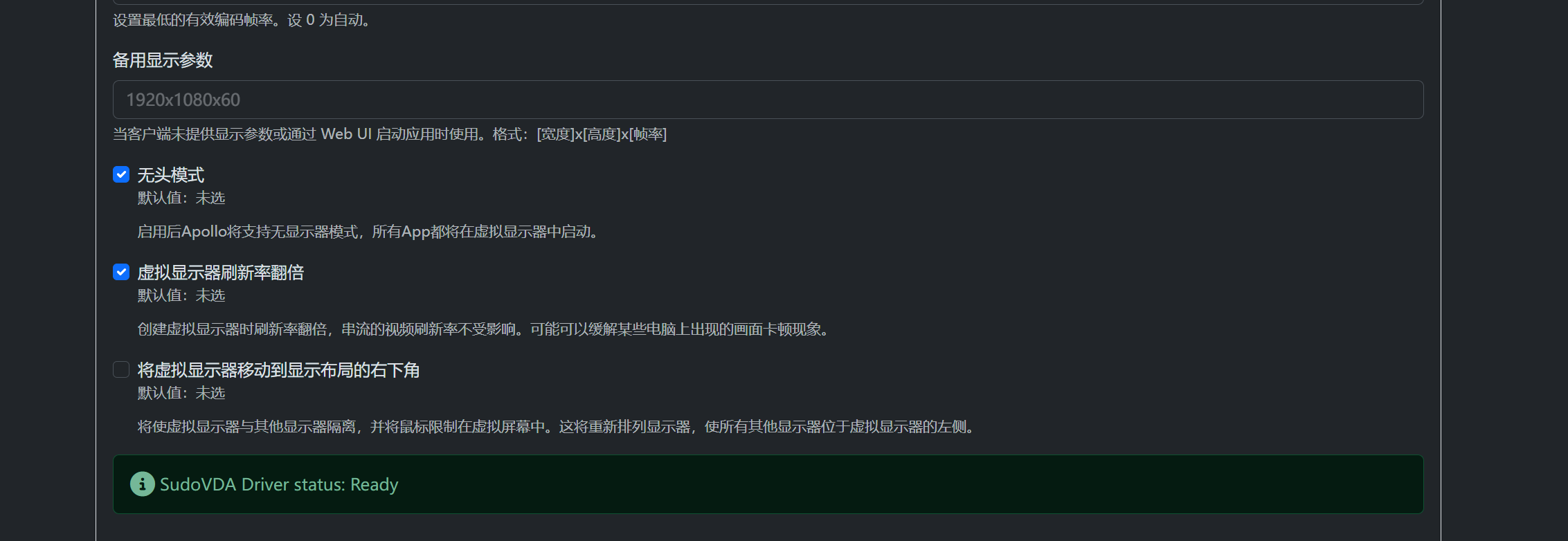 需要开启无头模式。之后远程串流,将显示器输出修改为另一个显示器。 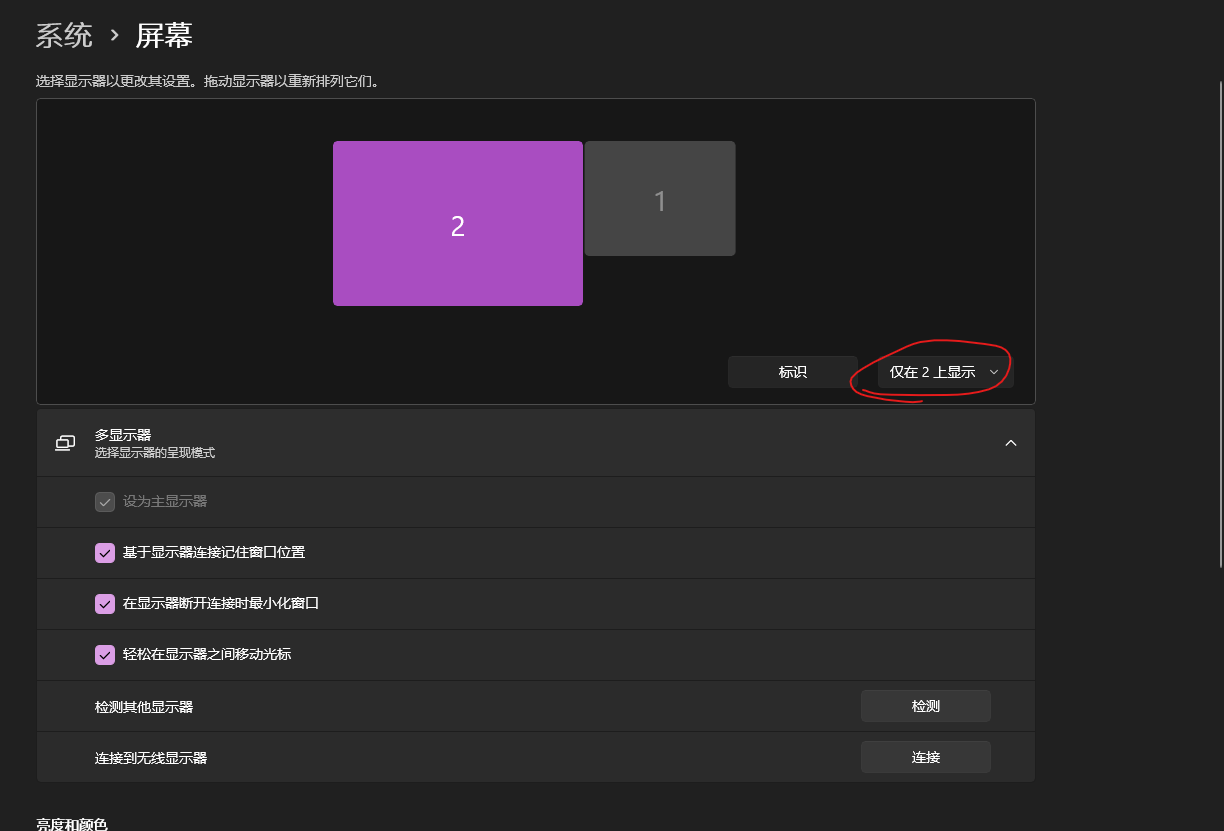 按需调整分辨率和缩放大小。 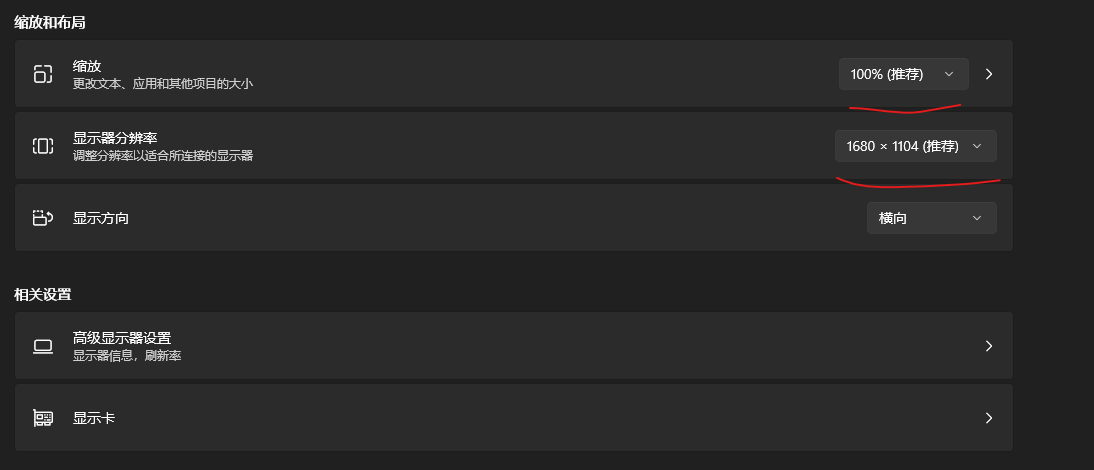 ### 添加暂停/恢复命令 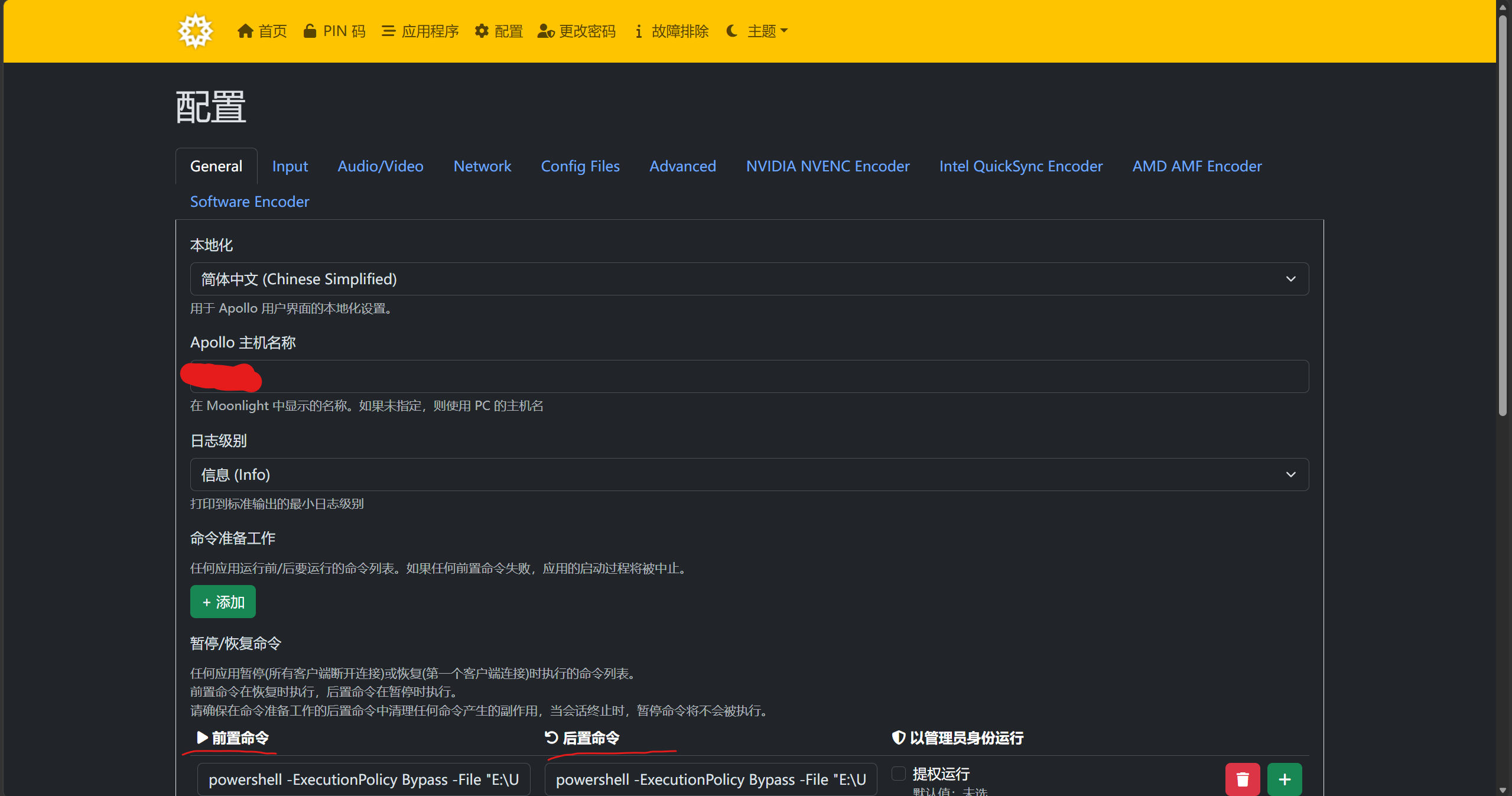 如图所示,添加前置命令和后置命令。注意替换实际目录。 #### 非编译版本 `前置命令` ```cmd powershell -ExecutionPolicy Bypass -File "实际目录\apollo-disable-input.ps1" ``` `后置命令` ```cmd powershell -ExecutionPolicy Bypass -File "实际目录\apollo-enable-input.ps1" ``` #### 编译版本 `前置命令` ```cmd "实际目录\apollo-disable-input.exe" ``` `后置命令` ```cmd "实际目录\apollo-enable-input.exe" ``` ## 最后 你可以自行测试效果。如果遇到物理键鼠完全无响应的情况,可以 **按住电源键强制重启。** 注:`Ctrl + Alt + Del`没有被屏蔽。
传递专业知识、拓宽行业人脉——看雪讲师团队等你加入!!
收藏
・
1
点赞
・
0
打赏
分享
分享到微信
分享到QQ
分享到微博
赞赏记录
参与人
雪币
留言
时间
查看更多
赞赏
×
1 雪花
5 雪花
10 雪花
20 雪花
50 雪花
80 雪花
100 雪花
150 雪花
200 雪花
支付方式:
微信支付
赞赏留言:
快捷留言
感谢分享~
精品文章~
原创内容~
精彩转帖~
助人为乐~
感谢分享~
最新回复
(
0
)
游客
登录
|
注册
方可回帖
回帖
表情
雪币赚取及消费
高级回复
返回
Haohandc
3
发帖
2
回帖
10
RANK
关注
私信
他的文章
[分享]有线串流!Apollo Fleet Launcher
1356
[原创]如何让Apollo(Sunshine)串流时自动“熄屏”,屏蔽物理键鼠;串流结束后自动锁屏
1446
[原创]POLARIS CTF 2026 Reverse WP
1420
关于我们
联系我们
企业服务
看雪公众号
专注于PC、移动、智能设备安全研究及逆向工程的开发者社区
看原图
赞赏
×
雪币:
+
留言:
快捷留言
为你点赞!
返回
顶部







