虽然没有进决赛但还是记录一下吧,比起去年UE做的已经很多了
1.dump libsec2026
拿到题是一个godot引擎加godot-cpp扩展的游戏引擎版本是4.5.1(关系到后面对应哪一版源码,虽然每版改动应该也不大吧)

assets目录下可以看到有.gdc脚本,应该有主要相关逻辑写在trigger.gdc\token.gdc等,但.gdc被加密,不能用GDRE工具直接解。
观察两个so文件:libgodot-android.so; libsec2026.so
libsec2026.so套了壳,用脚本dump一下
function dump_so(libName) {
Java.perform(() => {
var libso = Process.getModuleByName(libName);
if (!libso) {
var modules = Process.enumerateModules();
console.log("[+] 已加载的 SO 文件列表 (" + modules.length + " 个):");
modules.forEach(function(m, i) {
console.log(" [" + i + "] " + m.name + " base=" + m.base + " size=" + m.size + " path=" + m.path);
});
console.error("[!] 错误:未找到模块 libil2cpp.so");
return;
}
console.log("[+] 模块基址: " + libso.base);
console.log("[+] 模块大小: " + libso.size);
if (libso.size <= 0 || libso.size > 0x10000000) {
console.error("[!] 模块大小异常,可能获取失败");
return;
}
try {
Memory.protect(libso.base, libso.size, 'r--');
var chunkSize = 0x1000;
var totalSize = libso.size;
var file_path = "/sdcard/download/" + libso.name + "_" + libso.base + "_" + ptr(totalSize) + ".so";
var file_handle = new File(file_path, "wb");
if (file_handle) {
for (var offset = 0; offset < totalSize; offset += chunkSize) {
var bytesToRead = Math.min(chunkSize, totalSize - offset);
try {
var chunk = libso.base.add(offset).readByteArray(bytesToRead);
if (chunk !== null) {
file_handle.write(chunk);
} else {
console.warn("[!] 读取的内存块为空,跳过写入");
}
} catch (e) {
console.warn("[!] 偏移 0x" + offset.toString(16) + " 处读取失败,用0填充");
var zeroBuffer = new ArrayBuffer(bytesToRead);
file_handle.write(zeroBuffer);
}
}
file_handle.flush();
file_handle.close();
console.log("[dump] 成功: " + file_path);
}
} catch (e) {
console.error("[!] dump_so 过程中发生异常: " + e.message);
}
});
}
console.log("[+] 脚本加载时间: " + new Date().toLocaleTimeString());
setTimeout( () => {
console.log("[+] 回调执行时间: " + new Date().toLocaleTimeString());
console.log("[+] 延迟后开始 dump...");
dump_so("libsec2026.so");
}, 10000);
从so文件的大小和字符串信息可以判断出 libgodot_android.so是godot引擎库,libsec2026.so是godot-cpp扩展部分和native方法实现;
2.找到 godot-key
查找godot相关加解密,应该是要找一个32位的AES密钥,加密模式是CFB,发现教程说关键函数是core/io/file_access_pack.cpp:相关教程都是用字符串定位这个构造函数去拿到script_encryption_key
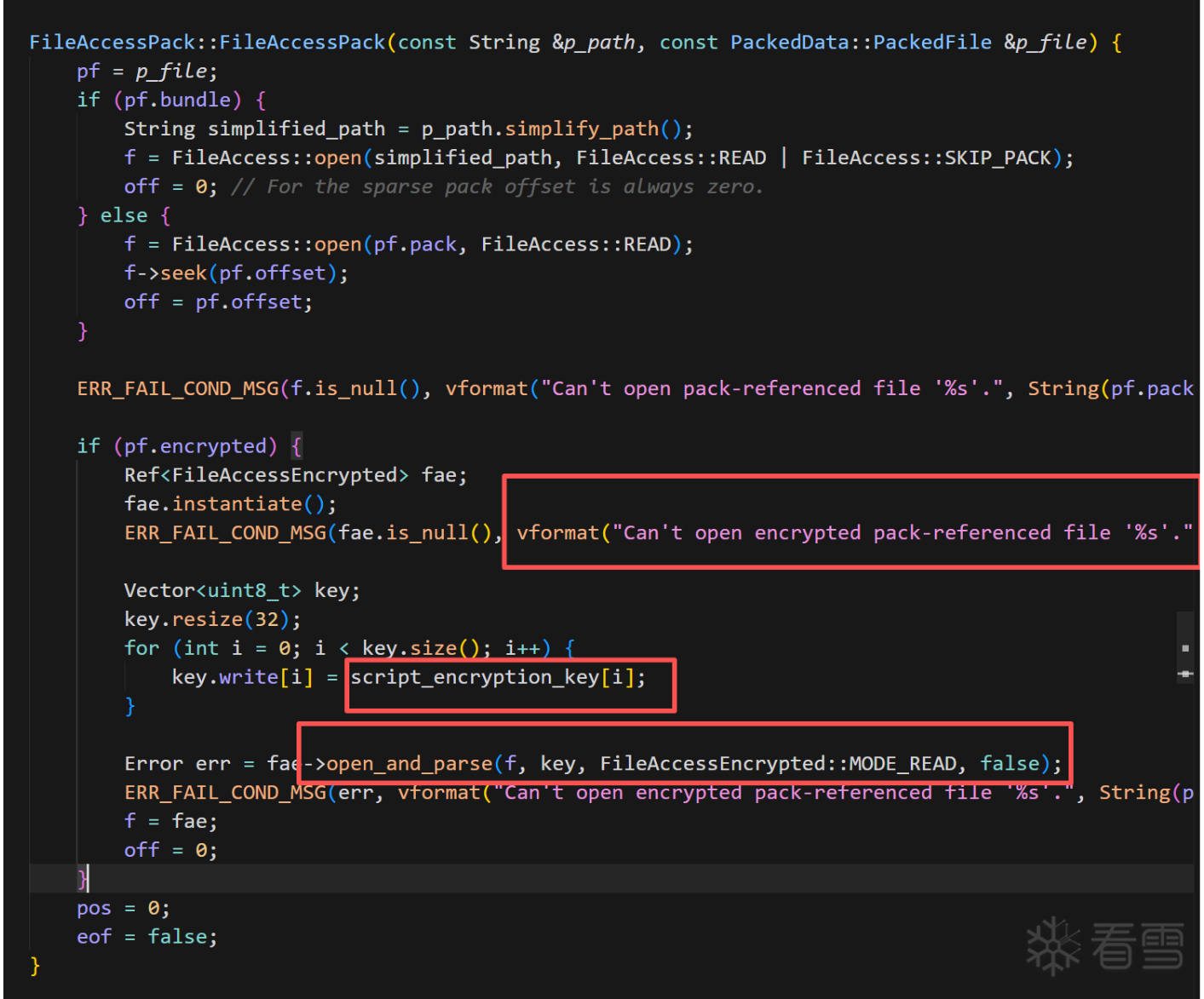
但是,出题人肯定不能出这么简单,已经把这种字符串信息抹去了但是,本人虽笨却非常的勤快,决定尝试照着源码硬推,这种字符串没有,总有别的字符串,(且秉持着恩师的源码在一起的函数和文件,汇编也会在附近。。。一番搜索下定位到了pck_packer.cpp: 
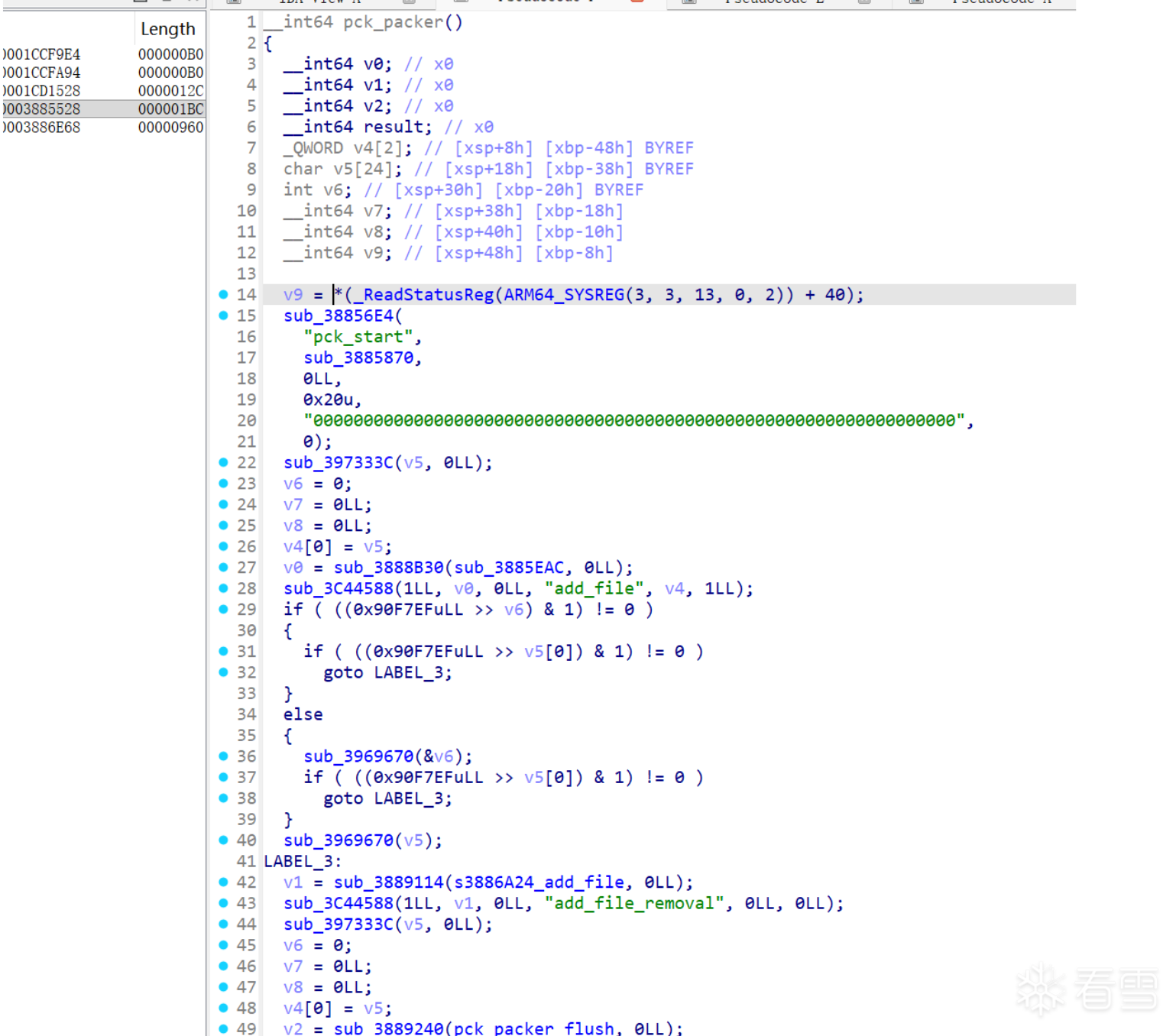
file_access_pack.cpp是解包部分逻辑,而pck_packer.cpp是打包部分逻辑,二者一定会有关联:二者都跟FileAccessEncrypted::open_and_parse有关,这就缩小查找范围了,可以直接把pck_packer的地址和源码给ai让它去帮我们找这个构造函数了
后面发现还有一些办法:
1.用魔术头“GDPC”定位try_and_open函数
2.用“res://”的交叉引用定位排查等等(不太推荐,很多地方引用
总之在ai强大的能力和努力下,成功地获得一系列相关函数地址: 
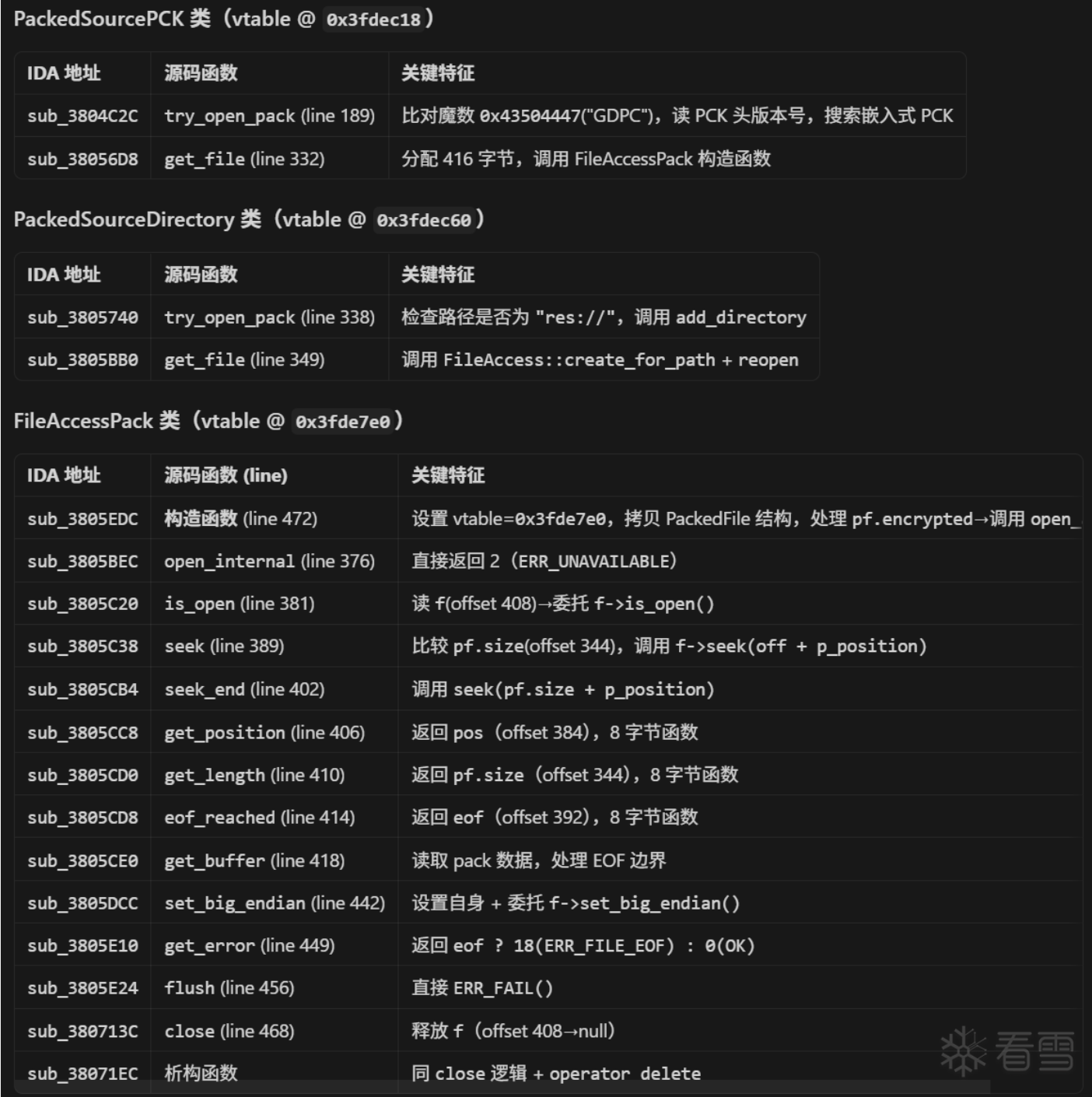
也自然可以直接定位到我们要的key,这里出题人非常非常善良啊,key不是动态生成的,直接就给了: 

3.拿到gd脚本
但是把key输入GDRE还是解密失败了,于是就再次利用ai分析加解密流程,肯定是中间有地方魔改了: 
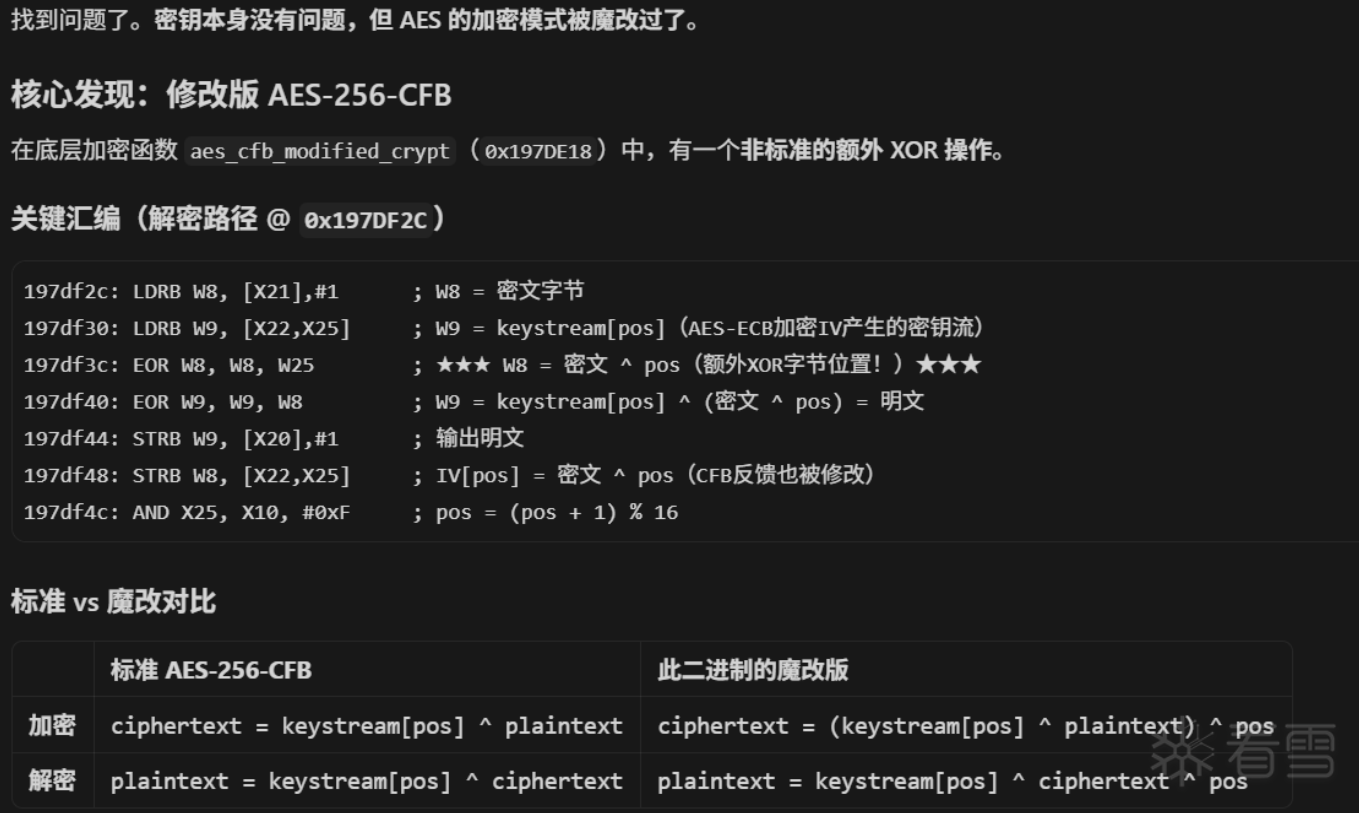
于是再让ai搓了一个解密脚本:
"""Godot 4.x 单文件解密 (修改版 AES-256-CFB)"""
import struct, sys, hashlib
from Crypto.Cipher import AES
KEY = bytes.fromhex("ce4df8753b59a5a39ade58ac07ef947a3da39f2af75e3284d51217c04d49a061")
def decrypt_modified_cfb(key: bytes, iv: bytes, ciphertext: bytes) -> bytes:
"""修改版 CFB: plain[i] = keystream[pos] ^ (cipher[i] ^ pos), pos = i % 16"""
aes = AES.new(key, AES.MODE_ECB)
iv_block = bytearray(iv)
plaintext = bytearray(len(ciphertext))
pos = 0
for i in range(len(ciphertext)):
if pos == 0:
keystream = bytearray(aes.encrypt(bytes(iv_block)))
c = ciphertext[i]
modified = c ^ pos
plaintext[i] = keystream[pos] ^ modified
iv_block[pos] = modified
pos = (pos + 1) & 0xF
return bytes(plaintext)
def decrypt_file(data: bytes, key: bytes) -> bytes:
"""解密 FileAccessEncrypted 格式: [16B md5][8B length][16B iv][ciphertext]"""
md5_exp = data[:16]
length = struct.unpack_from('<Q', data, 16)[0]
iv = data[24:40]
ds = length + (16 - length % 16) if length % 16 else length
plain = decrypt_modified_cfb(key, iv, data[40:40 + ds])[:length]
if hashlib.md5(plain).digest() != md5_exp:
raise ValueError("MD5 校验失败 — 密钥错误或数据损坏")
return plain
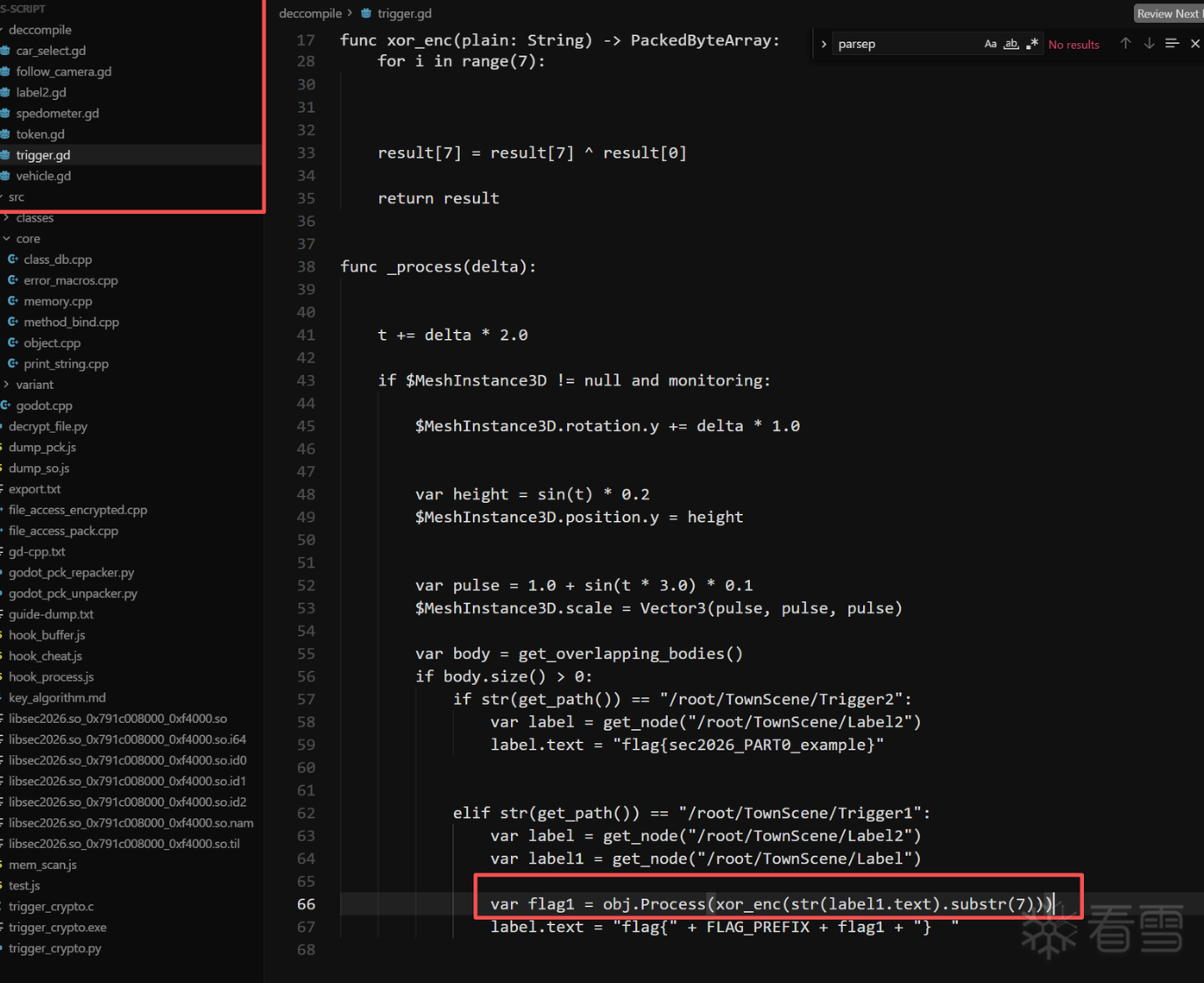
解密后的.gdc文件头就正常了,放进GDRE工具里就可以反编译了flag生成逻辑就是先异或一下然后传进native层加密(大概 
4.重打包游戏
但拿到flag这一步,其实根本不需要去看native层加密逻辑(所以flag只值20分吗。。
这里有了godotscript脚本,虽然因为有cpp扩展的缘故不能直接放回引擎直接运行修改,但可以修改gd脚本重打包,而且我只是修改,连parsepck索引文件都不用重新生成,只用把trigger.gd改一下再用GDRE编译一下.gdc再套刚那套魔改AES加密回去就行了!
(这里其实还想了一种更难的方法,如果能找到godot引擎load -> call 一个gd函数的调用链,然后找到对应地址可以构造出一个任意gd代码注入执行器?(太复杂了没尝试。。
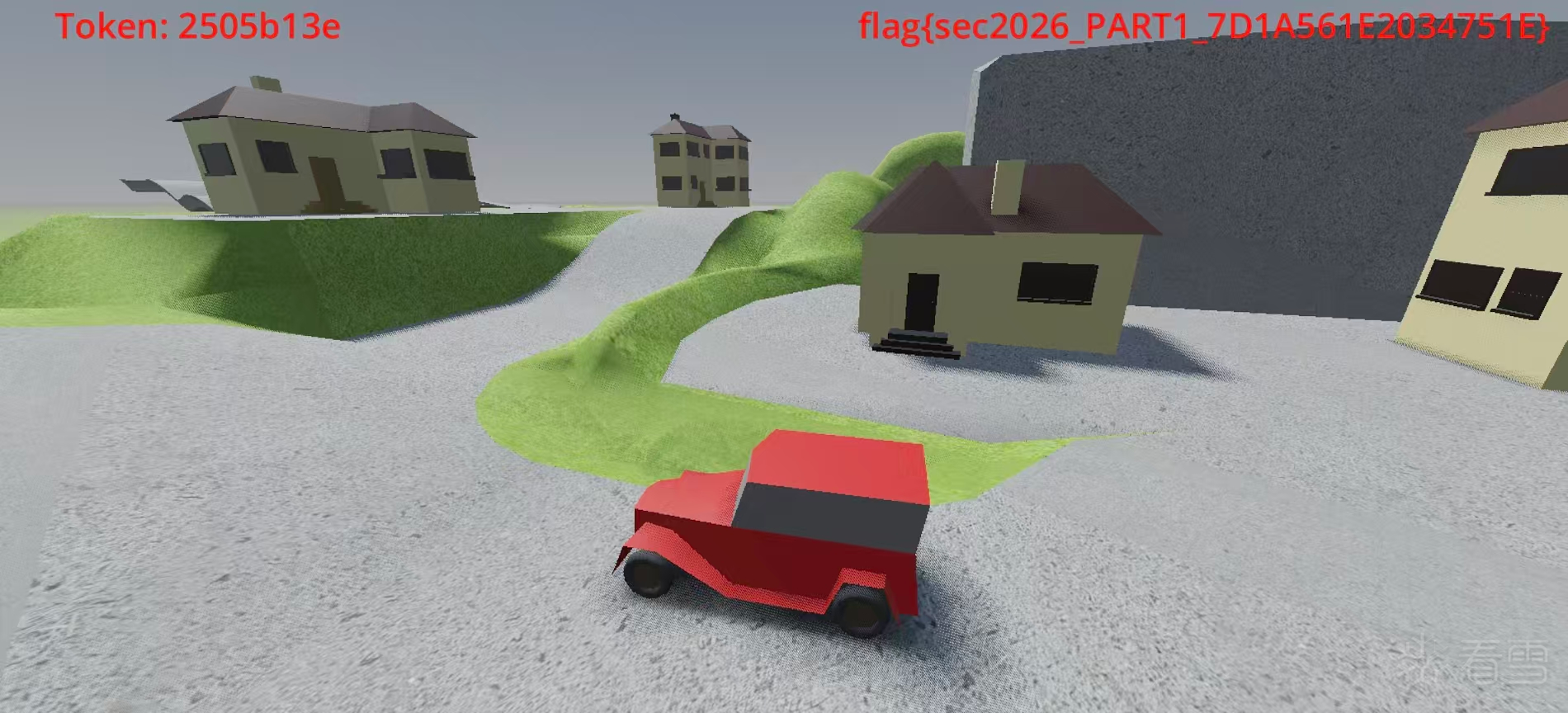
回到trigger.gd,真的非常好改啊,连文件大小都不用变啊,只用把两个碰撞判断的对象调换一下,1改成2,这样碰到黄色方块就是拿到flag,碰到绿色才是示例flag~改完重打包签名,得到“开挂版”:下载链接: 重打包apk
5.找加密函数地址
接下来就是在libsec2026.so里找加密函数了从字符信息里已经知道godot-cpp扩展部分也在这个so里,所以再次对应源码分析函数
之前研究过unity,感觉godot挺像,就是gd脚本去调cpp肯定是有个调用链的,比如有一个表存了所有函数地址,然后通过一个接口找到对应地址巴拉巴拉所以就是要hook这个调用链去拿到函数地址,然后就能看加密逻辑了
大概就是classdb是一个关键的类,最关键的注册方法的函数是classdb_register_extension_class_method(ClassDB::bind_method_godot会调用)定位godot.cpp简单,然后根据godot.cpp里有引用ClassDB::deinitialize,推到classdb的范围再从函数特征定位到ClassDB::bind_method_godot,再让ai分析这个函数: 
就拿到了classdb_register_extension_class_method的偏移,然后就可以hook这个函数拿到调用的加密函数的地址减去base基址获得加密函数的偏移:(我这里hook都写一起了,最后再放完整版吧,这个版本也是几次拿到回显然后让ai调整后的
const CLASSDB_REG_METHOD_GLOBAL = 0xEDD10;
function readPtrAt(addr) {
var lo = addr.readU32() >>> 0;
var hi = addr.add(4).readU32() >>> 0;
return ptr("0x" + hi.toString(16) + ("00000000" + lo.toString(16)).slice(-8));
}
function off(p) {
return "0x" + p.sub(base).toString(16);
}
var base;
function hookRegistration() {
var globalAddr = base.add(CLASSDB_REG_METHOD_GLOBAL);
var funcPtr = globalAddr.readPointer();
console.log("[*] globalAddr = " + globalAddr);
console.log("[*] classdb_register_extension_class_method = " + funcPtr);
Interceptor.attach(funcPtr, {
onEnter: function (args) {
var info = args[2];
var methodBind = readPtrAt(info.add(0x08));
var argCount = info.add(0x34).readU32();
var hasReturn = info.add(0x24).readU8();
var realFunc = readPtrAt(methodBind.add(0x50));
console.log("[method] impl=" + off(realFunc) +
" args=" + argCount + " ret=" + hasReturn +
" | MethodBind=" + methodBind);
},
onLeave: function (retval) {
var keyAddr = base.add(0xED5D2);
var nonceAddr = base.add(0xED5F3);
console.log("[key] " + hexdump(keyAddr, { length: 32, ansi: false }));
console.log("[nonce] " + hexdump(nonceAddr, { length: 12, ansi: false }));
}
});
}
运行一下拿到这个地址 
6.分析复现加密函数
然后这里有个什么混淆跳转吧,反正最后加密逻辑在0x4E548 
emmmm实话说拿到加密函数地址以后就全依靠ai了()
ai 分析出是chacha20 流密码加密,还有key和nonce的地址(0xED5D2,0xED5F3)
但第一次复现加密结果对不上,就动态去看key、nonce有没有更改:都已经触发flag生成以后还是没有变
所以认为这个"Th1s ls n0t a rea1 key!!@sec2026" 是个烟雾弹来着,这确实是key,只是加密算法应该又被魔改了(不知道是不是这里做错了,但确实复现出来的flag跟游戏里显示的对上了当时就觉得应该没问题了,不太懂啊有没有佬可以给笨人解释一下)
state[0..3] = "expand 32-byte k" (常量 0x61707865, 0x3320646e, 0x79622d32, 0x6b206574)
state[4..11] = key (8 个 u32)
state[12] = counter
state[13..15]= nonce (3 个 u32)
所以直接把这块内存都打印出来: 
发现魔改的地方: 
然后让ai复现加解密过程就可以了hook脚本:
"use strict";
const CLASSDB_REG_METHOD_GLOBAL = 0xEDD10;
function readPtrAt(addr) {
var lo = addr.readU32() >>> 0;
var hi = addr.add(4).readU32() >>> 0;
return ptr("0x" + hi.toString(16) + ("00000000" + lo.toString(16)).slice(-8));
}
function off(p) {
return "0x" + p.sub(base).toString(16);
}
var base;
function hookRegistration() {
var globalAddr = base.add(CLASSDB_REG_METHOD_GLOBAL);
var funcPtr = globalAddr.readPointer();
console.log("[*] globalAddr = " + globalAddr);
console.log("[*] classdb_register_extension_class_method = " + funcPtr);
Interceptor.attach(funcPtr, {
onEnter: function (args) {
var info = args[2];
var methodBind = readPtrAt(info.add(0x08));
var argCount = info.add(0x34).readU32();
var hasReturn = info.add(0x24).readU8();
var realFunc = readPtrAt(methodBind.add(0x50));
console.log("[method] impl=" + off(realFunc) +
" args=" + argCount + " ret=" + hasReturn +
" | MethodBind=" + methodBind);
},
onLeave: function (retval) {
var keyAddr = base.add(0xED5D2);
var nonceAddr = base.add(0xED5F3);
console.log("[key] " + hexdump(keyAddr, { length: 32, ansi: false }));
console.log("[nonce] " + hexdump(nonceAddr, { length: 12, ansi: false }));
}
});
}
function hookChaCha20XOR() {
var xorFunc = base.add(0x5B950);
console.log("[*] hooking ChaCha20_XOR at " + xorFunc);
Interceptor.attach(xorFunc, {
onEnter: function (args) {
var statePtr = args[0];
var inputPtr = args[1];
var size = args[3].toInt32();
console.log("[chacha20] size=" + size);
console.log("[chacha20] state (64 bytes):\n" +
hexdump(statePtr, { length: 64, ansi: false }));
console.log("[chacha20] input:\n" +
hexdump(inputPtr, { length: size, ansi: false }));
var key = statePtr.add(16).readByteArray(32);
var nonce = statePtr.add(52).readByteArray(12);
var counter = statePtr.add(48).readU32();
console.log("[chacha20] key:\n" + hexdump(key, { ansi: false }));
console.log("[chacha20] nonce:\n" + hexdump(nonce, { ansi: false }));
console.log("[chacha20] counter=" + counter);
this.outputPtr = args[2];
this.size = size;
},
onLeave: function (retval) {
if (this.size > 0) {
console.log("[chacha20] output:\n" +
hexdump(this.outputPtr, { length: this.size, ansi: false }));
}
}
});
}
function main() {
console.log("=== hook_process.js ===");
base = Process.getModuleByName("libsec2026.so").base;
console.log("[*] libsec2026.so base = " + base);
hookRegistration();
hookChaCha20XOR();
}
setTimeout(main, 1000);
复现flag算法脚本:
#include <stdio.h>
#include <stdint.h>
#include <string.h>
#include <stdlib.h>
static const uint8_t KEY[32] = "Th1s ls n0t a rea1 key!!@sec2026";
static const uint8_t NONCE[12] = "012345678901";
static const char FLAG_PREFIX[] = "sec2026_PART1_";
static const uint32_t CONSTANTS[4] = {
0x61707866, 0x3320646f, 0x79622d31, 0x6b206573
};
static inline uint32_t rotl32(uint32_t v, int n)
{
return (v << n) | (v >> (32 - n));
}
static void quarter_round(uint32_t s[16], int a, int b, int c, int d)
{
s[a] += s[b]; s[d] ^= s[a]; s[d] = rotl32(s[d], 16);
s[c] += s[d]; s[b] ^= s[c]; s[b] = rotl32(s[b], 12);
s[a] += s[b]; s[d] ^= s[a]; s[d] = rotl32(s[d], 8);
s[c] += s[d]; s[b] ^= s[c]; s[b] = rotl32(s[b], 7);
}
static void chacha20_block(const uint8_t key[32], uint32_t counter,
const uint8_t nonce[12], uint8_t out[64])
{
uint32_t state[16], work[16];
state[0] = CONSTANTS[0];
state[1] = CONSTANTS[1];
state[2] = CONSTANTS[2];
state[3] = CONSTANTS[3];
for (int i = 0; i < 8; i++)
memcpy(&state[4 + i], key + i * 4, 4);
state[12] = counter;
for (int i = 0; i < 3; i++)
memcpy(&state[13 + i], nonce + i * 4, 4);
memcpy(work, state, sizeof(state));
for (int i = 0; i < 10; i++) {
quarter_round(work, 0, 4, 8, 12);
quarter_round(work, 1, 5, 9, 13);
quarter_round(work, 2, 6, 10, 14);
quarter_round(work, 3, 7, 11, 15);
quarter_round(work, 0, 5, 10, 15);
quarter_round(work, 1, 6, 11, 12);
quarter_round(work, 2, 7, 8, 13);
quarter_round(work, 3, 4, 9, 14);
}
for (int i = 0; i < 16; i++) {
uint32_t val = work[i] + state[i];
memcpy(out + i * 4, &val, 4);
}
}
static void chacha20(const uint8_t *data, size_t len, uint8_t *out,
const uint8_t key[32], const uint8_t nonce[12],
uint32_t counter)
{
uint8_t block[64];
for (size_t off = 0; off < len; off += 64) {
chacha20_block(key, counter + (uint32_t)(off / 64), nonce, block);
size_t chunk = (len - off < 64) ? (len - off) : 64;
for (size_t j = 0; j < chunk; j++)
out[off + j] = data[off + j] ^ block[j];
}
}
static void xor_enc(const char *plain, uint8_t buf[8])
{
memset(buf, 0, 8);
size_t slen = strlen(plain);
if (slen > 8) slen = 8;
memcpy(buf, plain, slen);
for (int i = 0; i < 7; i++)
buf[i] ^= buf[i + 1];
buf[7] ^= buf[0];
}
static void xor_dec(uint8_t buf[8])
{
buf[7] ^= buf[0];
for (int i = 6; i >= 0; i--)
buf[i] ^= buf[i + 1];
}
static void print_hex(const char *label, const uint8_t *data, size_t len)
{
printf("%s", label);
for (size_t i = 0; i < len; i++)
printf("%02x%s", data[i], i + 1 < len ? " " : "");
printf("\n");
}
int main(int argc, char *argv[])
{
if (argc < 2) {
printf("Usage: %s <plaintext>\n", argv[0]);
return 1;
}
const char *test_input = argv[1];
printf("plaintext: %s\n", test_input);
uint8_t xored[8];
xor_enc(test_input, xored);
print_hex("xor_enc: ", xored, 8);
uint8_t encrypted[8];
chacha20(xored, 8, encrypted, KEY, NONCE, 0);
print_hex("ChaCha20: ", encrypted, 8);
uint8_t decrypted[8];
chacha20(encrypted, 8, decrypted, KEY, NONCE, 0);
print_hex("decrypted: ", decrypted, 8);
uint8_t recovered[8];
memcpy(recovered, decrypted, 8);
xor_dec(recovered);
size_t end = 8;
while (end > 0 && recovered[end - 1] == 0) end--;
printf("recovered: %.*s\n", (int)end, recovered);
return 0;
}
看样子是复现成功了。。。吧:

特别感谢ida-mcp,Opus4.6,公司买的token,但也可能就是我用了太多ai所以写的不够详细就没进决赛,唉好难过,本来第一次觉得自己能进决赛了55555555
[培训]《冰与火的战歌:Windows内核攻防实战》!从零到实战,融合AI与Windows内核攻防全技术栈,打造具备自动化能力的内核开发高手。
最后于 2天前
被318编辑
,原因:

