首页
社区
课程
招聘
[原创]Frida 检测 libmsaoaidsec.so 绕过学习
发表于: 4天前 717

[原创]Frida 检测 libmsaoaidsec.so 绕过学习

4天前
717
1
2
3
frida 16.2.1
android 14
IDA pro 9.1

b站 7.76版本——8.81版本(最新版)

SO 库的加载流程详解

Android 系统加载一个 SO 库的顺序如下:

  1. dlopen / android_dlopen_ext:系统调用加载器,将 SO 映射到内存。
  2. .init / .init_proc:执行初始化段的代码。
  3. .init_array:执行初始化数组中的函数(C++ 全局构造函数等)。
  4. JNI_OnLoad:最后执行,通常用于注册 JNI 方法。

定位检测点

1
2
3
4
5
6
7
8
9
10
11
12
13
14
15
16
17
18
19
20
21
22
23
24
25
26
27
28
29
30
31
32
33
34
35
36
37
38
function hook_dlopen() {
    const funcName = "android_dlopen_ext";
    const libc = Module.findBaseAddress("libc.so");
    var funcPtr = Module.findExportByName(null, funcName);
 
    if (funcPtr !== null && funcPtr !== undefined) {
        console.log(`[*] Hooking ${funcName} at libc.so!0x${(funcPtr - libc.base).toString(16)}`);
 
        Interceptor.attach(funcPtr, {
            onEnter: function (args) {
                this.pathPtr = args[0];
                if (this.pathPtr !== null && this.pathPtr !== undefined) {
                    try {
                        // 读取加载的so名称字符串并打印
                        var path = this.pathPtr.readCString();
                        console.log("\x1b[36m[dlopen] \x1b[0m" + path);
                        if (path.indexOf("libmsaoaidsec.so") !== -1) {
                            this.isTarget = true;
                        }
                    } catch (e) {
                        console.log("[!] Error reading path string in " + this.funcName);
                    }
                }
            }, onLeave: function (retval) {
                console.log("结束");
 
            }
        });
    } else {
        console.log("[-] Warning: " + funcName + " not found in exports.");
    }
}
 
 
function main() {
    hook_dlopen();
}
setImmediate(main);

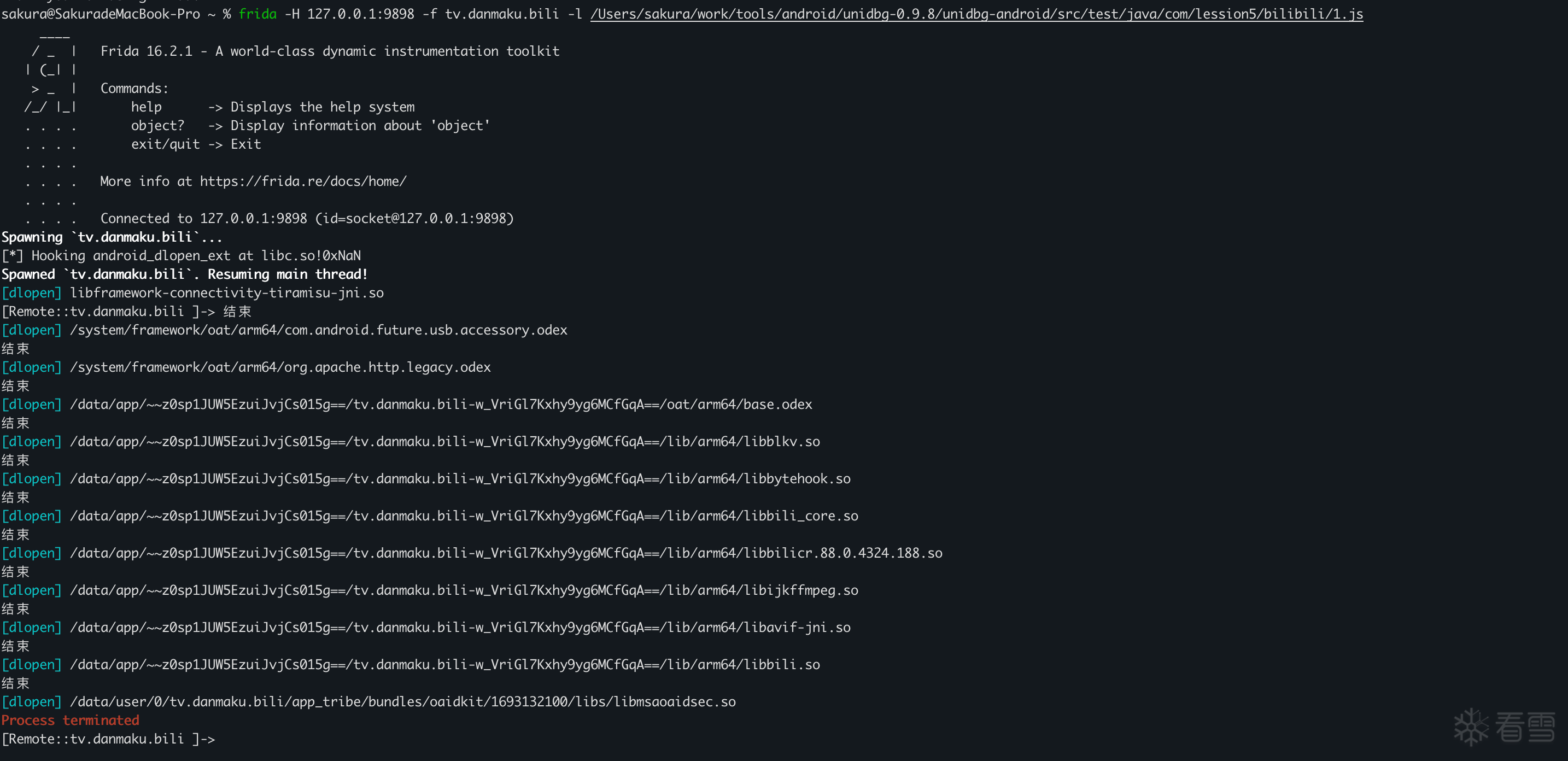
可以看到除了libmsaoaidsec.so,都输出了结束,并且最后是打印libmsaoaidsec.so后程序退出,所以libmsaoaidsec.so大概率为检测的so文件,并且没有打印出“结束”,所以我们可以确定是检测点在so加载完成之前

图片描述

可以通过在dlopen结束之后,去HOOK JNI_Onload函数,去判断检测函数在JNI_Onload之前还是之后

1
2
3
4
5
6
7
8
9
10
11
12
13
14
15
16
17
18
19
20
21
22
23
24
25
26
27
28
29
30
31
32
33
34
35
36
37
38
39
40
41
42
43
44
45
46
47
48
function hook_dlopen() {
    const funcName = "android_dlopen_ext";
    const libc = Module.findBaseAddress("libc.so");
    var funcPtr = Module.findExportByName(null, funcName);
 
    if (funcPtr !== null && funcPtr !== undefined) {
        console.log(`[*] Hooking ${funcName} at libc.so!0x${(funcPtr - libc.base).toString(16)}`);
 
        Interceptor.attach(funcPtr, {
            onEnter: function (args) {
                this.pathPtr = args[0];
                if (this.pathPtr !== null && this.pathPtr !== undefined) {
                    try {
                        // 读取加载的so名称字符串并打印
                        var path = this.pathPtr.readCString();
                        console.log("\x1b[36m[dlopen] \x1b[0m" + path);
                        if (path.indexOf("libmsaoaidsec.so") !== -1) {
                            this.isTarget = true;
                        }
                    } catch (e) {
                        console.log("[!] Error reading path string in " + this.funcName);
                    }
                }
            }, onLeave: function (retval) {
                if (this.isTarget) {
                    hook_JNI_OnLoad();
                }
 
            }
        });
    } else {
        console.log("[-] Warning: " + funcName + " not found in exports.");
    }
}
 
function hook_JNI_OnLoad() {
    let module = Process.findModuleByName("libmsaoaidsec.so")
    Interceptor.attach(module.base.add(0x13A4C), {
        onEnter(args) {
            console.log("JNI_OnLoad")
        }
    })
}
 
function main() {
    hook_dlopen();
}
setImmediate(main);

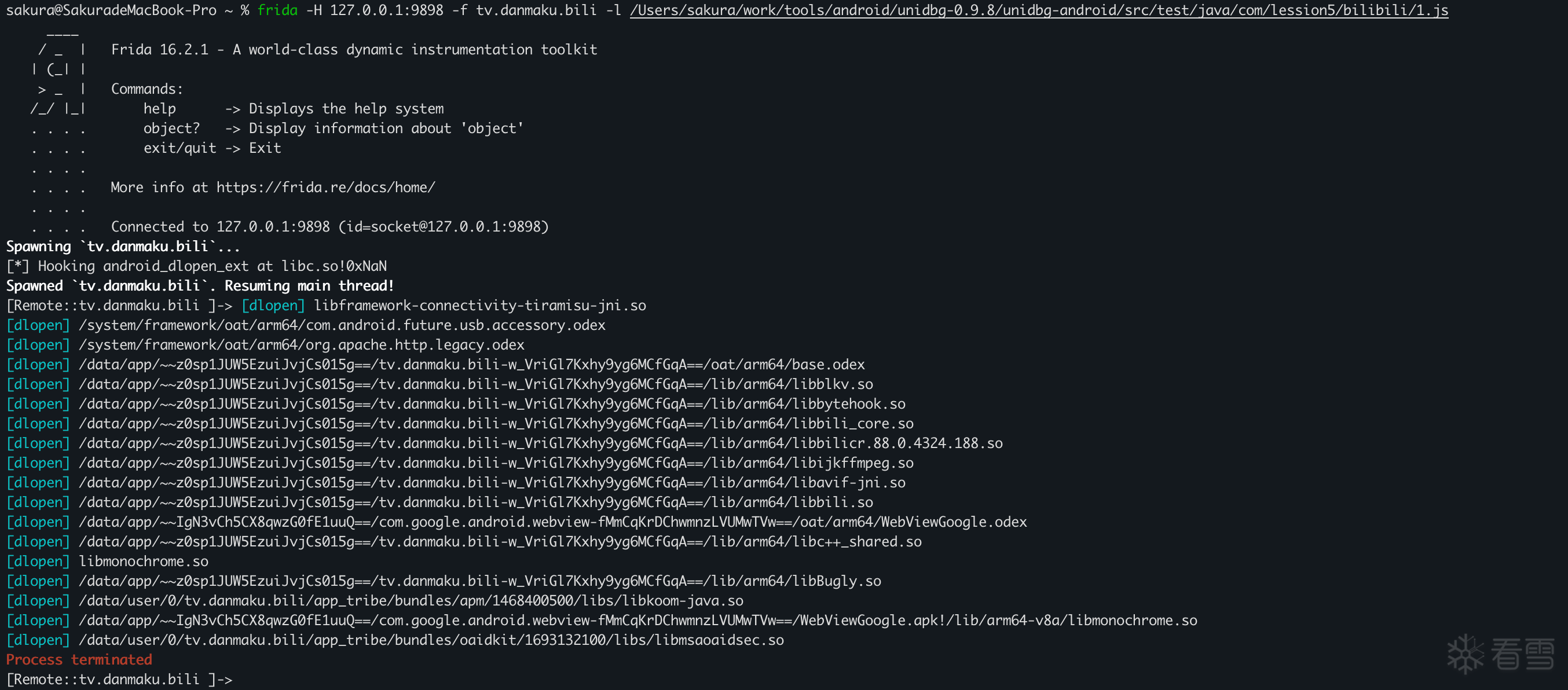
发现最后没有打印出JNI_OnLoad,所以肯定是在JNI_OnLoad之前检测的

图片描述

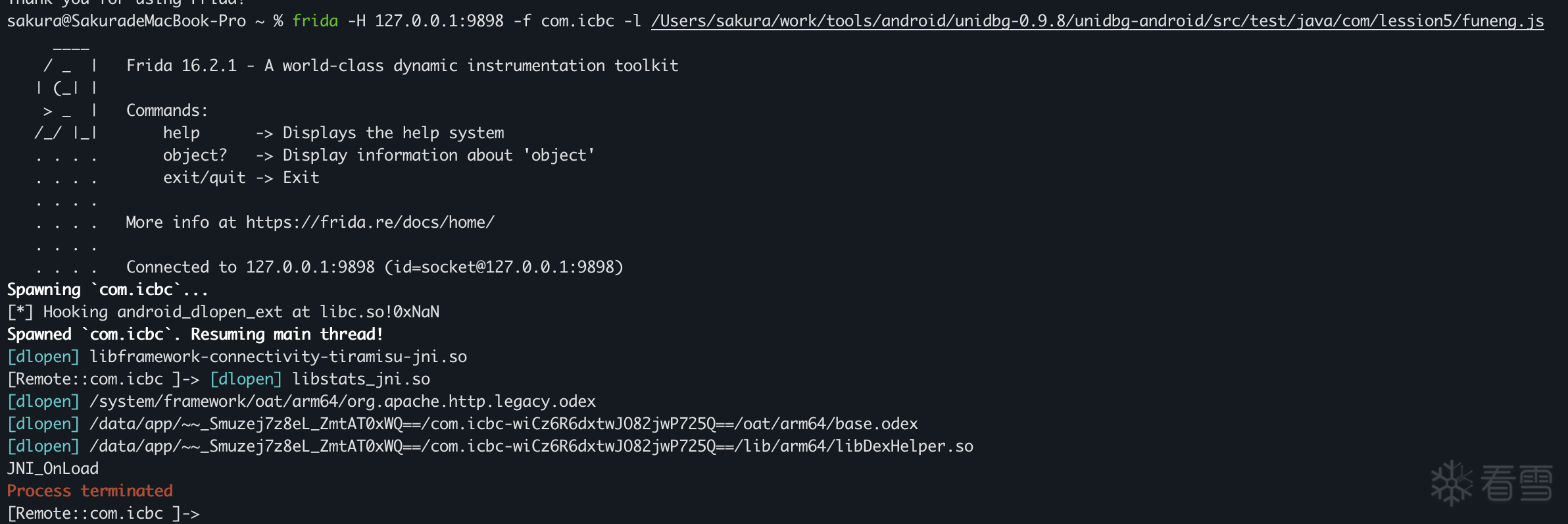
如果在JNI_OnLoad加载后,执行结果应当如下:会先打印出JNI_OnLoad再退出

图片描述

所以根据以上的结果,我们可以判断出,检测函数是在JNI_OnLoad之前就开始检测了

所以我们找一个靠前的时间点, 在so初始化的时候我们找一个锚点,在这个锚点再去进行后续的hook,首先我们先找锚点

绕过检测点

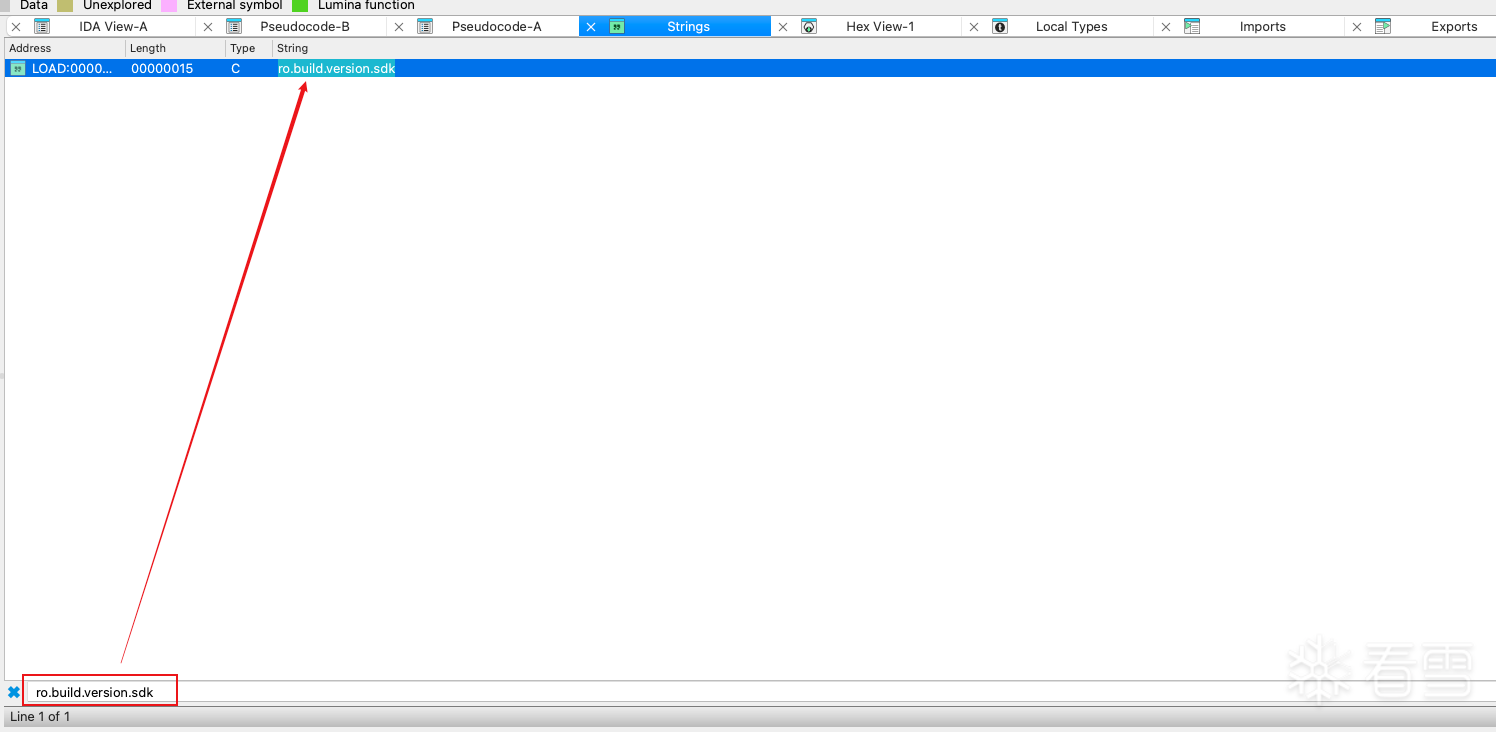
打开IDA pro,我们一般情况下都会找 **__system_property_get**作为我们的锚点,一般情况下参数为ro.build.version.sdk

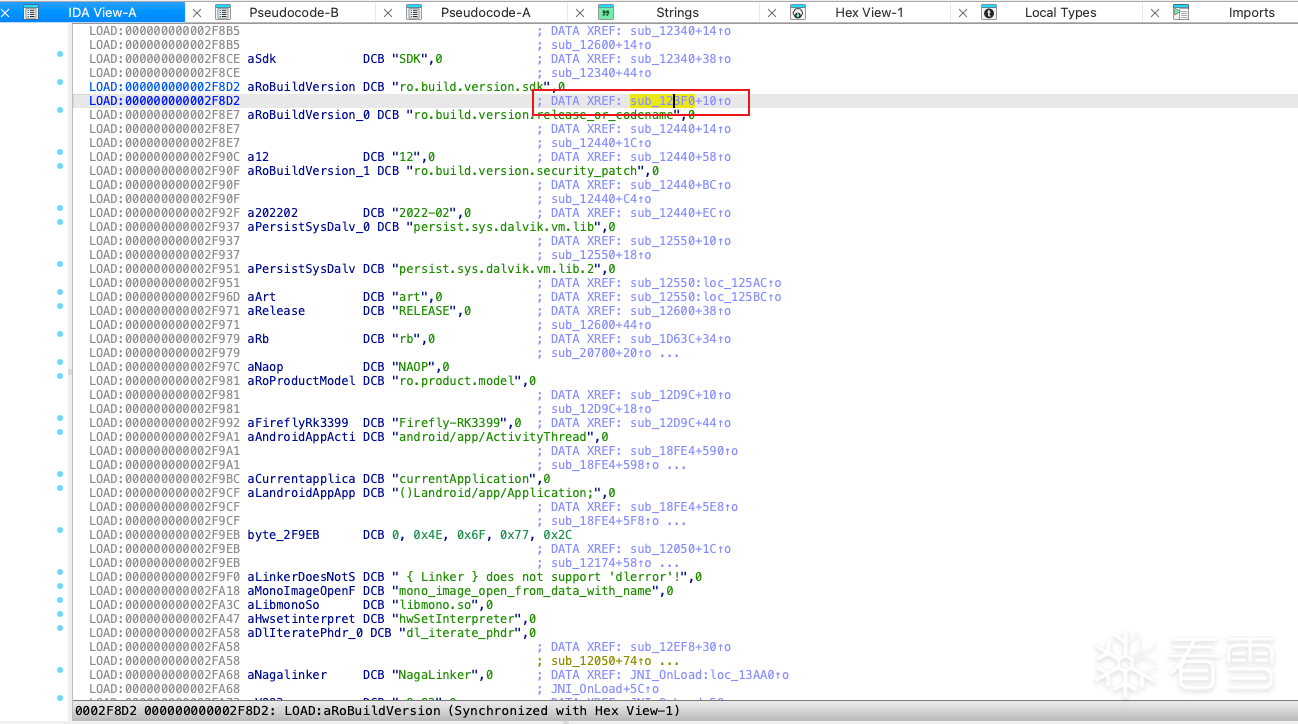
我们可以直接通过IDA搜索字符串ro.build.version.sdk,双击跳转到这个函数

图片描述

图片描述

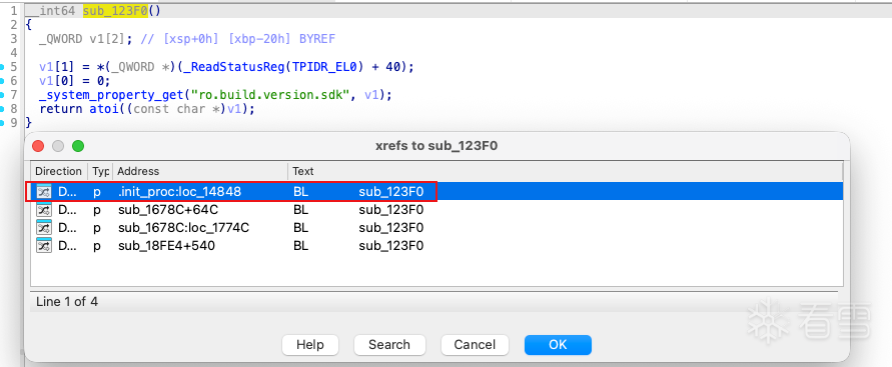
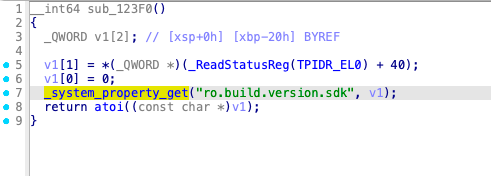
我们可以找到sub_123F0,发现其调用了_system_property_get,调用系统属性获取函数,获取 SDK 版本,

图片描述

查看sub_123F0的交叉引用,可以看到在init_proc中,sub_123F0被调用了,我们知道init_proc是一个很靠前的时间点,所以可以确认 **__system_property_get**就是一个很好的锚点,此时 SO 已经在内存中(基址已确定),但后续的检测线程还没来得及创建

图片描述

所以我们给出下面的代码先做一个测试:

1
2
3
4
5
6
7
8
9
10
11
12
13
14
15
16
17
18
19
20
21
22
23
24
25
26
27
28
29
30
31
32
33
34
35
36
37
38
39
40
41
42
43
44
45
46
47
48
49
50
51
52
53
54
55
56
57
58
59
60
61
62
63
64
65
66
function hook_dlopen() {
    const funcName = "android_dlopen_ext";
    const libc = Module.findBaseAddress("libc.so");
    var funcPtr = Module.findExportByName(null, funcName);
 
    if (funcPtr !== null && funcPtr !== undefined) {
        console.log(`[*] Hooking ${funcName} at libc.so!0x${(funcPtr - libc.base).toString(16)}`);
 
        Interceptor.attach(funcPtr, {
            onEnter: function (args) {
                this.pathPtr = args[0];
                if (this.pathPtr !== null && this.pathPtr !== undefined) {
                    try {
                        // 读取加载的so名称字符串并打印
                        var path = this.pathPtr.readCString();
                        console.log("\x1b[36m[dlopen] \x1b[0m" + path);
                        if (path.indexOf("libmsaoaidsec.so") !== -1) {
                            this.isTarget = true;
                            hook_system_property_get();         //在libmsaoaidsec.so进行初始化的时候hook
                        }
                    } catch (e) {
                        console.log("[!] Error reading path string in " + this.funcName);
                    }
                }
 
            }, onLeave: function (retval) {
            }
        });
    } else {
        console.log("[-] Warning: " + funcName + " not found in exports.");
    }
}
 
function hook_JNI_OnLoad() {
    let module = Process.findModuleByName("libmsaoaidsec.so")
    Interceptor.attach(module.base.add(0x13A4C), {
        onEnter(args) {
            console.log("JNI_OnLoad")
        }
    })
}
 
function hook_system_property_get() {
    var system_property_get_addr = Module.findExportByName(null, "__system_property_get");
 
    if (system_property_get_addr !== null && system_property_get_addr !== undefined) {
        Interceptor.attach(system_property_get_addr, {
            onEnter: function (args) {
                var nameptr = args[0];
                if (nameptr) {
                    var name = ptr(nameptr).readCString();
                    if (name.indexOf("ro.build.version.sdk") >= 0) {
                        console.log("Found ro.build.version.sdk, need to patch");
                        //这里可以开始进行HOOK
                    }
                }
            }
        })
    }
 
}
 
function main() {
    hook_dlopen();
}
setImmediate(main);
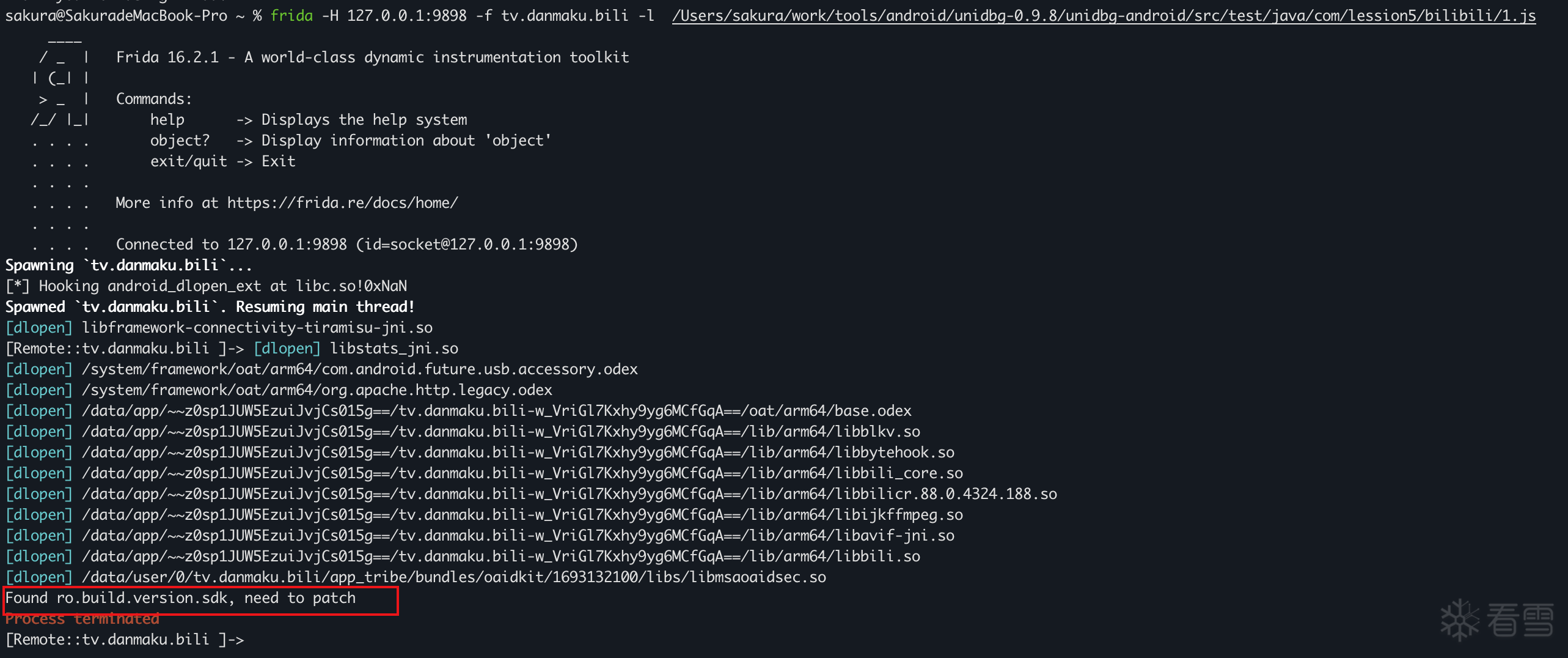
可以看到结果打印了Found ro.build.version.sdk, need to patch,说明hook_system_property_get()在检测函数之前就执行了,说明我们的推断是合理的

图片描述

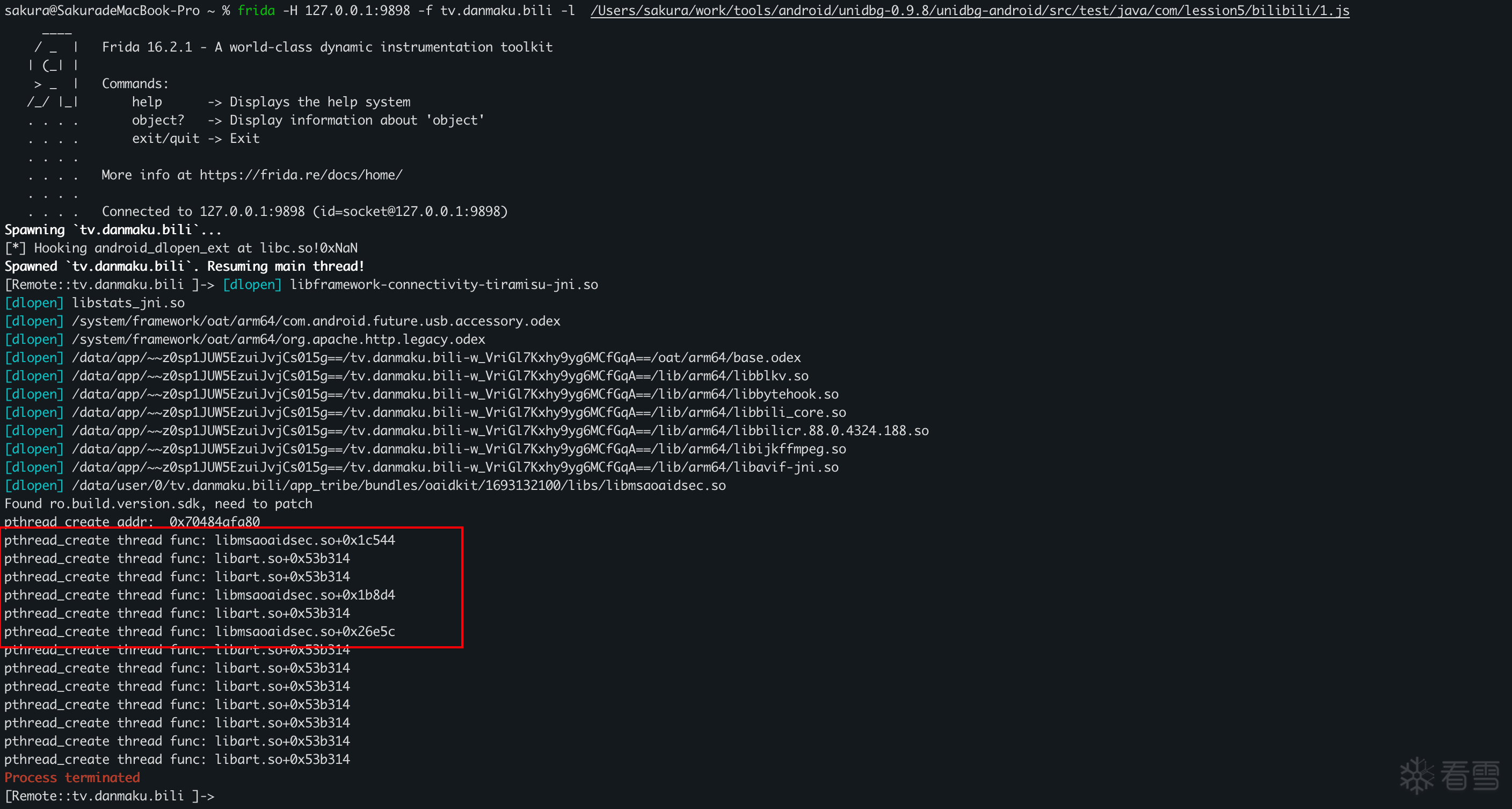
接下来就是去hook检测线程了,我们在这个锚点尝试hook pthread_create,打印出检测线程的地址

1
2
3
4
5
6
7
8
9
10
11
12
13
14
15
16
17
18
19
20
21
22
23
24
25
26
27
28
29
30
31
32
33
34
35
36
37
38
39
40
41
42
43
44
45
46
47
48
49
50
51
52
53
54
55
56
57
58
59
60
61
62
63
64
65
66
67
68
69
70
71
72
73
74
75
76
77
78
79
80
81
82
83
function hook_dlopen() {
    const funcName = "android_dlopen_ext";
    const libc = Module.findBaseAddress("libc.so");
    var funcPtr = Module.findExportByName(null, funcName);
 
    if (funcPtr !== null && funcPtr !== undefined) {
        console.log(`[*] Hooking ${funcName} at libc.so!0x${(funcPtr - libc.base).toString(16)}`);
 
        Interceptor.attach(funcPtr, {
            onEnter: function (args) {
                this.pathPtr = args[0];
                if (this.pathPtr !== null && this.pathPtr !== undefined) {
                    try {
                        // 读取加载的so名称字符串并打印
                        var path = this.pathPtr.readCString();
                        console.log("\x1b[36m[dlopen] \x1b[0m" + path);
                        if (path.indexOf("libmsaoaidsec.so") !== -1) {
                            this.isTarget = true;
                            hook_system_property_get();
                        }
                    } catch (e) {
                        console.log("[!] Error reading path string in " + this.funcName);
                    }
                }
 
            }, onLeave: function (retval) {
            }
        });
    } else {
        console.log("[-] Warning: " + funcName + " not found in exports.");
    }
}
 
function hook_JNI_OnLoad() {
    let module = Process.findModuleByName("libmsaoaidsec.so")
    Interceptor.attach(module.base.add(0x13A4C), {
        onEnter(args) {
            console.log("JNI_OnLoad")
        }
    })
}
 
function hook_pthread_create() {
    var pthread_create_addr = Module.findExportByName("libc.so", "pthread_create");
    console.log("pthread_create addr: ", pthread_create_addr);
    Interceptor.attach(pthread_create_addr, {
        onEnter: function (args) {
            var thread_func_addr = args[2];
            var module = Process.findModuleByAddress(thread_func_addr);
            console.log(`pthread_create thread func: ${module.name}+0x${(thread_func_addr - module.base).toString(16)}`);
        }, onLeave: function (retval) {
        }
    });
}
 
 
function hook_system_property_get() {
    var system_property_get_addr = Module.findExportByName(null, "__system_property_get");
 
    if (system_property_get_addr !== null && system_property_get_addr !== undefined) {
        Interceptor.attach(system_property_get_addr, {
            onEnter: function (args) {
                var nameptr = args[0];
                if (nameptr) {
                    var name = ptr(nameptr).readCString();
                    if (name.indexOf("ro.build.version.sdk") >= 0) {
                        console.log("Found ro.build.version.sdk, need to patch");
                        // hook_pthread_create();
                        // bypass()
                        //这里可以开始进行HOOK
                        hook_pthread_create();
                    }
                }
            }
        })
    }
 
}
 
function main() {
    hook_dlopen();
}
setImmediate(main);
图片描述

我们直接尝试去nop这些线程

1
2
3
4
5
6
7
8
9
10
11
12
13
14
15
16
17
18
19
20
21
22
23
24
25
26
27
28
29
30
31
32
33
34
35
36
37
38
39
40
41
42
43
44
45
46
47
48
49
50
51
52
53
54
55
56
57
58
59
60
61
62
63
64
65
66
67
68
69
70
71
72
73
74
75
76
77
78
79
80
81
82
83
84
85
86
87
88
89
90
91
92
93
94
95
96
97
98
99
100
function hook_dlopen() {
    const funcName = "android_dlopen_ext";
    const libc = Module.findBaseAddress("libc.so");
    var funcPtr = Module.findExportByName(null, funcName);
 
    if (funcPtr !== null && funcPtr !== undefined) {
        console.log(`[*] Hooking ${funcName} at libc.so!0x${(funcPtr - libc.base).toString(16)}`);
 
        Interceptor.attach(funcPtr, {
            onEnter: function (args) {
                this.pathPtr = args[0];
                if (this.pathPtr !== null && this.pathPtr !== undefined) {
                    try {
                        // 读取加载的so名称字符串并打印
                        var path = this.pathPtr.readCString();
                        console.log("\x1b[36m[dlopen] \x1b[0m" + path);
                        if (path.indexOf("libmsaoaidsec.so") !== -1) {
                            this.isTarget = true;
                            hook_system_property_get();
                        }
                    } catch (e) {
                        console.log("[!] Error reading path string in " + this.funcName);
                    }
                }
 
            }, onLeave: function (retval) {
            }
        });
    } else {
        console.log("[-] Warning: " + funcName + " not found in exports.");
    }
}
 
function hook_JNI_OnLoad() {
    let module = Process.findModuleByName("libmsaoaidsec.so")
    Interceptor.attach(module.base.add(0x13A4C), {
        onEnter(args) {
            console.log("JNI_OnLoad")
        }
    })
}
 
function hook_pthread_create() {
    var pthread_create_addr = Module.findExportByName("libc.so", "pthread_create");
    console.log("pthread_create addr: ", pthread_create_addr);
    Interceptor.attach(pthread_create_addr, {
        onEnter: function (args) {
            var thread_func_addr = args[2];
            var module = Process.findModuleByAddress(thread_func_addr);
            console.log(`pthread_create thread func: ${module.name}+0x${(thread_func_addr - module.base).toString(16)}`);
        }, onLeave: function (retval) {
        }
    });
}
 
function nopFunc(addr) {
    Memory.protect(addr, 4, 'rwx');  // 修改该地址的权限为可读可写
    var writer = new Arm64Writer(addr);
    writer.putRet();   // 直接将函数首条指令设置为ret指令
    writer.flush();    // 写入操作刷新到目标内存,使得写入的指令生效
    writer.dispose();  // 释放 Arm64Writer 使用的资源
    console.log("nop " + addr + " success");
}
function bypass_detect_func() {
    var base = Module.findBaseAddress("libmsaoaidsec.so")
    // jxbank
    nopFunc(base.add(0x1c544));
    nopFunc(base.add(0x1b8d4));
    nopFunc(base.add(0x26e5c));
}
 
 
function hook_system_property_get() {
    var system_property_get_addr = Module.findExportByName(null, "__system_property_get");
 
    if (system_property_get_addr !== null && system_property_get_addr !== undefined) {
        Interceptor.attach(system_property_get_addr, {
            onEnter: function (args) {
                var nameptr = args[0];
                if (nameptr) {
                    var name = ptr(nameptr).readCString();
                    if (name.indexOf("ro.build.version.sdk") >= 0) {
                        console.log("Found ro.build.version.sdk, need to patch");
                        // hook_pthread_create();
                        // bypass()
                        //这里可以开始进行HOOK
                        // hook_pthread_create();
                        bypass_detect_func();
                    }
                }
            }
        })
    }
 
}
 
function main() {
    hook_dlopen();
}
setImmediate(main);
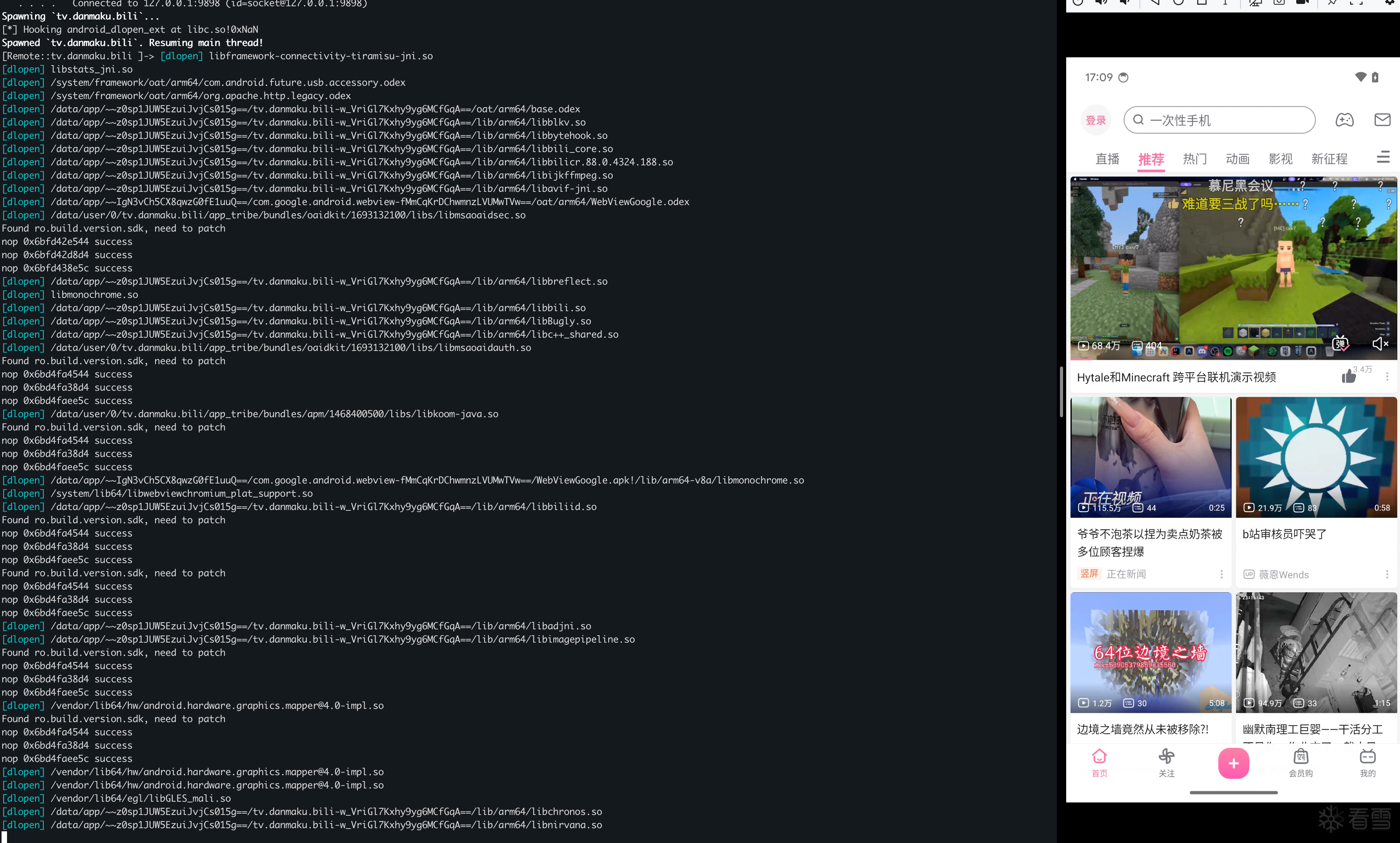
frida已经不退出了

图片描述

其他锚点

这种寻找锚点的方式,不只可以使用__system_property_get作为我们的锚点,还可以使用其他的函数,这边使用gemini找了几个可以尝试作为锚点的函数

锚点函数 推荐指数 触发时机 适用场景
__system_property_get ⭐⭐⭐⭐⭐ 极早 几乎所有加固都会读取ro.build.version或厂商信息
dlsym ⭐⭐⭐⭐⭐ 极早 壳需要隐藏 API 调用时(如隐藏ptrace等)
prctl ⭐⭐⭐ 较早 防止 Dump 或 允许 Ptrace 时

dlsym

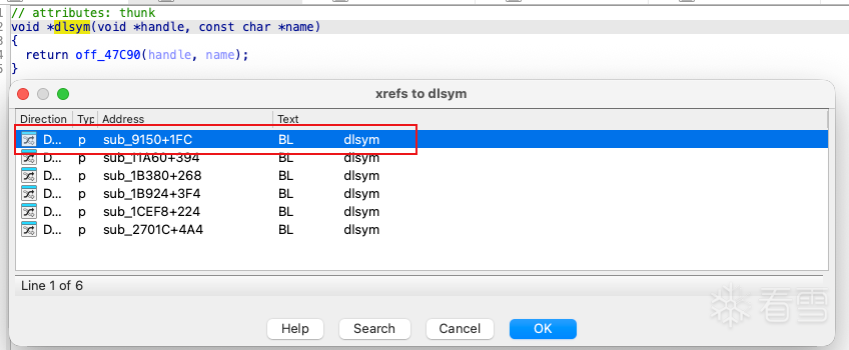
首先我们在IDA中看dlsym是否在init_proc阶段被调用:找到dlsym,查看它的引用

图片描述

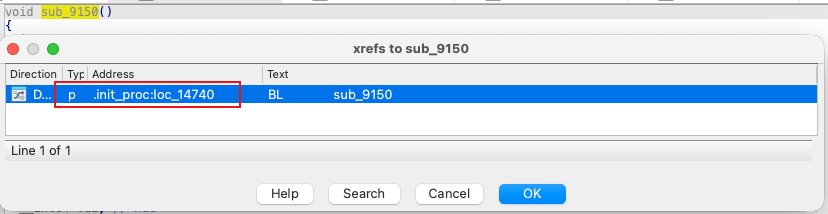
定位到sub_9150,继续查看引用,可以发现在init_proc中被调用了,所以在初始化阶段确实存在dlsym

图片描述

SO 加壳或做对抗时,为了隐藏导入表,往往会通过 dlopen/dlsym 动态获取系统函数地址(如 ptrace, open, pthread_create)。特征参数:第二个参数是函数名称字符串,这里编写如下的代码,测试是否会动态导入pthread_create

1
2
3
4
5
6
7
8
9
10
11
12
13
14
15
16
17
18
19
20
21
22
23
24
25
26
27
28
29
30
31
32
33
34
35
36
37
38
39
40
41
42
43
44
45
46
47
48
49
50
51
52
53
54
55
56
function hook_dlopen() {
    const funcName = "android_dlopen_ext";
    const libc = Module.findBaseAddress("libc.so");
    var funcPtr = Module.findExportByName(null, funcName);
 
    if (funcPtr !== null && funcPtr !== undefined) {
        console.log(`[*] Hooking ${funcName} at libc.so!0x${(funcPtr - libc.base).toString(16)}`);
 
        Interceptor.attach(funcPtr, {
            onEnter: function (args) {
                this.pathPtr = args[0];
                if (this.pathPtr !== null && this.pathPtr !== undefined) {
                    try {
                        // 读取加载的so名称字符串并打印
                        var path = this.pathPtr.readCString();
                        console.log("\x1b[36m[dlopen] \x1b[0m" + path);
                        if (path.indexOf("libmsaoaidsec.so") !== -1) {
                            this.isTarget = true;
                            // hook_system_property_get();
                            // hook_prctl_anchor()
                            hook_dlsym_anchor();
                        }
                    } catch (e) {
                        console.log("[!] Error reading path string in " + this.funcName);
                    }
                }
 
            }, onLeave: function (retval) {
            }
        });
    } else {
        console.log("[-] Warning: " + funcName + " not found in exports.");
    }
}
function hook_dlsym_anchor() {
    const dlsym_addr = Module.findExportByName(null, "dlsym");
    if (dlsym_addr) {
        Interceptor.attach(dlsym_addr, {
            onEnter: function (args) {
                this.symbolName = args[1].readCString();
                // 监听壳是否在动态获取pthread_create
                if (this.symbolName && (this.symbolName.indexOf("pthread_create") >= 0)) {
 
                    console.log("[Anchor] dlsym finding: " + this.symbolName);
                    // 触发核心 Bypass 逻辑
                    // bypass_detect_func();
                }
            }
        });
    }
}
 
function main() {
    hook_dlopen();
}
setImmediate(main);
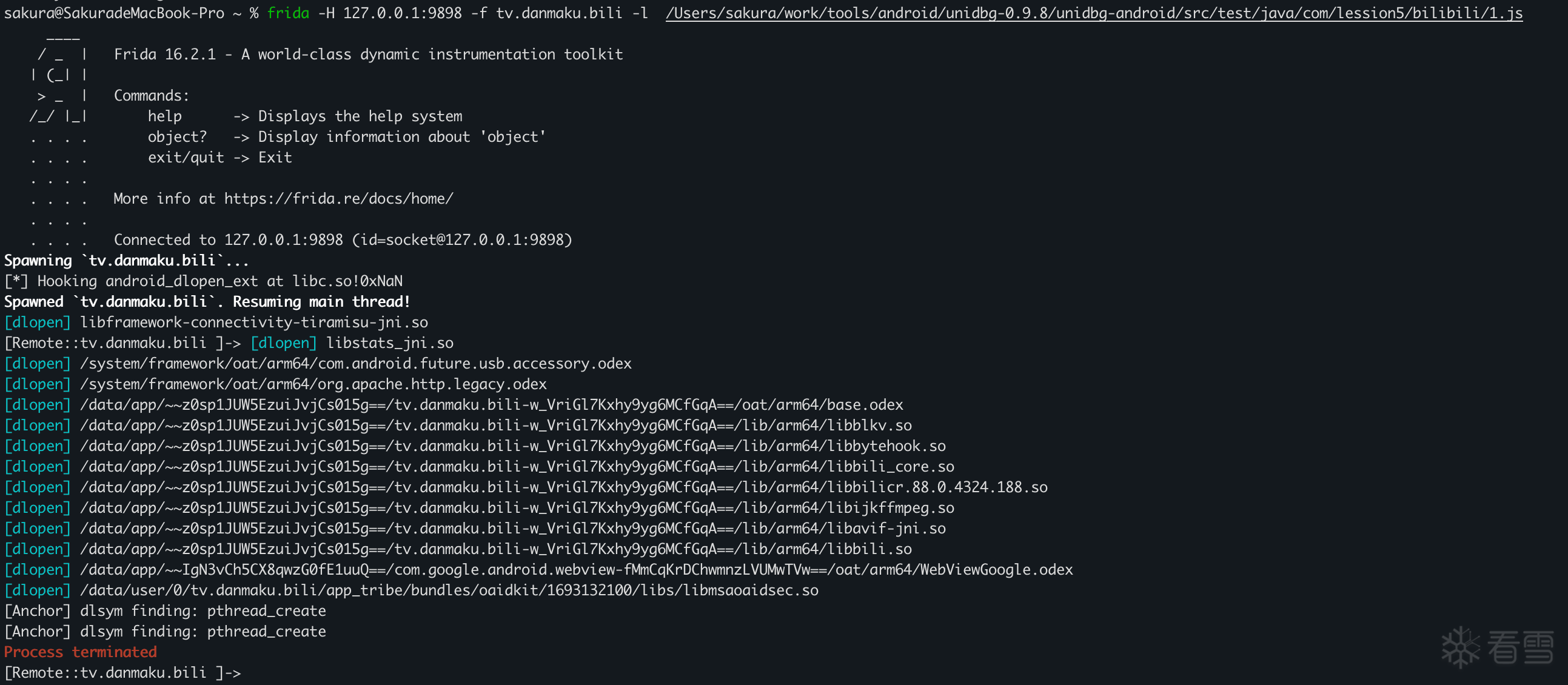
可以看到打印了[Anchor] dlsym finding: pthread_create

图片描述

我们在这个锚点执行我们的bypass方法

1
2
3
4
5
6
7
8
9
10
11
12
13
14
15
16
17
18
19
20
21
22
23
24
25
26
27
28
29
30
31
32
33
34
35
36
37
38
39
40
41
42
43
44
45
46
47
48
49
50
51
52
53
54
55
56
function hook_dlopen() {
    const funcName = "android_dlopen_ext";
    const libc = Module.findBaseAddress("libc.so");
    var funcPtr = Module.findExportByName(null, funcName);
 
    if (funcPtr !== null && funcPtr !== undefined) {
        console.log(`[*] Hooking ${funcName} at libc.so!0x${(funcPtr - libc.base).toString(16)}`);
 
        Interceptor.attach(funcPtr, {
            onEnter: function (args) {
                this.pathPtr = args[0];
                if (this.pathPtr !== null && this.pathPtr !== undefined) {
                    try {
                        // 读取加载的so名称字符串并打印
                        var path = this.pathPtr.readCString();
                        console.log("\x1b[36m[dlopen] \x1b[0m" + path);
                        if (path.indexOf("libmsaoaidsec.so") !== -1) {
                            this.isTarget = true;
                            // hook_system_property_get();
                            // hook_prctl_anchor()
                            hook_dlsym_anchor();
                        }
                    } catch (e) {
                        console.log("[!] Error reading path string in " + this.funcName);
                    }
                }
 
            }, onLeave: function (retval) {
            }
        });
    } else {
        console.log("[-] Warning: " + funcName + " not found in exports.");
    }
}
function hook_dlsym_anchor() {
    const dlsym_addr = Module.findExportByName(null, "dlsym");
    if (dlsym_addr) {
        Interceptor.attach(dlsym_addr, {
            onEnter: function (args) {
                this.symbolName = args[1].readCString();
                // 监听壳是否在动态获取pthread_create
                if (this.symbolName && (this.symbolName.indexOf("pthread_create") >= 0)) {
 
                    console.log("[Anchor] dlsym finding: " + this.symbolName);
                    // 触发核心 Bypass 逻辑
                    bypass_detect_func();
                }
            }
        });
    }
}
 
function main() {
    hook_dlopen();
}
setImmediate(main);
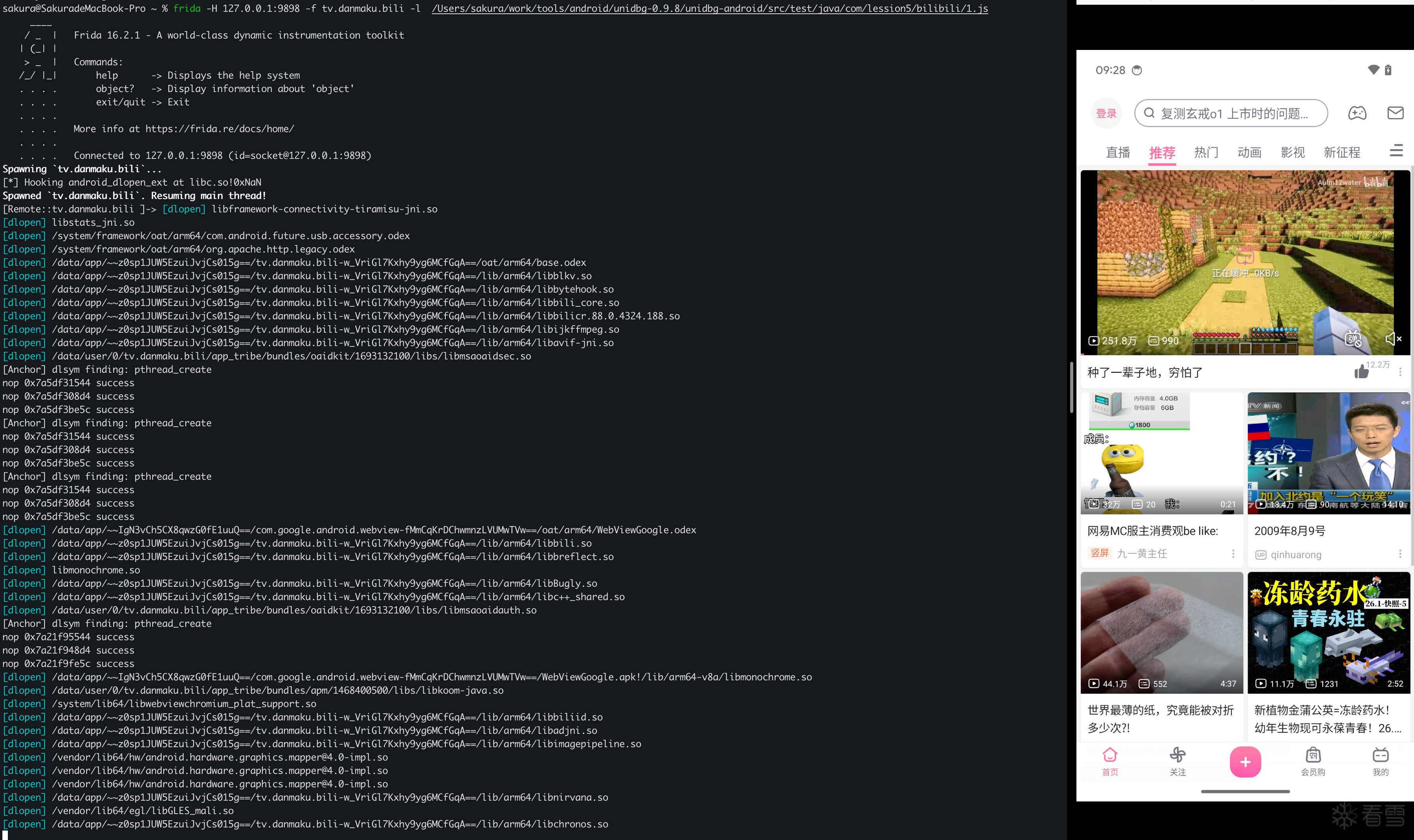
可以看到已经成功绕过,frida未退出

图片描述

prctl

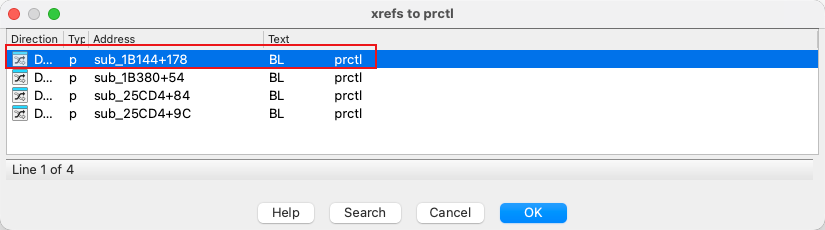
这里验证了**prctl**,IDA中的调用路径如下:

通过function中搜索函数,定位到函数

图片描述

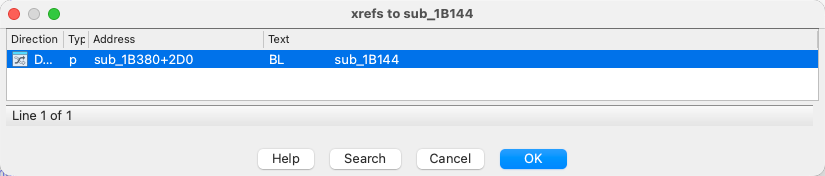
开始查看引用,找到sub_1B144

图片描述

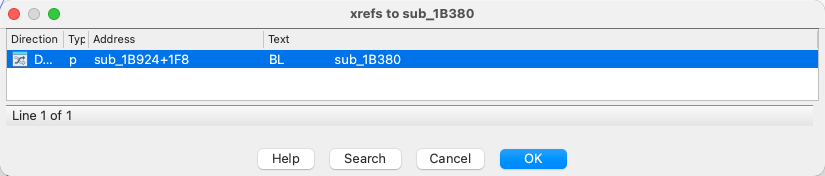
查看sub_1B144的引用,找到了sub_1B380

图片描述

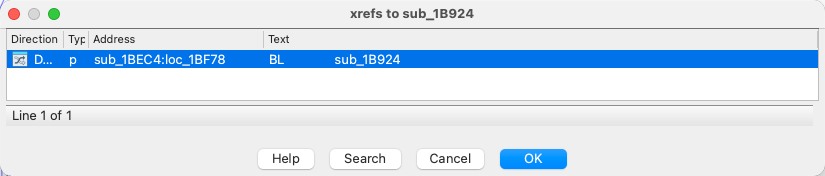
继续查看引用,找到sub_1B924

图片描述

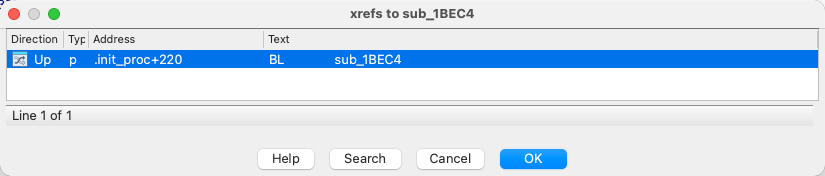
继续往上跟进,找到sub_1BEC4

图片描述

发现在init_proc中调用了sub_1BEC4,说明了prctl确实是在初始化阶段被调用了

图片描述

具体代码如下:

1
2
3
4
5
6
7
8
9
10
11
12
13
14
15
16
17
18
19
20
21
22
23
24
25
26
27
28
29
30
31
32
33
34
35
36
37
38
39
40
41
42
43
44
45
46
47
48
49
50
51
52
53
54
55
56
57
58
59
60
61
62
63
64
65
66
67
68
69
70
71
72
73
74
75
76
77
78
79
80
81
82
83
84
85
86
87
function hook_dlopen() {
    const funcName = "android_dlopen_ext";
    const libc = Module.findBaseAddress("libc.so");
    var funcPtr = Module.findExportByName(null, funcName);
 
    if (funcPtr !== null && funcPtr !== undefined) {
        console.log(`[*] Hooking ${funcName} at libc.so!0x${(funcPtr - libc.base).toString(16)}`);
 
        Interceptor.attach(funcPtr, {
            onEnter: function (args) {
                this.pathPtr = args[0];
                if (this.pathPtr !== null && this.pathPtr !== undefined) {
                    try {
                        // 读取加载的so名称字符串并打印
                        var path = this.pathPtr.readCString();
                        console.log("\x1b[36m[dlopen] \x1b[0m" + path);
                        if (path.indexOf("libmsaoaidsec.so") !== -1) {
                            this.isTarget = true;
                            // hook_system_property_get();
                            hook_prctl_anchor()
                        }
                    } catch (e) {
                        console.log("[!] Error reading path string in " + this.funcName);
                    }
                }
 
            }, onLeave: function (retval) {
            }
        });
    } else {
        console.log("[-] Warning: " + funcName + " not found in exports.");
    }
}
 
 
function hook_pthread_create() {
    var pthread_create_addr = Module.findExportByName("libc.so", "pthread_create");
    console.log("pthread_create addr: ", pthread_create_addr);
    Interceptor.attach(pthread_create_addr, {
        onEnter: function (args) {
            var thread_func_addr = args[2];
            var module = Process.findModuleByAddress(thread_func_addr);
            console.log(`pthread_create thread func: ${module.name}+0x${(thread_func_addr - module.base).toString(16)}`);
        }, onLeave: function (retval) {
        }
    });
}
 
function nopFunc(addr) {
    Memory.protect(addr, 4, 'rwx');  // 修改该地址的权限为可读可写
    var writer = new Arm64Writer(addr);
    writer.putRet();   // 直接将函数首条指令设置为ret指令
    writer.flush();    // 写入操作刷新到目标内存,使得写入的指令生效
    writer.dispose();  // 释放 Arm64Writer 使用的资源
    console.log("nop " + addr + " success");
}
function bypass_detect_func() {
    var base = Module.findBaseAddress("libmsaoaidsec.so")
    // jxbank
    nopFunc(base.add(0x1c544));
    nopFunc(base.add(0x1b8d4));
    nopFunc(base.add(0x26e5c));
}
 
 
function hook_prctl_anchor() {
    const prctl_ptr = Module.findExportByName(null, "prctl");
    const PR_SET_DUMPABLE = 4;
 
    if (prctl_ptr) {
        Interceptor.attach(prctl_ptr, {
            onEnter: function (args) {
                const option = args[0].toInt32();
                // 锚点:检测到尝试禁止内存 dump
                if (option === 15) {
                    console.log(`[Anchor] prctl(PR_SET_DUMPABLE) detected!`);
                    bypass_detect_func();
                }
            }
        });
    }
}
 
function main() {
    hook_dlopen();
}
setImmediate(main);
但是存在一个问题,这个锚点虽然能执行bypass_detect_func,但是实测下来无法执行hook_pthread_create()

其他绕过方法

这时候就有兄弟要问了,有没有更轮椅的方法,有的兄弟,有的

只需要去下载一个florida 就可以一键绕过检测了

下载对应的版本,直接替换原本的frida-server即可。

参考文章

绕过最新版bilibili app反frida机制
[原创]经典 Frida 检测 libmsaoaidsec.so 绕过
[原创]某加固新版frida检测绕过-trace一把嗦
[原创] bilibili frida检测分析绕过

小白第一次发帖,可能分析和描述中存在错漏,望大佬指点~


[培训]Windows内核深度攻防:从Hook技术到Rootkit实战!

收藏
免费 3
支持
分享
最新回复 (1)
雪    币: 104
活跃值: (7486)
能力值: ( LV2,RANK:10 )
在线值:
发帖
回帖
粉丝
2
tql
4天前
0
游客
登录 | 注册 方可回帖
返回