-
-
[求助]ydark 的 speedhack 全局变速是怎么做到的
-
发表于:
2026-1-26 18:37
2833
-
[求助]ydark 的 speedhack 全局变速是怎么做到的
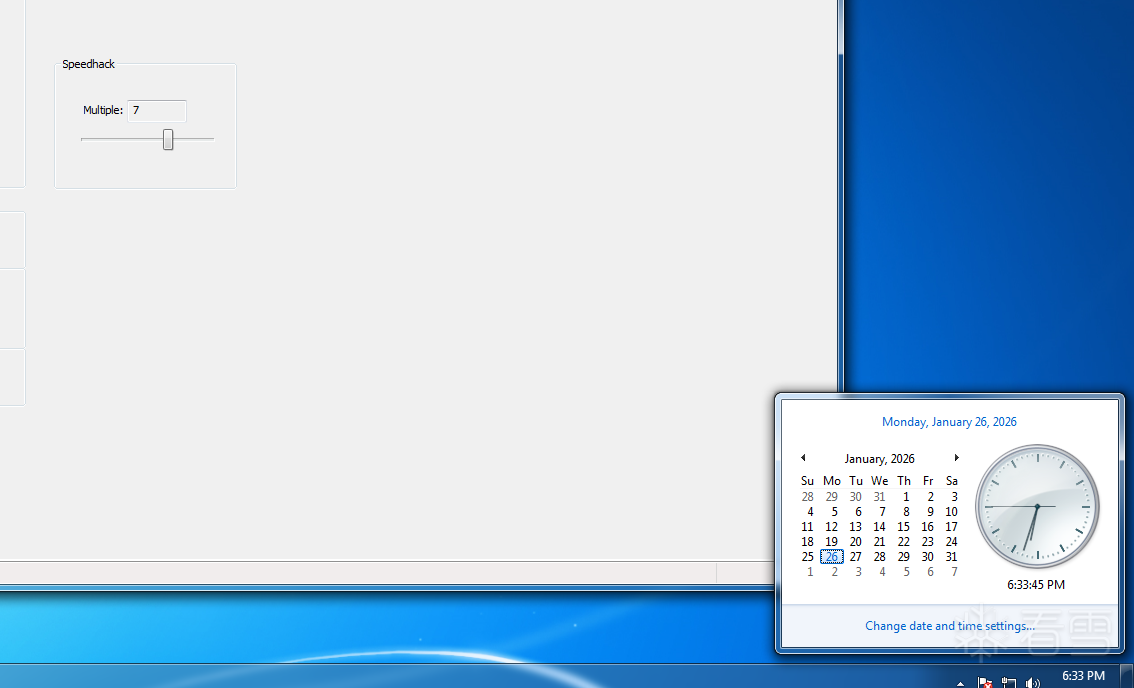
 如图 开启该功能后 系统感觉像是被加速一样 全局变速 我内核hook了ssdt NtQueryPerformanceCounter 后却没效果
kd> dt _KUSER_SHARED_DATA 0xFFFFF78000000000
nt!_KUSER_SHARED_DATA
   +0x000 TickCountLowDeprecated : 0
   +0x004 TickCountMultiplier : 0xf99a027
   +0x008 InterruptTime    : _KSYSTEM_TIME
   +0x014 SystemTime       : _KSYSTEM_TIME
   +0x020 TimeZoneBias     : _KSYSTEM_TIME
   +0x02c ImageNumberLow   : 0x8664
   +0x02e ImageNumberHigh  : 0x8664
   +0x030 NtSystemRoot     : [260]  "C:\Windows"
   +0x238 MaxStackTraceDepth : 0
   +0x23c CryptoExponent   : 0
   +0x240 TimeZoneId       : 0
   +0x244 LargePageMinimum : 0x200000
   +0x248 Reserved2        : [7] 0
   +0x264 NtProductType    : 1 ( NtProductWinNt )
   +0x268 ProductTypeIsValid : 0x1 ''
   +0x26c NtMajorVersion   : 6
   +0x270 NtMinorVersion   : 1
   +0x274 ProcessorFeatures : [64]  ""
   +0x2b4 Reserved1        : 0x7ffeffff
   +0x2b8 Reserved3        : 0x80000000
   +0x2bc TimeSlip         : 0
   +0x2c0 AlternativeArchitecture : 0 ( StandardDesign )
   +0x2c4 AltArchitecturePad : [1] 0
   +0x2c8 SystemExpirationDate : _LARGE_INTEGER 0x0
   +0x2d0 SuiteMask        : 0x110
   +0x2d4 KdDebuggerEnabled : 0x3 ''
   +0x2d5 NXSupportPolicy  : 0x2 ''
   +0x2d8 ActiveConsoleId  : 1
   +0x2dc DismountCount    : 0
   +0x2e0 ComPlusPackage   : 0xffffffff
   +0x2e4 LastSystemRITEventTickCount : 0x2424c
   +0x2e8 NumberOfPhysicalPages : 0x7ff7e
   +0x2ec SafeBootMode     : 0 ''
   +0x2ed TscQpcData       : 0 ''
   +0x2ed TscQpcEnabled    : 0y0
   +0x2ed TscQpcSpareFlag  : 0y0
   +0x2ed TscQpcShift      : 0y000000 (0)
   +0x2ee TscQpcPad        : [2]  ""
   +0x2f0 SharedDataFlags  : 0xe
   +0x2f0 DbgErrorPortPresent : 0y0
   +0x2f0 DbgElevationEnabled : 0y1
   +0x2f0 DbgVirtEnabled   : 0y1
   +0x2f0 DbgInstallerDetectEnabled : 0y1
   +0x2f0 DbgSystemDllRelocated : 0y0
   +0x2f0 DbgDynProcessorEnabled : 0y0
   +0x2f0 DbgSEHValidationEnabled : 0y0
   +0x2f0 SpareBits        : 0y0000000000000000000000000 (0)
   +0x2f4 DataFlagsPad     : [1] 0
   +0x2f8 TestRetInstruction : 0xc3
   +0x300 SystemCall       : 0
   +0x304 SystemCallReturn : 0
   +0x308 SystemCallPad    : [3] 0
   +0x320 TickCount        : _KSYSTEM_TIME
   +0x320 TickCountQuad    : 0x2822
   +0x320 ReservedTickCountOverlay : [3] 0x2822
   +0x32c TickCountPad     : [1] 0
   +0x330 Cookie           : 0x139b7206
   +0x334 CookiePad        : [1] 0
   +0x338 ConsoleSessionForegroundProcessId : 0n1520
   +0x340 DEPRECATED_Wow64SharedInformation : [16] 0
   +0x380 UserModeGlobalLogger : [16] 0
   +0x3a0 ImageFileExecutionOptions : 0
   +0x3a4 LangGenerationCount : 1
   +0x3a8 Reserved5        : 0
   +0x3b0 InterruptTimeBias : 0
   +0x3b8 TscQpcBias       : 0
   +0x3c0 ActiveProcessorCount : 1
   +0x3c4 ActiveGroupCount : 1
   +0x3c6 Reserved4        : 0
   +0x3c8 AitSamplingValue : 0
   +0x3cc AppCompatFlag    : 1
   +0x3d0 DEPRECATED_SystemDllNativeRelocation : 0
   +0x3d8 DEPRECATED_SystemDllWowRelocation : 0
   +0x3dc XStatePad        : [1] 0
   +0x3e0 XState           : _XSTATE_CONFIGURATION
已知
+0x2ed TscQpcData : 0 ''
是0 肯定走系统调用 ,这是ntdll.dll 的
RtlQueryPerformanceCounter 函数实现
__int64 __fastcall RtlQueryPerformanceCounter(unsigned __int64 *a1, __int64 a2, __int64 a3)
{
  __int64 v3; // r8
  unsigned __int64 v4; // rax
  int v6; // eax
  int v7; // [rsp+38h] [rbp+10h] BYREF
  int v8; // [rsp+3Ch] [rbp+14h]

  if ( (MEMORY[0x7FFE02ED] & 1) != 0 )
  {
    v3 = MEMORY[0x7FFE03B8];
    v4 = __rdtsc();
    *a1 = (v3 + (((unsigned __int64)HIDWORD(v4) << 32) | (unsigned int)v4)) >> (MEMORY[0x7FFE02ED] >> 2);
    return 1i64;
  }
  v6 = NtQueryPerformanceCounter(a1, &v7, a3, a1);
  if ( v6 >= 0 )
  {
    if ( v7 || v8 )
      return 1i64;
    RtlSetLastWin32Error(120i64);
    return 0i64;
  }
  else
  {
    RtlSetLastWin32ErrorAndNtStatusFromNtStatus((unsigned int)v6);
    return 0i64;
  }
}
RtlGetTickCount实现
unsigned __int64 RtlGetTickCount()
{
  return ((unsigned __int64)MEMORY[0x7FFE0004] * MEMORY[0x7FFE0320]) >> 24;
}
这是我的驱动程序
#include <ntifs.h>
#include <ntddk.h>
#include <windef.h>
#include <ntstrsafe.h>


#define kprintf(Format, ...) DbgPrintEx(0, 0, "KernelSpeed : " Format, __VA_ARGS__)
#define dbg() DbgBreakPoint() //断点
#define kbg()		KeBugCheck(STATUS_NOT_SUPPORTED); //蓝屏

PKUSER_SHARED_DATA  pSharedUserData = (PKUSER_SHARED_DATA)KI_USER_SHARED_DATA;

ULONG patch_size;		            // 被修改了几个字节
PUCHAR head_n_byte;	            // 前几个字节数组
PVOID original_address;			// 原函数地址


/*
关闭写保护
*/
KIRQL WPOFFx64()
{
	KIRQL irql = KeRaiseIrqlToDpcLevel();
	UINT64 cr0 = __readcr0();
	cr0 &= 0xfffffffffffeffff;
	__writecr0(cr0);
	_disable();
	return irql;
}


/*
打开写保护
*/
VOID WPONx64(KIRQL irql)
{
	UINT64 cr0 = __readcr0();
	cr0 |= 0x10000;
	_enable();
	__writecr0(cr0);
	KeLowerIrql(irql);
}

#include "lde_inline.h"

PVOID g_pNtQueryPerformanceCounter = 0xfffff80002d97b78; // 替换为你的NtQueryPerformanceCounter64位地址 win7x64

LARGE_INTEGER g_OriginalPerformanceCount = { 0 };


// ************************ 原始内核函数指针定义(64位)************************
typedef NTSTATUS(*_fastcall PNtQueryPerformanceCounter)(OUT PLARGE_INTEGER PerformanceCount, IN PLARGE_INTEGER PerformanceFrequency);
// 全局原始函数指针(钩子函数中调用原始逻辑)
PNtQueryPerformanceCounter g_pOriginalNtQueryPerformanceCounter = NULL;


// Hook NtQueryPerformanceCounter:直接拦截用户态高精度计时器
NTSTATUS _fastcall MyNtQueryPerformanceCounter(OUT PLARGE_INTEGER PerformanceCount, IN PLARGE_INTEGER PerformanceFrequency)
{

	NTSTATUS status = STATUS_SUCCESS;
	status = ((PNtQueryPerformanceCounter)original_address)(PerformanceCount, PerformanceFrequency);
	////dbg();

	LARGE_INTEGER originalPerfCount = *PerformanceCount;


	PerformanceCount->QuadPart = originalPerfCount.QuadPart + (PerformanceCount->QuadPart - g_OriginalPerformanceCount.QuadPart) * 2;

	return status;
}

NTSTATUS DriverUnload(PDRIVER_OBJECT drvobj)
{
	KernelUnHook(g_pNtQueryPerformanceCounter, head_n_byte, patch_size);


	return STATUS_SUCCESS;

}


NTSTATUS DriverEntry(PDRIVER_OBJECT drvobj, PUNICODE_STRING regpath)
{
	drvobj->DriverUnload = DriverUnload;


	LDE_init();


	g_pOriginalNtQueryPerformanceCounter = (PNtQueryPerformanceCounter)g_pNtQueryPerformanceCounter;


	g_pOriginalNtQueryPerformanceCounter(&g_OriginalPerformanceCount, NULL);


	head_n_byte = KernelHook((PUCHAR)g_pNtQueryPerformanceCounter,
		(PUCHAR)MyNtQueryPerformanceCounter,
		&original_address,
		&patch_size);


	return STATUS_SUCCESS;
}
帮帮孩子吧
传递专业知识、拓宽行业人脉——看雪讲师团队等你加入!!
最后于 2026-1-28 23:23
被ThanatosKer编辑
,原因:





