未解决
[求助]vmware虚拟机windbg双机调试测试模式下运行驱动修改cr0wp位必蓝屏
223雪币
未解决 [求助]vmware虚拟机windbg双机调试测试模式下运行驱动修改cr0wp位必蓝屏
223雪币
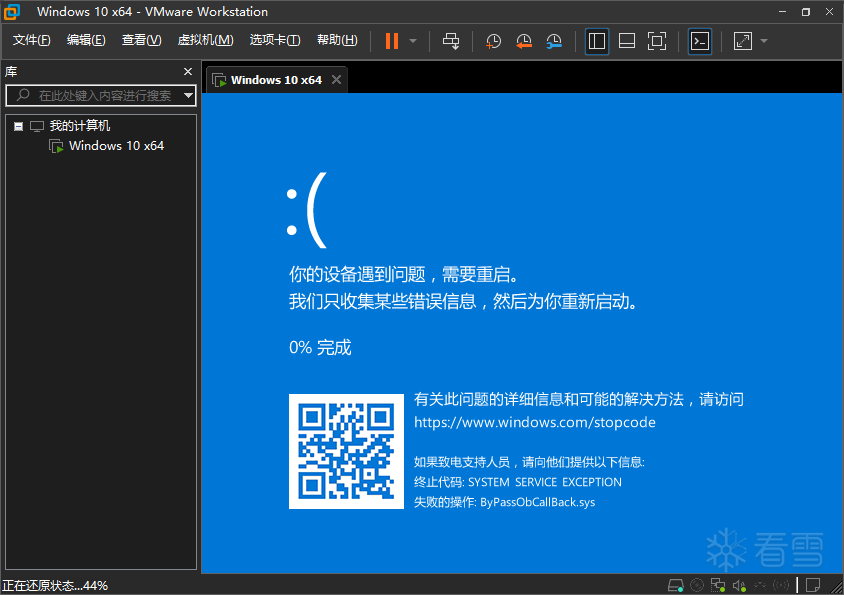
我是windows内核驱动圈萌新,读写wp位蓝屏,可以稳定复现。
问过ai,也在搜索引擎里搜不到解决方案,特来求助。
代码如下
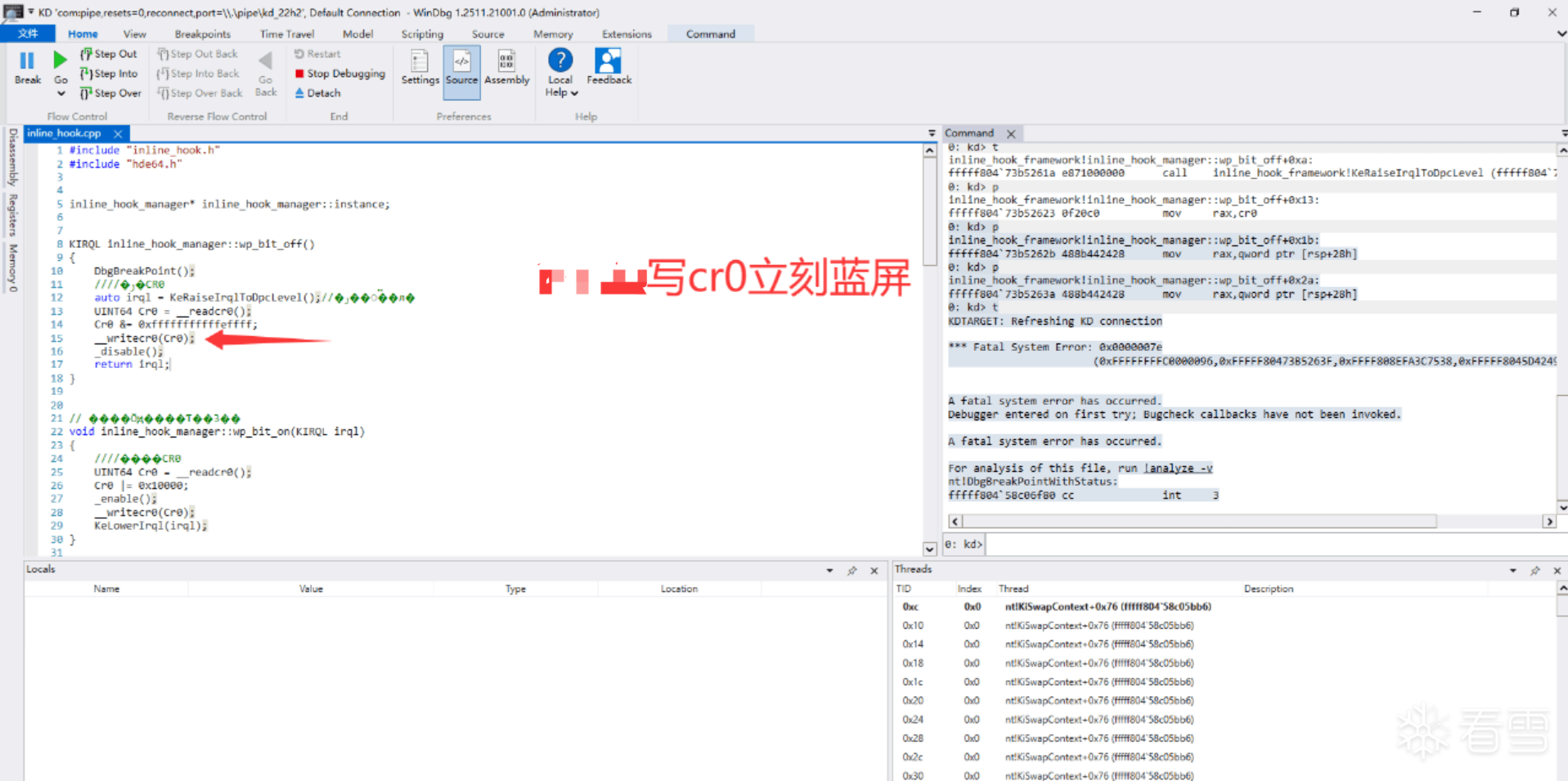
KIRQL inline_hook_manager::wp_bit_off()
{
//DbgBreakPoint();
////关闭CR0
auto irql = KeRaiseIrqlToDpcLevel();//关闭线程切换
UINT64 Cr0 = __readcr0();
Cr0 &= 0xfffffffffffeffff;
__writecr0(Cr0);
_disable();
return irql;
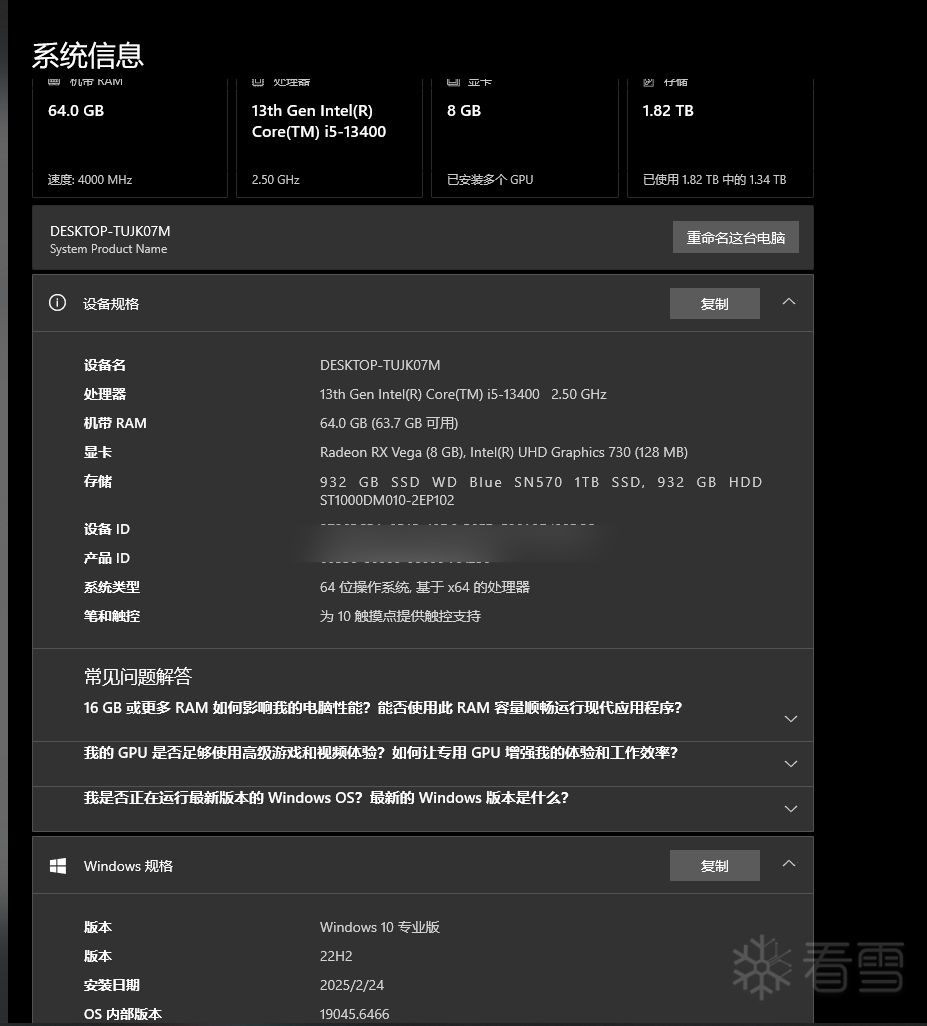
} cr0值都能读出来,单步f10跟走到__writecr0();就会蓝屏,环境VMware® Workstation 17 Pro,Windows 10 Pro, 64-bit (Build 19045.6466) 10.0.19045,bugcheckcode:
KDTARGET: Refreshing KD connection
*** Fatal System Error: 0x0000007e
(0xFFFFFFFFC0000096,0xFFFFF80473B5263F,0xFFFF808EFA3C7538,0xFFFFF8045D424920)
A fatal system error has occurred.
Debugger entered on first try; Bugcheck callbacks have not been invoked.
A fatal system error has occurred.
For analysis of this file, run !analyze -v
nt!DbgBreakPointWithStatus:
fffff804`58c06f80 cc int 3
0: kd> g
KDTARGET: Refreshing KD connection
*** Fatal System Error: 0x0000007e
(0xFFFFFFFFC0000096,0xFFFFF8024AA2263F,0xFFFFBD0816782538,0xFFFF8A01017FA920)
Break instruction exception - code 80000003 (first chance)
A fatal system error has occurred.
Debugger entered on first try; Bugcheck callbacks have not been invoked.
A fatal system error has occurred.
For analysis of this file, run !analyze -v
nt!DbgBreakPointWithStatus:
fffff802`3ee06f80 cc int 3
1: kd> !analyze -v
Connected to Windows 10 19041 x64 target at (Sun Jan 4 21:10:16.468 2026 (UTC + 8:00)), ptr64 TRUE
Loading Kernel Symbols
...............................................................
................................................................
..........................................................
Loading User Symbols
Loading unloaded module list
.....Unable to enumerate user-mode unloaded modules, Win32 error 0n30
*******************************************************************************
* *
* Bugcheck Analysis *
* *
*******************************************************************************
SYSTEM_THREAD_EXCEPTION_NOT_HANDLED (7e)
This is a very common BugCheck. Usually the exception address pinpoints
the driver/function that caused the problem. Always note this address
as well as the link date of the driver/image that contains this address.
Arguments:
Arg1: ffffffffc0000096, The exception code that was not handled
Arg2: fffff8024aa2263f, The address that the exception occurred at
Arg3: ffffbd0816782538, Exception Record Address
Arg4: ffff8a01017fa920, Context Record Address
Debugging Details:
------------------
KEY_VALUES_STRING: 1
Key : Analysis.CPU.mSec
Value: 1015
Key : Analysis.Elapsed.mSec
Value: 7657
Key : Analysis.IO.Other.Mb
Value: 0
Key : Analysis.IO.Read.Mb
Value: 4
Key : Analysis.IO.Write.Mb
Value: 1
Key : Analysis.Init.CPU.mSec
Value: 843
Key : Analysis.Init.Elapsed.mSec
Value: 136141
Key : Analysis.Memory.CommitPeak.Mb
Value: 73
Key : Analysis.Version.DbgEng
Value: 10.0.29482.1003
Key : Analysis.Version.Description
Value: 10.2509.29.03 amd64fre
Key : Analysis.Version.Ext
Value: 1.2509.29.3
Key : Bugcheck.Code.KiBugCheckData
Value: 0x7e
Key : Bugcheck.Code.LegacyAPI
Value: 0x7e
Key : Bugcheck.Code.TargetModel
Value: 0x7e
Key : Failure.Bucket
Value: 0x7E_C0000096_inline_hook_framework!inline_hook_manager::wp_bit_off
Key : Failure.Exception.Code
Value: 0xc0000096
Key : Failure.Exception.IP.Address
Value: 0xfffff8024aa2263f
Key : Failure.Exception.IP.Module
Value: inline_hook_framework
Key : Failure.Exception.IP.Offset
Value: 0x263f
Key : Failure.Exception.Record
Value: 0xffffbd0816782538
Key : Failure.Hash
Value: {e5b694c0-6499-05fb-b6cd-5e71ebb66b58}
Key : Faulting.IP.Type
Value: Paged
Key : Hypervisor.Enlightenments.Value
Value: 13088
Key : Hypervisor.Enlightenments.ValueHex
Value: 0x3320
Key : Hypervisor.Flags.AnyHypervisorPresent
Value: 1
Key : Hypervisor.Flags.ApicEnlightened
Value: 0
Key : Hypervisor.Flags.ApicVirtualizationAvailable
Value: 0
Key : Hypervisor.Flags.AsyncMemoryHint
Value: 0
Key : Hypervisor.Flags.CoreSchedulerRequested
Value: 0
Key : Hypervisor.Flags.CpuManager
Value: 0
Key : Hypervisor.Flags.DeprecateAutoEoi
Value: 1
Key : Hypervisor.Flags.DynamicCpuDisabled
Value: 0
Key : Hypervisor.Flags.Epf
Value: 0
Key : Hypervisor.Flags.ExtendedProcessorMasks
Value: 0
Key : Hypervisor.Flags.HardwareMbecAvailable
Value: 0
Key : Hypervisor.Flags.MaxBankNumber
Value: 0
Key : Hypervisor.Flags.MemoryZeroingControl
Value: 0
Key : Hypervisor.Flags.NoExtendedRangeFlush
Value: 1
Key : Hypervisor.Flags.NoNonArchCoreSharing
Value: 0
Key : Hypervisor.Flags.Phase0InitDone
Value: 1
Key : Hypervisor.Flags.PowerSchedulerQos
Value: 0
Key : Hypervisor.Flags.RootScheduler
Value: 0
Key : Hypervisor.Flags.SynicAvailable
Value: 1
Key : Hypervisor.Flags.UseQpcBias
Value: 0
Key : Hypervisor.Flags.Value
Value: 536632
Key : Hypervisor.Flags.ValueHex
Value: 0x83038
Key : Hypervisor.Flags.VpAssistPage
Value: 1
Key : Hypervisor.Flags.VsmAvailable
Value: 0
Key : Hypervisor.RootFlags.AccessStats
Value: 0
Key : Hypervisor.RootFlags.CrashdumpEnlightened
Value: 0
Key : Hypervisor.RootFlags.CreateVirtualProcessor
Value: 0
Key : Hypervisor.RootFlags.DisableHyperthreading
Value: 0
Key : Hypervisor.RootFlags.HostTimelineSync
Value: 0
Key : Hypervisor.RootFlags.HypervisorDebuggingEnabled
Value: 0
Key : Hypervisor.RootFlags.IsHyperV
Value: 0
Key : Hypervisor.RootFlags.LivedumpEnlightened
Value: 0
Key : Hypervisor.RootFlags.MapDeviceInterrupt
Value: 0
Key : Hypervisor.RootFlags.MceEnlightened
Value: 0
Key : Hypervisor.RootFlags.Nested
Value: 0
Key : Hypervisor.RootFlags.StartLogicalProcessor
Value: 0
Key : Hypervisor.RootFlags.Value
Value: 0
Key : Hypervisor.RootFlags.ValueHex
Value: 0x0
Key : SecureKernel.HalpHvciEnabled
Value: 0
Key : Stack.Pointer
Value: PRCBException
Key : WER.OS.Branch
Value: vb_release
Key : WER.OS.Version
Value: 10.0.19041.1
BUGCHECK_CODE: 7e
BUGCHECK_P1: ffffffffc0000096
BUGCHECK_P2: fffff8024aa2263f
BUGCHECK_P3: ffffbd0816782538
BUGCHECK_P4: ffff8a01017fa920
FAULTING_THREAD: ffffbe07deb4c080
EXCEPTION_RECORD: ffffbd0816782538 -- (.exr 0xffffbd0816782538)
ExceptionAddress: fffff8024aa2263f (inline_hook_framework!inline_hook_manager::wp_bit_off+0x000000000000002f)
ExceptionCode: c0000096
ExceptionFlags: 00000000
NumberParameters: 0
CONTEXT: ffff8a01017fa920 -- (.cxr 0xffff8a01017fa920)
rax=0000000080040033 rbx=ffffbe07e3c34000 rcx=0000000000000000
rdx=ffffbd0816782770 rsi=fffff8024aa2423e rdi=ffffbe07de50301e
rip=fffff8024aa2263f rsp=ffffbd0816782770 rbp=ffffbd0816782a20
r8=0000000000000012 r9=fffff8024aa24230 r10=0000000000001001
r11=0000000000000002 r12=ffffd20a17444f50 r13=ffffffff800026c8
r14=0000000000000000 r15=ffffbe07e3b15e30
iopl=0 nv up ei ng nz na pe cy
cs=0010 ss=0018 ds=002b es=002b fs=0053 gs=002b efl=00050283
inline_hook_framework!inline_hook_manager::wp_bit_off+0x2f:
fffff802`4aa2263f 0f22c0 mov cr0,rax
Resetting default scope
PROCESS_NAME: System
ERROR_CODE: (NTSTATUS) 0xc0000096 - { }
EXCEPTION_CODE_STR: c0000096
EXCEPTION_STR: 0xc0000096
IP_IN_PAGED_CODE:
inline_hook_framework!inline_hook_manager::wp_bit_off+2f [C:\Users\Administrator\source\repos\lab1-inline_hook_framework\inline_hook_framework\inline_hook.cpp @ 15]
fffff802`4aa2263f 0f22c0 mov cr0,rax
STACK_TEXT:
ffffbd08`16782770 fffff802`4aa225c1 : ffffbe07`de503000 fffff802`4aa24230 00000000`00000012 fffff802`4aa24230 : inline_hook_framework!inline_hook_manager::wp_bit_off+0x2f [C:\Users\Administrator\source\repos\lab1-inline_hook_framework\inline_hook_framework\inline_hook.cpp @ 15]
ffffbd08`167827b0 fffff802`4aa211f7 : ffffbe07`de503000 fffff802`4aa24230 fffff802`4aa21000 00000000`00002710 : inline_hook_framework!inline_hook_manager::inline_hook+0x181 [C:\Users\Administrator\source\repos\lab1-inline_hook_framework\inline_hook_framework\inline_hook.cpp @ 57]
ffffbd08`16782850 fffff802`4aa26020 : ffffbe07`e3b15e30 ffffbe07`e3c34000 ffffbe07`e3c34000 fffff802`3f3b418e : inline_hook_framework!DriverEntry+0x37 [C:\Users\Administrator\source\repos\lab1-inline_hook_framework\inline_hook_framework\DriverMain.cpp @ 89]
ffffbd08`16782890 fffff802`3f16fff0 : ffffbe07`e3c34000 00000000`00000000 00000000`00000000 ffffbd08`16782a20 : inline_hook_framework!GsDriverEntry+0x20 [minkernel\tools\gs_support\kmodefastfail\gs_driverentry.c @ 47]
ffffbd08`167828c0 fffff802`3f13d10d : 00000000`0000002c 00000000`00000000 00000000`00000000 00000000`00001000 : nt!PnpCallDriverEntry+0x4c
ffffbd08`16782920 fffff802`3f180697 : 00000000`00000000 00000000`00000000 fffff802`3f725440 00000000`00000000 : nt!IopLoadDriver+0x4e5
ffffbd08`16782af0 fffff802`3ec418f5 : ffffbe07`00000000 ffffffff`800026c8 ffffbe07`deb4c080 00000000`00000000 : nt!IopLoadUnloadDriver+0x57
ffffbd08`16782b30 fffff802`3ed5d6e5 : ffffbe07`deb4c080 00000000`00000080 ffffbe07`dea7d080 00000000`00000000 : nt!ExpWorkerThread+0x105
ffffbd08`16782bd0 fffff802`3ee065c8 : ffff8a01`017a8180 ffffbe07`deb4c080 fffff802`3ed5d690 00000000`00000000 : nt!PspSystemThreadStartup+0x55
ffffbd08`16782c20 00000000`00000000 : ffffbd08`16783000 ffffbd08`1677c000 00000000`00000000 00000000`00000000 : nt!KiStartSystemThread+0x28
FAULTING_SOURCE_LINE: C:\Users\Administrator\source\repos\lab1-inline_hook_framework\inline_hook_framework\inline_hook.cpp
FAULTING_SOURCE_FILE: C:\Users\Administrator\source\repos\lab1-inline_hook_framework\inline_hook_framework\inline_hook.cpp
FAULTING_SOURCE_LINE_NUMBER: 15
FAULTING_SOURCE_CODE:
12: auto irql = KeRaiseIrqlToDpcLevel();
13: UINT64 Cr0 = __readcr0();
14: Cr0 &= 0xfffffffffffeffff;
> 15: __writecr0(Cr0);
16: _disable();
17: return irql;
18: }
19:
20:
SYMBOL_NAME: inline_hook_framework!inline_hook_manager::wp_bit_off+2f
MODULE_NAME: inline_hook_framework
IMAGE_NAME: inline_hook_framework.sys
STACK_COMMAND: .cxr 0xffff8a01017fa920 ; kb
BUCKET_ID_FUNC_OFFSET: 2f
FAILURE_BUCKET_ID: 0x7E_C0000096_inline_hook_framework!inline_hook_manager::wp_bit_off
OS_VERSION: 10.0.19041.1
BUILDLAB_STR: vb_release
OSPLATFORM_TYPE: x64
OSNAME: Windows 10
FAILURE_ID_HASH: {e5b694c0-6499-05fb-b6cd-5e71ebb66b58}
Followup: MachineOwner
A fatal system error has occurred.
Debugger entered on first try; Bugcheck callbacks have not been invoked.
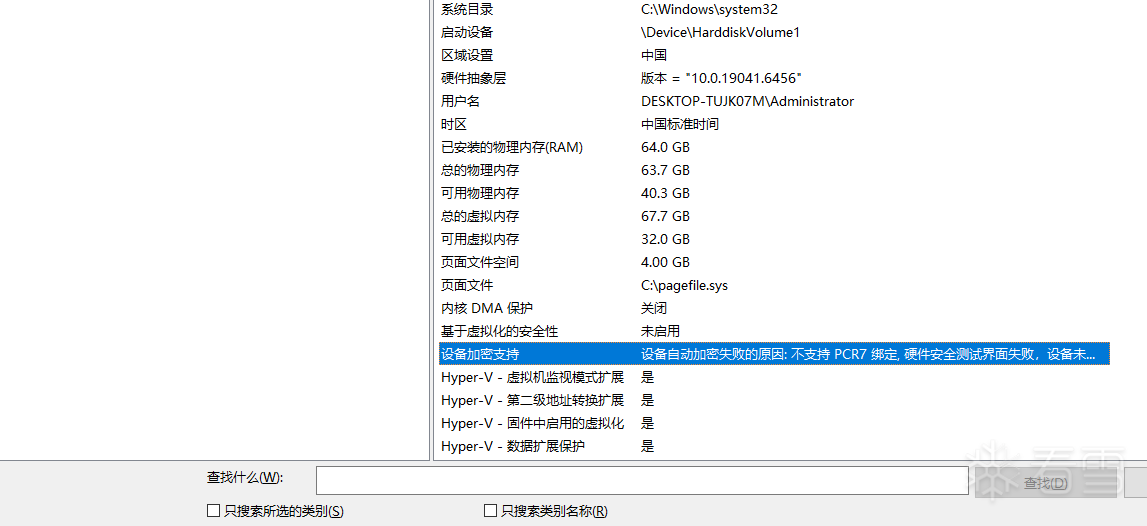
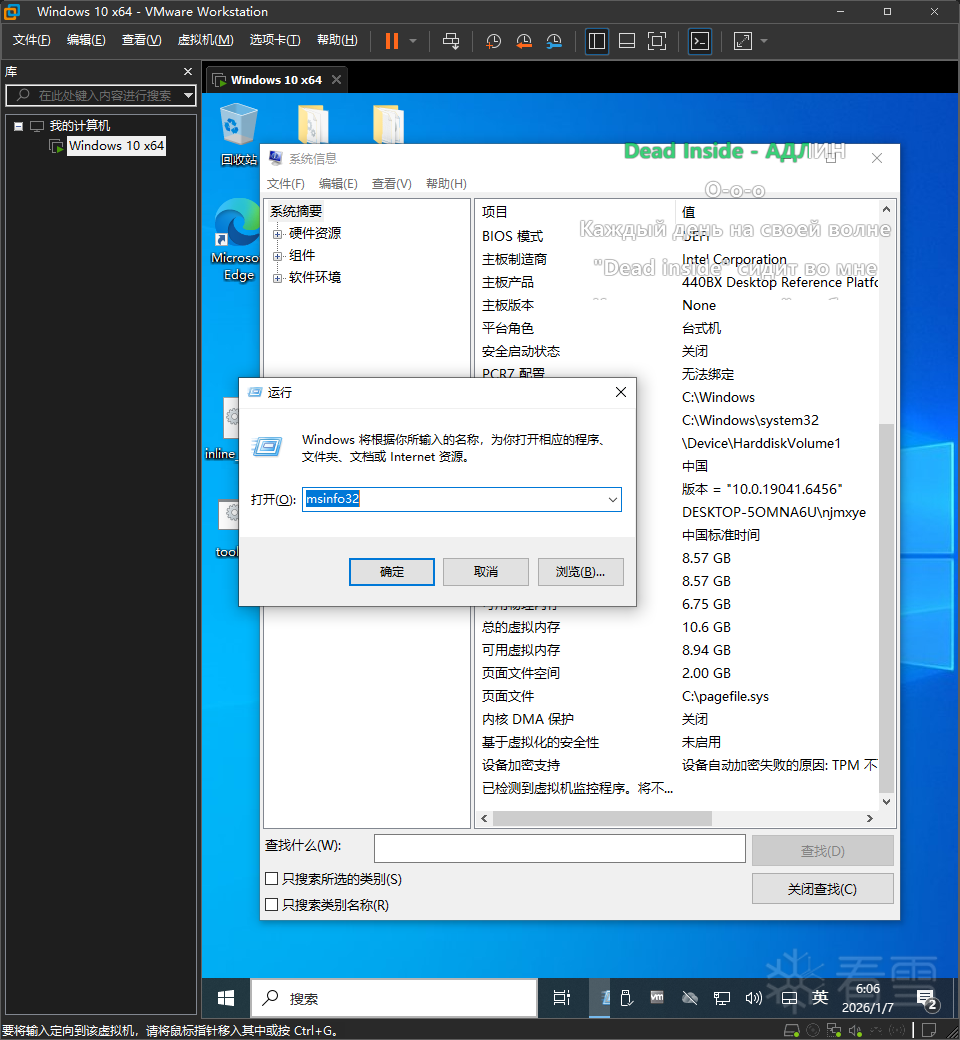
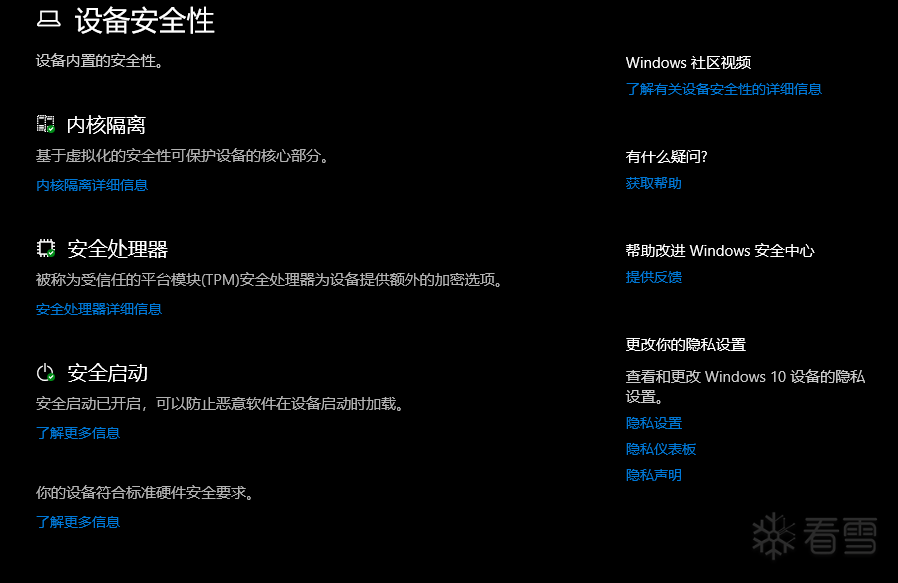
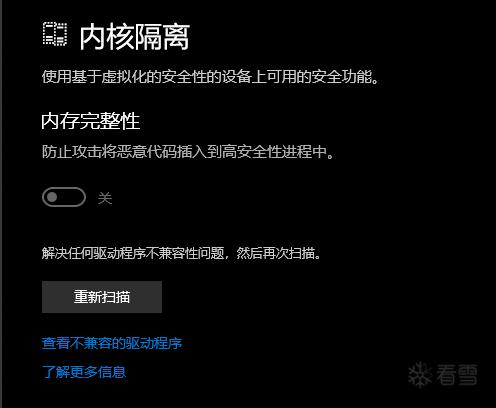
A fatal system error has occurred. 虚拟机和物理机的windows安全中心->内核隔离->内存完整性均关闭,vbs基于虚拟化的安全性处于关闭状态,windows系统功能hyperv关闭,windows虚拟机监控程序平台关闭。
物理机四个是,如图。虚拟机win+r,msinfo32显示已检测到虚拟机监控程序,将不显示Hyper-V所需的功能。
传播安全知识、拓宽行业人脉——看雪讲师团队等你加入!
上传的附件: