首页
课程
问答
CTF
社区
招聘
峰会
发现
排行榜
知识库
工具下载
看雪20年
看雪商城
证书查询
登录
注册
首页
社区
课程
招聘
发现
问答
CTF
排行榜
知识库
工具下载
峰会
看雪商城
证书查询
社区
编程技术
发新帖
0
0
Vue视差标题背景
发表于: 2025-10-22 09:32
1248
Vue视差标题背景
轩辕奇迹
2025-10-22 09:32
1248
## 一、说明 这个我是为了放在<a href="elink@d90K9s2c8@1M7s2y4Q4x3@1q4Q4x3V1k6Q4x3V1k6%4N6%4N6Q4x3X3g2T1j5h3u0&6y4$3u0D9L8$3N6Q4x3X3g2U0L8$3#2Q4x3V1k6A6L8X3c8W2P5q4)9J5k6h3S2@1L8h3H3`.">博客</a>的标题部分作为背景图,上下滚动的时候比较好看。 原理就是通过几张透明的png进行叠加,然后在上下滚动时,外层png移动的快,内层png移动得慢来实现视差效果。 * 先放一张示意图: 这里实际的距离X和Y在观察者看来是一样的,原因是距离观察者的距离Z不一样导致的。 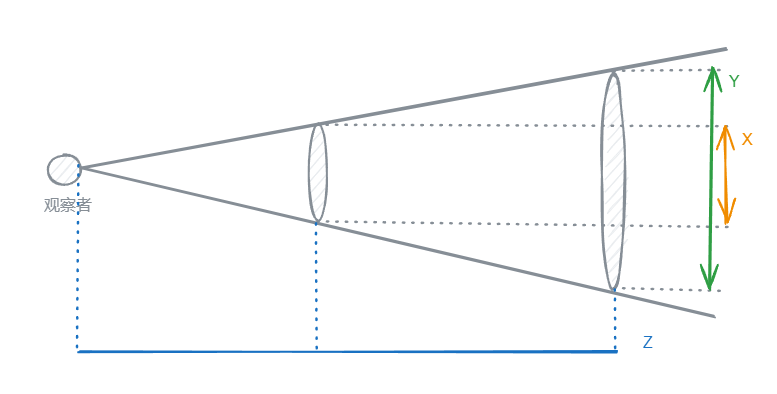 * 再放一张视差标题背景的3d示意图: 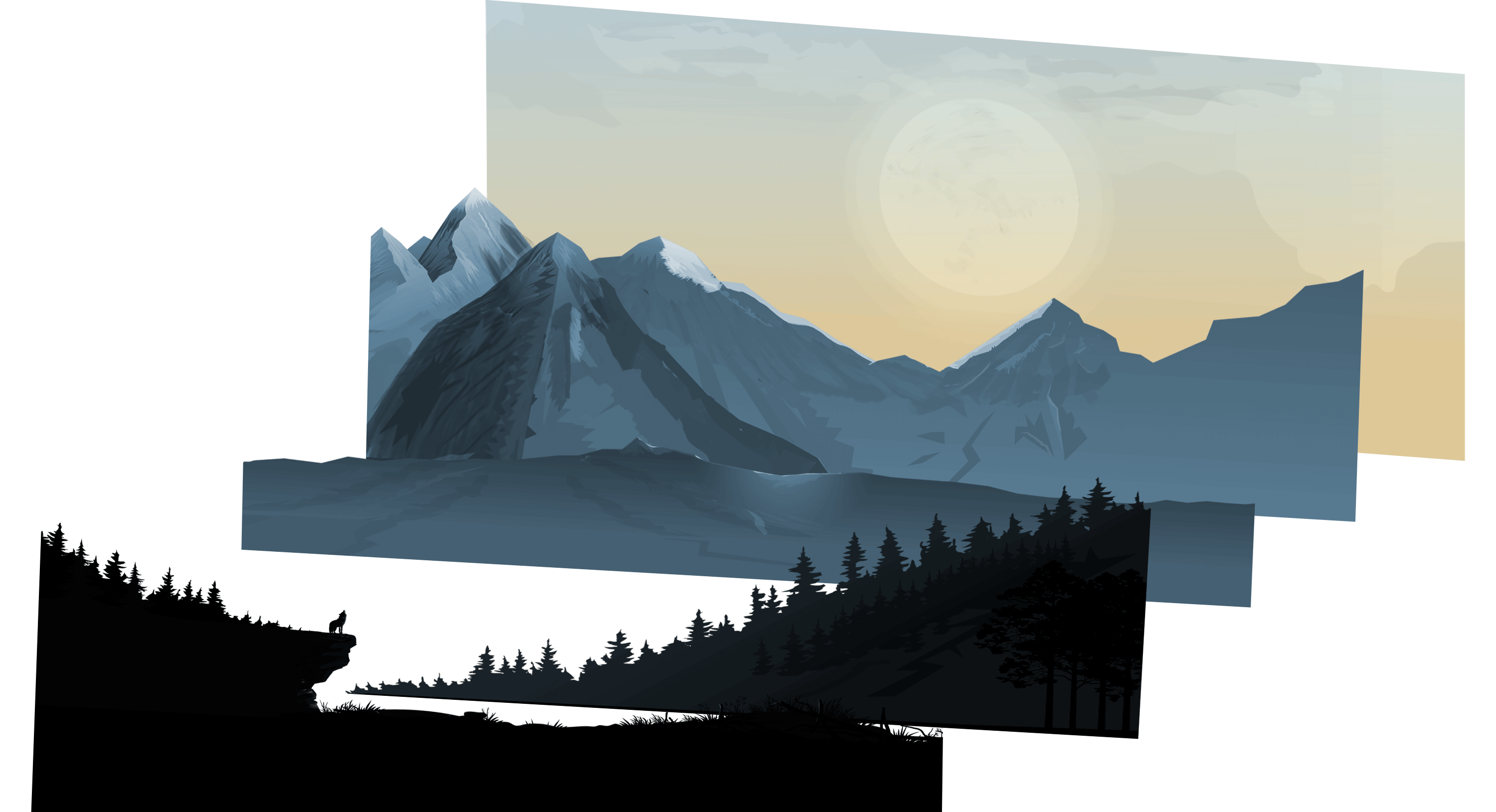 ## 二、Vue代码 这里为了代码高亮分三部分展示 html部分 ```html <template> <section> <img :src="p0Src" id="p0" :style="{ transform: `translateY(${p0Top}px)`, zIndex: `100` }" alt="p0"> <img :src="p1Src" id="p1" :style="{ transform: `translateY(${p1Top}px)`, zIndex: `200` }" alt="p1"> <img :src="p2Src" id="p2" :style="{ transform: `translateY(${p2Top}px)`, zIndex: `300` }" alt="p2"> <img :src="p3Src" id="p3" :style="{ transform: `translateY(${p3Top}px)`, zIndex: `400` }" alt="p3"> <img :src="p4Src" id="p4" :style="{ transform: `translateY(${p4Top}px)`, zIndex: `500` }" alt="p4"> <img :src="p6Src" id="p6" :style="{ transform: `translateY(${p6Top}px)`, zIndex: `600` }" alt="p6"> <div id="banner_title" class="container" :style="{ marginRight: `0px`, marginTop: `${bannerTitleMarginTop}px`, width: `75%`}"> <h1>{{blogTitle}}</h1> <p class="description">{{blogDescription}}</p> </div> </section> </template> ``` js部分 ```js <script> const imgUrl = "https://xxxxxxxxxxxx/"; export default { name: "Banner", data() { return { p0Src: imgUrl + 'banner/ppp0.png', p1Src: imgUrl + 'banner/pp1.png', p2Src: imgUrl + 'banner/pp2.png', p3Src: imgUrl + 'banner/pp3.png', p4Src: imgUrl + 'banner/pp4.png', p6Src: imgUrl + 'banner/pp6.png', p0Top: 0, p1Top: 0, p2Top: 0, p3Top: 0, p4Top: 0, p6Top: 0, bannerTitleMarginTop: -100, requestId: undefined, // 用于跟踪 requestAnimationFrame 的标识 }; }, props:{ blogTitle:{ type: String, require: true }, blogDescription:{ type: String, require: true }, }, mounted() { this.addScrollListener(); }, beforeDestroy() { this.removeScrollListener(); }, methods: { addScrollListener() { // 使用 passive 参数优化滚动性能 window.addEventListener('scroll', this.handleScroll, {passive: true}); }, removeScrollListener() { window.removeEventListener('scroll', this.handleScroll); }, handleScroll() { const value = window.scrollY; this.p0Top = value * 0.6; this.p1Top = value * 0.36; this.p2Top = value * 0.24; this.p3Top = value * 0.16; this.p4Top = value * 0.12; this.p6Top = 0; this.bannerTitleMarginTop = value * 1.1 - 100; // 使用 requestAnimationFrame 更新样式 if (this.requestId === undefined) { this.requestId = requestAnimationFrame(this.updateStyles); } }, updateStyles() { // 清除请求动画帧标识 this.requestId = undefined; } } } </script> ``` style部分 ```css <style scoped lang="scss"> section { position: relative; width: 100%; height: 100vh; padding: 0px; display: flex; justify-content: center; align-items: center; overflow: hidden; img { position: absolute; top: 0; left: 0; width: 100%; //height: 100%; object-fit: cover; pointer-events: none; will-change: transform; // 提前告知浏览器哪些属性可能会发生变化 } #p4,#p3,#p2,#p1,#p0 { width: 100%; height: 100%; } #p6 { width: 100%; height: 150%; } section::before { content: ''; position: absolute; bottom: 0; width: 100%; //height: 100px; background: linear-gradient(to top, #1c0522, transparent); //z-index: 1000; } } @-webkit-keyframes bounce { 0%,10%,25%,40%,50% { -webkit-transform: translateY(0) rotate(0deg); transform: translateY(0) rotate(0deg) } 20% { -webkit-transform: translateY(-10px) rotate(0deg); transform: translateY(-10px) rotate(0deg) } 30% { -webkit-transform: translateY(-5px) rotate(0deg); transform: translateY(-5px) rotate(0deg) } } @keyframes bounce { 0%,10%,25%,40%,50% { -webkit-transform: translateY(0) rotate(0deg); transform: translateY(0) rotate(0deg) } 20% { -webkit-transform: translateY(-10px) rotate(0deg); transform: translateY(-10px) rotate(0deg) } 30% { -webkit-transform: translateY(-5px) rotate(0deg); transform: translateY(-5px) rotate(0deg) } } </style> ``` ## 三、效果 可以点击<a href="elink@908K9s2c8@1M7s2y4Q4x3@1q4Q4x3V1k6Q4x3V1k6%4N6%4N6Q4x3X3g2T1j5h3u0&6y4$3u0D9L8$3N6Q4x3X3g2U0L8$3#2Q4x3V1k6A6L8X3c8W2P5q4)9J5k6h3S2@1L8h3H3`.">七仔的博客</a>然后上下缓慢滚动来查看效果。
冰与火的战歌:Windows内核攻防实战高级班!从零到实战,融合AI与Windows内核攻防全技术栈,打造具备自动化能力的内核开发高手。
#开发技巧
收藏
・
0
点赞
・
0
打赏
分享
分享到微信
分享到QQ
分享到微博
赞赏记录
参与人
雪币
留言
时间
查看更多
赞赏
×
1 雪花
5 雪花
10 雪花
20 雪花
50 雪花
80 雪花
100 雪花
150 雪花
200 雪花
支付方式:
微信支付
赞赏留言:
快捷留言
感谢分享~
精品文章~
原创内容~
精彩转帖~
助人为乐~
感谢分享~
最新回复
(
0
)
游客
登录
|
注册
方可回帖
回帖
表情
雪币赚取及消费
高级回复
返回
轩辕奇迹
7
发帖
9
回帖
10
RANK
关注
私信
他的文章
Vue视差标题背景
1248
[原创]博客的加载速度和大小的优化、优化再优化
1393
[原创]使用 Github Pages 和 Hexo 搭建博客
1356
给VitePress的右上角增加Github角标
1331
[原创]【开源】七仔的桌面工具 v2.6.1
1575
关于我们
联系我们
企业服务
看雪公众号
专注于PC、移动、智能设备安全研究及逆向工程的开发者社区
看原图
赞赏
×
雪币:
+
留言:
快捷留言
为你点赞!
返回
顶部







