-
-
[原创]某box App逆向分析(启动检测绕过+广告跳过)
-
发表于: 2026-4-25 17:05 2017
-


目标应用:com.secret.prettyhezi
核心目标:
1)启动检测绕过
2)广告绕过
主要方法:
jadx 静态分析
Frida Java / native hook 请求与响应明文关联分析
反编译工具: jadx IDA pro
运行时工具: Frida
具体分析流程:
1. 启动阶段安全检测绕过 用已经被root以及安装了Magisk的实验机打开APP,发现打开一直白屏,对于正常手机来说是可以直接进入APP的,现在就要怀疑是不是有一些启动检测手段 用MT打开安装包查看一下:
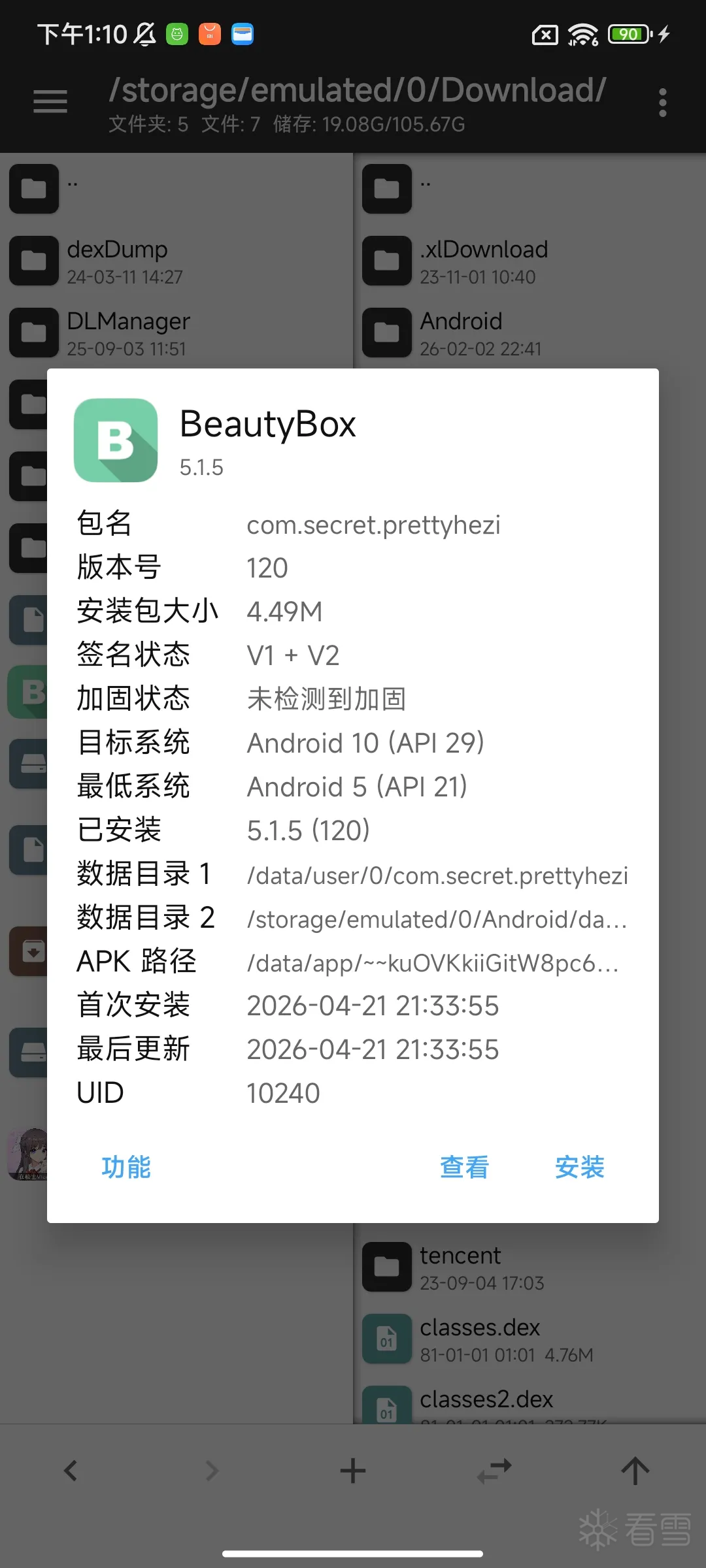
没有加壳,直接用jadx打开 第一步:手动搜索root有关代码
/system/bin/su
/system/xbin/su
/sbin/su
/vendor/bin/su
/data/adb/magisk
/data/adb/modules
/system/app/Superuser.apk

发现检测代码段,我们跟踪一下
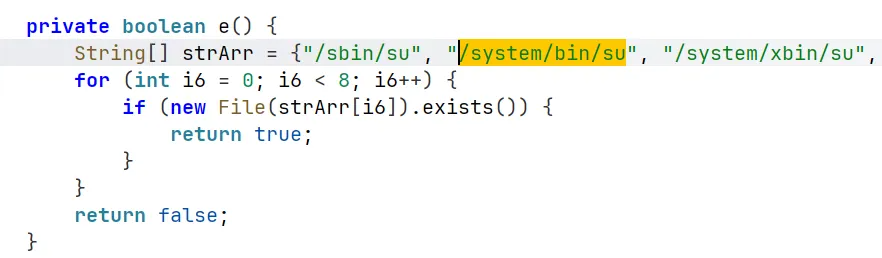
经典的root检测手段 我们看一下函数调用链
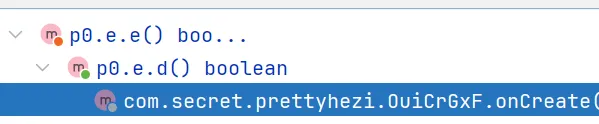
追到了一个onCreate函数
onCreate() 是 Android 里非常核心的生命周期回调方法,意思是:某个组件第一次被创建时,系统会调用它的 onCreate(),让你做初始化工作
对逆向分析来说,它是寻找启动逻辑、检测逻辑、跳转逻辑的重要位置。
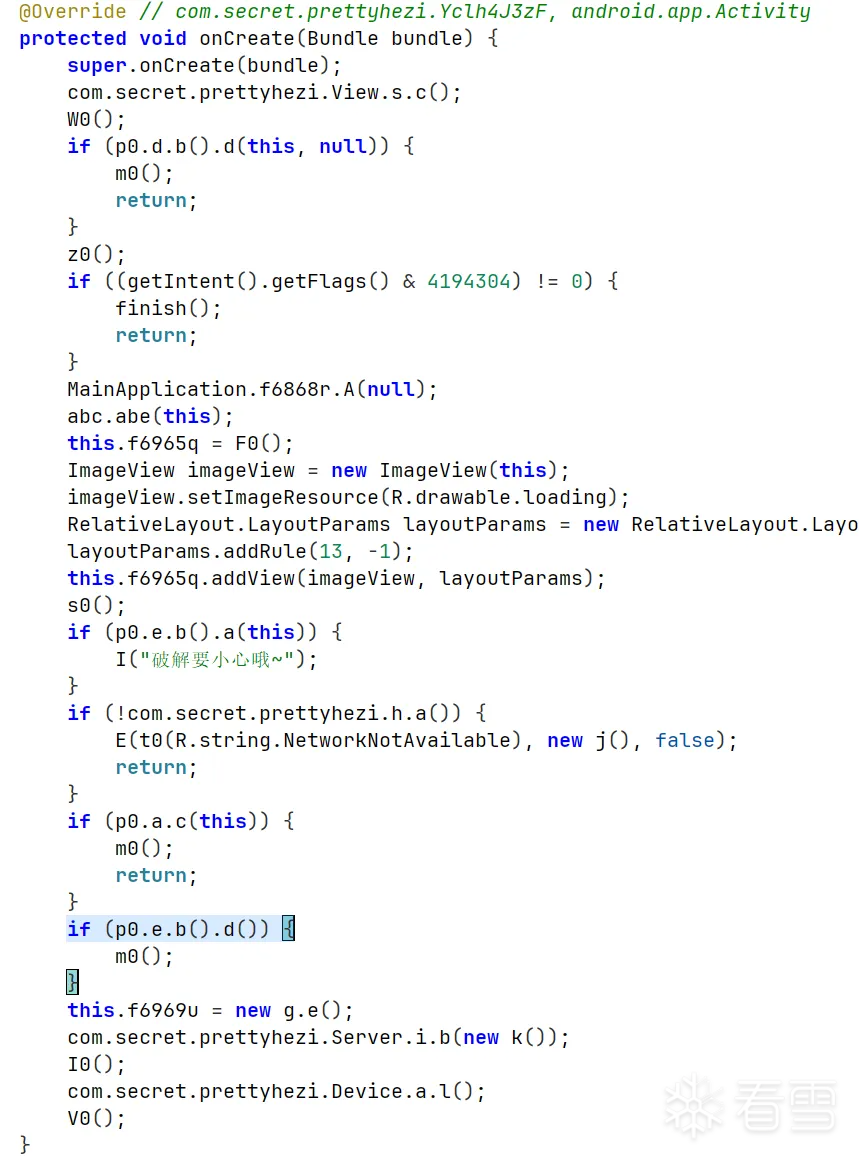
可以发现我们之前追到的root检测方法:p0.e.b().d() 整个onCreate()还有提示“破解要小心”的字符串,说明整个逻辑可能更偏向于APP的启动检测 接下来我们仔细分析一下每个调用的函数会不会是检测函数 看到很多都调用m0(),分析一下具体作用是调用system.exit()函数
 public void m0() {
        for (int size = f8217n.size() - 1; size >= 0; size--) {
            ((Yclh4J3zF) f8217n.get(size)).finish();
        }
        f8217n.clear();
        System.exit(0);
    }
追一下调用m0()的条件函数
// 模拟器 / 虚拟机环境检测
if (p0.d.b().d(this, null)) {
            m0();
            return;
}

// p0.d.b().d() 代码
//这段代码是一个模拟器 / 虚拟机环境检测函数
//1. 基带版本是否异常
//2. build flavor 是否包含 vbox / sdk_gphone
//3. product board 是否包含 android / goldfish
//4. board platform 是否异常
//5. hardware 是否包含 ttvm / nox
//6. 是否支持闪光灯
//7. 传感器数量是否太少
//8. 用户安装 App 数量是否太少
//9. /proc/self/cgroup 是否可读取
//10. 把检测信息通过 cVar 回调输出
//通过多个设备特征打分,i6 分数大于 3,就认为当前运行环境像模拟器。
public boolean d(Context context, c cVar) {
        if (context == null) {
            throw new IllegalArgumentException("context must not be null");
        }
        String strA = a("gsm.version.baseband");
        int i6 = (strA == null || strA.contains("1.0.0.0")) ? 1 : 0;
        String strA2 = a("ro.build.flavor");
        if (strA2 != null && (strA2.contains("vbox") || strA2.contains("sdk_gphone"))) {
            i6++;
        }
        String strA3 = a("ro.product.board");
        if (strA3 != null && (strA3.contains("android") | strA3.contains("goldfish"))) {
            i6++;
        }
        String strA4 = a("ro.board.platform");
        if (strA4 == null || strA4.contains("android")) {
            i6++;
        }
        String strA5 = a("ro.hardware");
        if (strA5 == null) {
            i6++;
        } else if (strA5.toLowerCase().contains("ttvm") || strA5.toLowerCase().contains("nox")) {
            i6 += 10;
        }
        boolean zHasSystemFeature = context.getPackageManager().hasSystemFeature("android.hardware.camera.flash");
        if (!zHasSystemFeature) {
            i6++;
        }
        String str = zHasSystemFeature ? "support CameraFlash" : "unsupport CameraFlash";
        int size = ((SensorManager) context.getSystemService("sensor")).getSensorList(-1).size();
        if (size < 7) {
            i6++;
        }
        String str2 = "sensorNum" + size;
        int iC = c(p0.b.c().a("pm list package -3"));
        if (iC < 5) {
            i6++;
        }
        String str3 = "userAppNum" + iC;
        String strA6 = p0.b.c().a("cat /proc/self/cgroup");
        if (strA6 == null) {
            i6++;
        }
        if (cVar != null) {
            StringBuffer stringBuffer = new StringBuffer("ceshi start|");
            stringBuffer.append(strA);
            stringBuffer.append("|");
            stringBuffer.append(strA2);
            stringBuffer.append("|");
            stringBuffer.append(strA3);
            stringBuffer.append("|");
            stringBuffer.append(strA4);
            stringBuffer.append("|");
            stringBuffer.append(strA5);
            stringBuffer.append("|");
            stringBuffer.append(str);
            stringBuffer.append("|");
            stringBuffer.append(str2);
            stringBuffer.append("|");
            stringBuffer.append(str3);
            stringBuffer.append("|");
            stringBuffer.append(strA6);
            stringBuffer.append("|end");
            cVar.a(stringBuffer.toString());
        }
        return i6 > 3;
    }
//debuggable 状态检测
if (p0.e.b().a(this)) {
I("破解要小心哦~");
}
//判断当前 App 是否处于 debug/debuggable 状态
public boolean a(Context context) {
return (context.getApplicationInfo().flags & 2) != 0;
}// 模拟器检测
if (p0.a.c(this)) {
m0();
return;
}
// 通过两种方式检测某类目标特征是否存在。
// 第一种方式是 b(a(context)),如果结果为空,则使用 d(context) 作为备用检测。
// 只要任意方式检测到结果,就返回 true,否则返回 false
public static boolean c(Context context) {
ArrayList arrayList = new ArrayList();
try {
String strB = b(a(context));
if (TextUtils.isEmpty(strB)) {
List listD = d(context);
if (listD.size() > 0) {
arrayList.add(listD.get(0));
}
} else {
arrayList.add(strB);
}
} catch (Exception e6) {
e6.printStackTrace();
}
return !arrayList.isEmpty();
}
// 判断当前 App 是否运行在模拟器环境中。
// 只要识别到 MuMu、蓝叠、夜神、逍遥、雷电、Genymotion 等模拟器特征,就返回 true。
private static String b(List list) {
if (list.size() == 0) {
return HttpUrl.FRAGMENT_ENCODE_SET;
}
String str = (String) list.get(0);
if (str.contains("mumu")) {
return "mumu";
}
if (str.contains("ami")) {
return "AMIDuOS";
}
if (str.contains("bluestacks")) {
return "蓝叠";
}
if (str.contains("kaopu001") || str.contains("tiantian")) {
return "天天";
}
if (str.contains("kpzs")) {
return "靠谱助手";
}
if (!str.contains("genymotion")) {
return str.contains("uc") ? "uc" : str.contains("blue") ? "blue" : str.contains("microvirt") ? "逍遥" : str.contains("itools") ? "itools" : str.contains("syd") ? "手游岛" : str.contains("bignox") ? "夜神" : str.contains("haimawan") ? "海马玩" : str.contains("windroy") ? "windroy" : str.contains("flysilkworm") ? "雷电" : str.contains("emu") ? "emu" : str.contains("le8") ? "le8" : str.contains("vphone") ? "vphone" : str.contains("duoyi") ? "多益" : HttpUrl.FRAGMENT_ENCODE_SET;
}
String str2 = Build.MODEL;
return str2.contains("iTools") ? "iTools" : str2.contains("ChangWan") ? "畅玩" : "genymotion";
}
public static boolean c(Context context) {
ArrayList arrayList = new ArrayList();
try {
String strB = b(a(context));
if (TextUtils.isEmpty(strB)) {
List listD = d(context);
if (listD.size() > 0) {
arrayList.add(listD.get(0));
}
} else {
arrayList.add(strB);
}
} catch (Exception e6) {
e6.printStackTrace();
}
return !arrayList.isEmpty();
}
//d(Context context) 可以确定是一个备用模拟器检测函数,专门检测 BlueStacks 蓝叠模拟器
public static List d(Context context) {
Intent intent = new Intent("android.intent.action.MAIN", (Uri) null);
intent.addCategory("android.intent.category.LAUNCHER");
ArrayList arrayList = new ArrayList();
List<ResolveInfo> listQueryIntentActivities = context.getPackageManager().queryIntentActivities(intent, 0);
for (int i6 = 0; i6 < listQueryIntentActivities.size(); i6++) {
ActivityInfo activityInfo = listQueryIntentActivities.get(i6).activityInfo;
String str = activityInfo.packageName;
String str2 = activityInfo.name;
activityInfo.loadLabel(context.getPackageManager());
if (!TextUtils.isEmpty(str) && str.contains("bluestacks")) {
arrayList.add("蓝叠");
return arrayList;
}
}
return arrayList;
}// root检测
// 比较基础的 root 检测逻辑。整体判断方式有两个:
// 1.检查系统属性 ro.secure 是否为 0;
// 2.检查常见路径下是否存在 su 文件。
// 只要任意一个条件命中,就认为设备已经 root,然后执行 m0()。
if (p0.e.b().d()) {
m0();
}
public boolean d() {
if (c() == 0) {
return true;
}
return e();
}
private int c() {
String strB = p0.b.c().b("ro.secure");
return (strB != null && "0".equals(strB)) ? 0 : 1;
}
private boolean e() {
String[] strArr = {"/sbin/su", "/system/bin/su", "/system/xbin/su", "/data/local/xbin/su", "/data/local/bin/su", "/system/sd/xbin/su", "/system/bin/failsafe/su", "/data/local/su"};
for (int i6 = 0; i6 < 8; i6++) {
if (new File(strArr[i6]).exists()) {
return true;
}
}
return false;
}hook点以及差不多找到了 直接frida hook一下,想永久化的可以用Xposed
// 虚拟机检测方法,返回 false 绕过检测
var p0_d = Java.use("p0.d");
var xuniqi_hook = p0_d.d.overload("android.content.Context", "p0.c");
xuniqi_hook.implementation = function(context, p0_c_instance) {
  //var ret = xuniqi_hook.call(this, context, p0_c_instance );
  console.log("虚拟机检测被调用, 返回值: false" );
  return false;
};

// debug 调试检测方法,返回 false 绕过检测
var debug_hook = p0_e.a.overload("android.content.Context");
debug_hook.implementation = function(context) {
  //var ret = debug_hook.call(this, context);
  console.log("debug调试检测被调用, 返回值: false");
  return false;
};

// 模拟器检测方法,返回 false 绕过检测
var p0_a = Java.use("p0.a");
var moniqi_hook = p0_a.c.overload("android.content.Context");
moniqi_hook.implementation = function(context) {
  //var ret = moniqi_hook.call(this, context);
  console.log("模拟器检测被调用, 返回值: false");
  return false;
};

// root 检测方法,返回 false 绕过检测
var root_hook = p0_e.d.overload();
root_hook.implementation = function() {
  //var ret = root_hook.call(this);
  console.log("root 检测被调用, 返回值: false");
  return false;
};
运行发现还是白屏,切终端没有任何提示 这种情况大概率是检测没有找全,再次尝试找一下 结果发现一开始的代码 super.onCreate(bundle); 调用父类的 `onCreate()` 方法
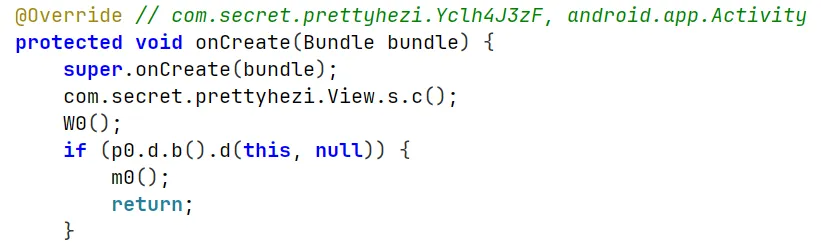
追踪一下
protected void onCreate(Bundle bundle) {
    super.onCreate(bundle);
    g4.h.n(this);
    R0(i());
    f8217n.add(this);
    if (p0.e.b().f()) {
        m0();
    }
    StrictMode.setThreadPolicy(new StrictMode.ThreadPolicy.Builder().detectNetwork().build());
    Z();
}
其中有一段条件下调用m0() 发现是Xposed模块检测
if (p0.e.b().f()) {
            m0();
        }
// Xposed模块检测
public boolean f() {
        try {
            throw new Exception("gg");
        } catch (Exception e6) {
            for (StackTraceElement stackTraceElement : e6.getStackTrace()) {
                if (stackTraceElement.getClassName().contains("de.robv.android.xposed.XposedBridge")) {
                    return true;
                }
            }
            return false;
        }
    }
补上完整的hook代码即可
Java.perform(function() {
    // =========================
    // Java 层环境检测绕过
    // =========================

    // xposed 检测方法,返回 false 绕过检测
    var xposed_hook = p0_e.f.overload();
    xposed_hook.implementation = function() {
        //var ret = xposed_hook.call(this);
        console.log("Xposed 检测被调用, 返回值: false" );
        return false;
    };

    // 虚拟机检测方法,返回 false 绕过检测
    var p0_d = Java.use("p0.d");
    var xuniqi_hook = p0_d.d.overload("android.content.Context", "p0.c");
    xuniqi_hook.implementation = function(context, p0_c_instance) {
        //var ret = xuniqi_hook.call(this, context, p0_c_instance );
        console.log("虚拟机检测被调用, 返回值: false" );
        return false;
    };

    // debug 调试检测方法,返回 false 绕过检测
    var debug_hook = p0_e.a.overload("android.content.Context");
    debug_hook.implementation = function(context) {
        //var ret = debug_hook.call(this, context);
        console.log("debug调试检测被调用, 返回值: false");
        return false;
    };

    // 模拟器检测方法,返回 false 绕过检测
    var p0_a = Java.use("p0.a");
    var moniqi_hook = p0_a.c.overload("android.content.Context");
    moniqi_hook.implementation = function(context) {
        //var ret = moniqi_hook.call(this, context);
        console.log("模拟器检测被调用, 返回值: false");
        return false;
    };

    // root 检测方法,返回 false 绕过检测
    var root_hook = p0_e.d.overload();
    root_hook.implementation = function() {
        //var ret = root_hook.call(this);
        console.log("root 检测被调用, 返回值: false");
        return false;
    };
});
再次启动APP,发现APP正常启动,终端也显示正常
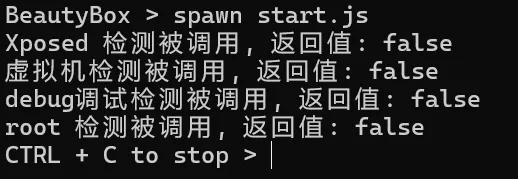
此APP的启动阶段检测已经绕过 ## 广告绕过 打开APP可以发现会调用广告,强制占用5秒

尝试去绕过广告 我们搜索一下“跳过”

我们依次查看
// 看起来是一个开屏广告 View / 启动页广告组件的构造函数
// 传入一个 (5 跳过)的参数,刚好和广告时间一样
public h(Yclh4J3zF yclh4J3zF, Runnable runnable) {
        super(yclh4J3zF);
        this.f6047g = 6;
        f6045i = true;
        this.f6048h = runnable;
        ArrayList arrayListA = c.a(1);
        if (arrayListA.size() == 0) {
            setVisibility(8);
            return;
        }
        int iD = g4.f.a().d("splashADIndex", 0);
        c((g.a) arrayListA.get(iD % arrayListA.size()));
        int i6 = iD + 1;
        g4.f.a().o("splashADIndex", i6 < arrayListA.size() * 10 ? i6 : 0);
        TextView textViewC = g4.d.c(yclh4J3zF, 14, -1, "5 跳过", 17);
        this.f6046f = textViewC;
        textViewC.setBackground(g4.h.d(g4.h.b(Color.parseColor("#3f000000"), 20.0f), g4.h.b(Color.parseColor("#6f000000"), 20.0f)));
        RelativeLayout.LayoutParams layoutParams = new RelativeLayout.LayoutParams(g4.h.r(60.0f), g4.h.r(40.0f));
        layoutParams.topMargin = g4.h.r(20.0f);
        layoutParams.rightMargin = g4.h.r(20.0f);
        layoutParams.addRule(11, -1);
        addView(this.f6046f, layoutParams);
        f();
        this.f6046f.setOnClickListener(new a());
    }

// g4.d.c(yclh4J3zF, 14, -1, "5 跳过", 17);
public static TextView c(Context context, int i6, int i7, String str, int i8) {
        TextView textView = new TextView(context);
        textView.setTextSize(i6);
        textView.setTextColor(i7);
        textView.setText(str);
        textView.setGravity(i8);
        textView.setPadding(0, 0, 0, 0);
        return textView;
    }
// 广告的倒计时控制函数
// 控制开屏广告的 5 秒倒计时。
// 倒计时从 5 开始,前 2 秒隐藏“跳过”按钮,剩余 3 秒显示“跳过”按钮;
// 每秒更新一次文本;倒计时到 0 时调用 h() 结束广告。
// this.f6046f.setVisibility(i6 >= 4 ? 8 : 0);用来控制跳过时机
// View.GONE = 8(不可见,并且不占布局空间) ; View.VISIBLE = 0(可见)
public void f() {
if (!((OuiCrGxF) this.f6020b).f6966r) {
this.f6047g--;
}
int i6 = this.f6047g;
if (i6 <= 0) {
if (i6 == 0) {
h();
return;
}
return;
}
this.f6046f.setVisibility(i6 >= 4 ? 8 : 0);
this.f6046f.setText(this.f6047g + " 跳过");
postDelayed(new b(), 1000L);
}这么来看广告的时间核心代码出现了,为了以防万一看一下函数调用链
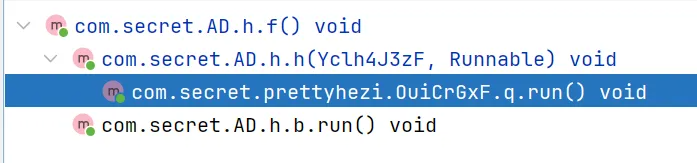
被第一个分析的广告组件的构造函数调用了,再上一层就是具体的run
public void run() {
            OuiCrGxF ouiCrGxF;
            String strC1;
            OuiCrGxF ouiCrGxF2;
            String strT0;
            Yclh4J3zF.s bVar;
            s sVar = (s) com.secret.prettyhezi.f.d(this.f7005a, s.class);
            if (sVar.code != 200) {
                OuiCrGxF.this.z(sVar.err);
                OuiCrGxF.this.X0();
                return;
            }
            MainApplication.f6868r.w(sVar.data);
            String strC = g4.a.c();
            long jCurrentTimeMillis = System.currentTimeMillis() / 1000;
            long j6 = sVar.data.sys.systime;
            int i6 = (int) (jCurrentTimeMillis - j6);
            g4.f.a().o("keySysDiffTime", i6);
            g4.h.f10718b = i6;
            if (MainApplication.f6868r.y().compareTo(strC) > 0) {
                MainApplication.f6868r.n(6).d();
                ouiCrGxF2 = OuiCrGxF.this;
                strT0 = ouiCrGxF2.t0(R.string.UpdateHint);
                bVar = new a();
            } else {
                if (MainApplication.f6868r.y().compareTo(strC) >= 0) {
                    if (jCurrentTimeMillis > j6 + 90000 || jCurrentTimeMillis < j6 - 90000) {
                        OuiCrGxF.this.E("你的手机时间不正确,请修正后启动", new c(), false);
                        return;
                    }
                    g4.f.a().r();
                    // 广告绕过核心代码
                    // 广告做个判断,然后调用com.secret.AD.h进行初始化
                    if (com.secret.AD.h.i()) {
                        OuiCrGxF.this.f6971w = new com.secret.AD.h(OuiCrGxF.this, new d());
                        OuiCrGxF ouiCrGxF3 = OuiCrGxF.this;
                        ouiCrGxF3.f6965q.addView(ouiCrGxF3.f6971w, new RelativeLayout.LayoutParams(-1, -1));
                    }
                    if (MainApplication.f6868r.t() > com.secret.prettyhezi.Server.r.savedNoticeVersion) {
                        OuiCrGxF.this.p1();
                    } else {
                        com.secret.prettyhezi.Server.r.LoadPrevious();
                    }
                    if (MainApplication.f6868r.k().sys.page > com.secret.prettyhezi.Server.s.savedPageVersion) {
                        OuiCrGxF.this.q1();
                    } else {
                        com.secret.prettyhezi.Server.s.LoadPrevious();
                    }
                    MainApplication.f6868r.g(true);
                    OuiCrGxF.this.f6967s.clear();
                    if (OuiCrGxF.this.g1(1, com.secret.prettyhezi.Server.v.f7323a)) {
                        ouiCrGxF = OuiCrGxF.this;
                        strC1 = com.secret.prettyhezi.Server.v.f7323a;
                    } else {
                        ouiCrGxF = OuiCrGxF.this;
                        strC1 = ouiCrGxF.c1(1);
                    }
                    ouiCrGxF.U0(strC1);
                    return;
                }
                ouiCrGxF2 = OuiCrGxF.this;
                strT0 = "你所用的版本不是官方版本,请到官网下载并先卸载后安装 \n" + com.secret.prettyhezi.Server.g.latestApk();
                bVar = new b();
            }
            ouiCrGxF2.E(strT0, bVar, false);
        }


// 广告判断函数
// 当开屏广告组件被创建时,它会把 f6045i 设置为 true
// 所以 f6045i 很可能表示:当前开屏广告是否正在显示;当前是否已经进入广告流程;是否禁止重复创建广告
public static boolean i() {
        return (f6045i || g4.f.a().f().isEmpty()) ? false : true;
    }

// g4.f.a().f()
// 读取某个本地配置字符串
// 优先读取 f10710e 对应的配置;
// 如果为空,再读取 f10712g 对应的备用配置
public String f() {
        String strI = i(f10710e, HttpUrl.FRAGMENT_ENCODE_SET);
        return strI.isEmpty() ? i(f10712g, HttpUrl.FRAGMENT_ENCODE_SET) : strI;
    }
public String i(String str, String str2) {
        return this.f10716b.getString(str, str2);
    }

/*
调用 i()
 ↓
判断 f6045i 是否为 true
 ├─ 是:说明广告正在显示,返回 false
 └─ 否:继续判断

读取 g4.f.a().f()
 ↓
优先读取 f10710e 配置
 ↓
如果 f10710e 为空,再读取 f10712g 配置
 ↓
如果最终还是为空,说明没有广告配置,返回 false
 ↓
如果不为空,说明有广告配置,返回 true
*/

// 总结:
// com.secret.AD.h.i()判断当前是否可以显示广告。
// 只有在“广告没有正在显示”并且“本地存在广告配置字符串”的情况下,才返回 true
结果已经很明显了,接下来有两种方法可以绕过广告 1. 去hook广告的time,修改时间=0来绕过 2. hook com.secret.AD.h.i()来直接跳过广告
// =========================
    // 广告相关绕过
    // =========================

    // 跳过广告
    var AD_h = Java.use("com.secret.AD.h");
    var ad_hook = AD_h.i.overload();
    ad_hook.implementation = function() {
        //var ret = ad_hook.call(this);
        console.log("广告被调用, 返回值: false");
        return false;
    };

    // 广告是否被初始化以及获取广告剩余时间,返回 true 绕过检测
    var AD_h = Java.use("com.secret.AD.h");
    var init = AD_h.$init.overload("com.secret.prettyhezi.Yclh4J3zF", "java.lang.Runnable");
    init.implementation = function (ctx, r) {
        console.log("广告被初始化");
        var ret = init.call(this, ctx, r);
        try {
            var fields = AD_h.class.getDeclaredFields();
            /*
            for (var i =0; i < fields.length; i++) {
                // 获取真实fields
                console.log("field name: " + fields[i].getName() + " value: " + fields[i].get(this) + " type: " + fields[i].getType());
            }
            */
            // 得到真实fields后发现g字段是广告剩余时间,直接修改为0绕过广告
            this.g.value = 0;
            console.log("广告剩余时间:" + this.g.value);
        } catch (e) {
            console.log("dump fields failed:  " + e);
        }
        return ret;
    };
但是运行代码事与愿违
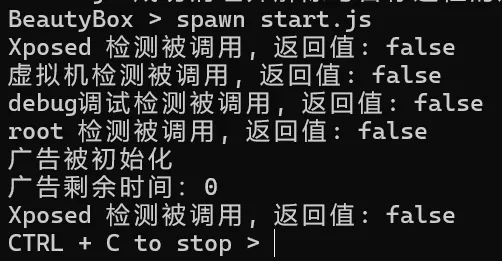
hook com.secret.AD.h.i()来直接跳过广告,没能hook到,应该是没走这条路 原本以为都结束了,结果这么看来还有不少路要走 我们返回广告类com.secret.AD认真分析一下广告的函数逻辑
/*
OuiCrGxF 启动逻辑
    ↓
com.secret.AD.h.i() 判断是否可以显示广告
    ↓
new com.secret.AD.h(OuiCrGxF.this, new d())
    ↓
h 构造函数初始化广告组件
    ↓
f() 启动倒计时
    ↓
倒计时归零后调用 h()
    ↓
h() 执行 this.f6048h.run()
    ↓
f6048h 实际上是 new d()
    ↓
d.run()
    ↓
OuiCrGxF.this.e1()
    ↓
e1() 判断广告是否结束 + 用户状态
    ↓
N0(cls) 跳转目标页面
    ↓
finish() 关闭启动页
*/

// 广告组件初始化函数
public h(Yclh4J3zF yclh4J3zF, Runnable runnable) {
        super(yclh4J3zF);
        this.f6047g = 6;
        f6045i = true;
        // 这里给f6048h = runnable参数
        // f6048h也被当前类中的h()调用,具体去查看一下h()
        this.f6048h = runnable;
        ArrayList arrayListA = c.a(1);
        if (arrayListA.size() == 0) {
            setVisibility(8);
            return;
        }
        int iD = g4.f.a().d("splashADIndex", 0);
        c((g.a) arrayListA.get(iD % arrayListA.size()));
        int i6 = iD + 1;
        g4.f.a().o("splashADIndex", i6 < arrayListA.size() * 10 ? i6 : 0);
        TextView textViewC = g4.d.c(yclh4J3zF, 14, -1, "5 跳过", 17);
        this.f6046f = textViewC;
        textViewC.setBackground(g4.h.d(g4.h.b(Color.parseColor("#3f000000"), 20.0f), g4.h.b(Color.parseColor("#6f000000"), 20.0f)));
        RelativeLayout.LayoutParams layoutParams = new RelativeLayout.LayoutParams(g4.h.r(60.0f), g4.h.r(40.0f));
        layoutParams.topMargin = g4.h.r(20.0f);
        layoutParams.rightMargin = g4.h.r(20.0f);
        layoutParams.addRule(11, -1);
        addView(this.f6046f, layoutParams);
        f();
        this.f6046f.setOnClickListener(new a());
    }
    // 被e1()调用
    public boolean g() {
        return this.f6021c == null || this.f6047g <= 0;
    }

    // 直接run
    // 执行函数,执行的f6048h在h()中被赋值runnable参数
    void h() {
        this.f6048h.run();
    }

// 调用h(Yclh4J3zF yclh4J3zF, Runnable runnable)的调用链
// 这里可以看到runnable参数=new d()
 if (com.secret.AD.h.i()) {
          OuiCrGxF.this.f6971w = new com.secret.AD.h(OuiCrGxF.this, new d());
          OuiCrGxF ouiCrGxF3 = OuiCrGxF.this;
          ouiCrGxF3.f6965q.addView(ouiCrGxF3.f6971w, new RelativeLayout.LayoutParams(-1, -1));
                    }
// 接着追踪d()
// 调用e1()
class d implements Runnable {
            d() {
            }

            @Override // java.lang.Runnable
            public void run() {
                OuiCrGxF.this.e1();
            }
        }
// 追踪e1()
// if (hVar == null || hVar.g())调用com.secret.AD.g()
public void e1() {
        Class cls;
        if (this.f6966r || !this.f6972x) {
            return;
        }
        com.secret.AD.h hVar = this.f6971w;
        if (hVar == null || hVar.g()) {
            a0 a0VarR = MainApplication.f6868r.r();
            if (a0VarR == null) {
                cls = CfTs9fWO.class;
            } else {
                if (!a0VarR.payment_password && a0VarR.grade != 0) {
                    BrmpD.T0(this);
                    return;
                }
                cls = ZIgnJ.class;
            }
            N0(cls);
            finish();
        }
    }
分析到这里,可以知道判断广告核心函数是com.secret.AD.h.g() + f() - 倒计时主循环 - 每秒 g-- - 更新“X 跳过”文本 - 到 0 时调用 h() + h() - 真正执行跳过回调 + g() - 返回“广告是否已经结束 / 是否可以跳过”的布尔状态 - 条件是: * 广告对象为空 * 或 倒计时 <= 0 hook com.secret.AD.h.g()即可跳过广告
// =========================
    // 广告相关绕过
    // =========================

    // 跳过广告
    // 检测广告是否已经播放完,返回 true 绕过检测
    var ad_stop_time_hook =  AD_h.g.overload();
    ad_stop_time_hook.implementation = function() {
        //var ret = ad_stop_time_hook.call(this);
        console.log("检测广告是否已经播放完, 返回值: true");
        return true;
    };

    /*
    // 广告是否被初始化以及获取广告剩余时间,返回 true 绕过检测
    var AD_h = Java.use("com.secret.AD.h");
    var init = AD_h.$init.overload("com.secret.prettyhezi.Yclh4J3zF", "java.lang.Runnable");
    init.implementation = function (ctx, r) {
        console.log("广告被初始化");
        var ret = init.call(this, ctx, r);
        try {
            var fields = AD_h.class.getDeclaredFields();

            //for (var i =0; i < fields.length; i++) {
                // 获取真实fields
                //console.log("field name: " + fields[i].getName() + " value: " + fields[i].get(this) + " type: " + fields[i].getType());
            //}
            // 得到真实fields后发现g字段是广告剩余时间,直接修改为0绕过广告
            this.g.value = 0;
            console.log("广告剩余时间:" + this.g.value);
        } catch (e) {
            console.log("dump fields failed:  " + e);
        }
        return ret;
    };
    */
到这里广告已经绕过
原帖:17cK9s2c8@1M7s2y4Q4x3@1q4Q4x3V1k6Q4x3V1k6%4N6%4N6Q4x3X3g2&6N6i4q4#2k6g2)9J5k6h3y4G2L8g2)9J5c8X3#2W2L8X3N6*7k6g2)9J5k6s2g2Y4K9K6u0C8i4K6u0r3N6s2u0*7k6e0k6E0i4K6u0r3P5Y4N6U0k6K6V1I4y4$3y4&6k6$3S2U0L8o6y4X3M7#2)9K6c8Y4y4A6L8X3N6D9k6f1c8G2j5#2)9J5x3H3`.`. 《BeautyBox 逆向分析》
赞赏
|
|
|---|---|

|
|




