-
-
[原创]智能填充隐藏功能——自动补全地址表单所在地区
-
发表于: 2025-12-23 17:39 4414
-


在应用程序使用过程中,用户经常需要填写各种表单,例如在寄送包裹时填写收货人信息、购买票务时填写购票人信息、参与调查时填写参与者信息等。这些重复且繁琐的信息填写过程,会直接影响用户的使用体验。为解决这一问题,HarmonyOS SDK融合场景服务(Scenario Fusion Kit)提供了智能填充功能,该功能可根据页面输入框类型、用户已输入内容,为用户提供输入建议,实现复杂表单一键填充。
然而,在填写表单时可能会遇到一个特殊的挑战:当表单中包含所在地区地址选择器时,智能填充不支持对地址选择器进行填充,为了实现地址信息的自动补全,开发者需要对表单中的地址字段进行开发。开发完成后,即使数据源中的"地址所在地区"信息不完整,智能填充服务也能够根据数据源中的详细地址内容,自动推断并补全地址选择器中的所在地区信息。
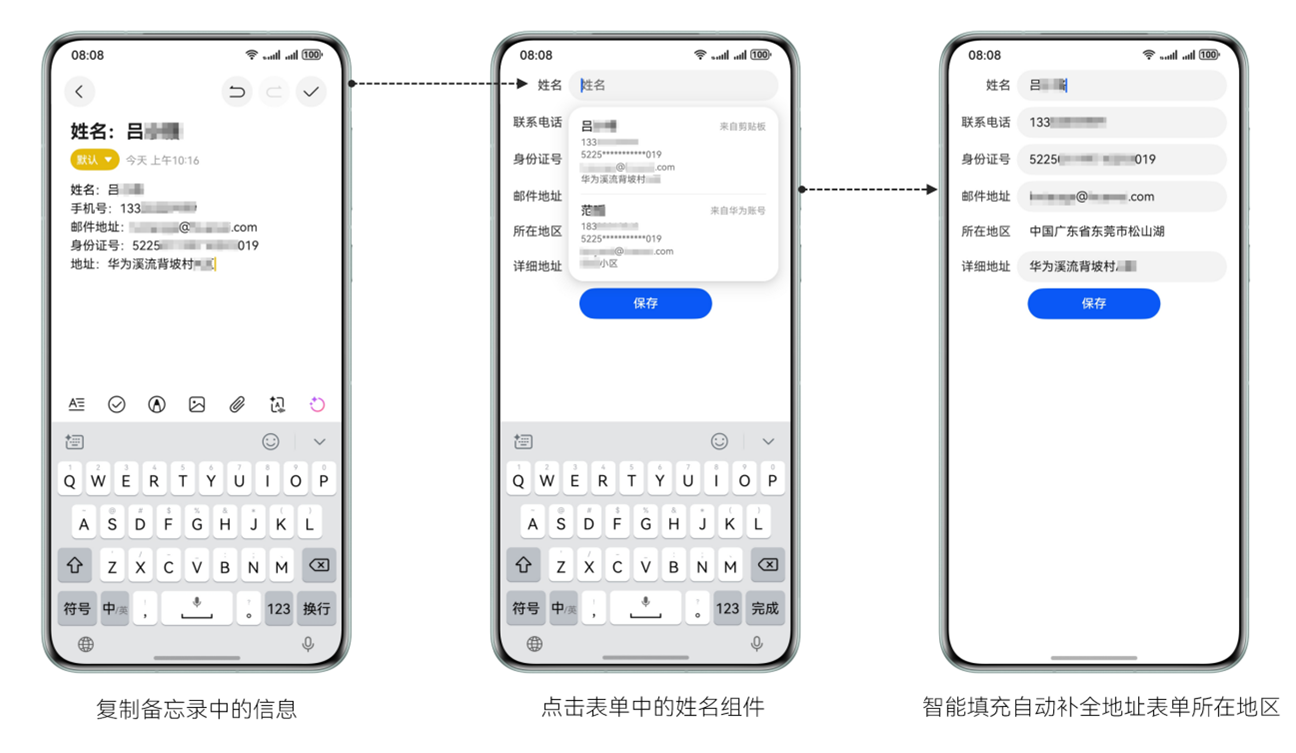
当"所在地区信息"自动补全后,如果补全内容不符合预期,用户也可以通过点击"地址选择器"重新选择修改。
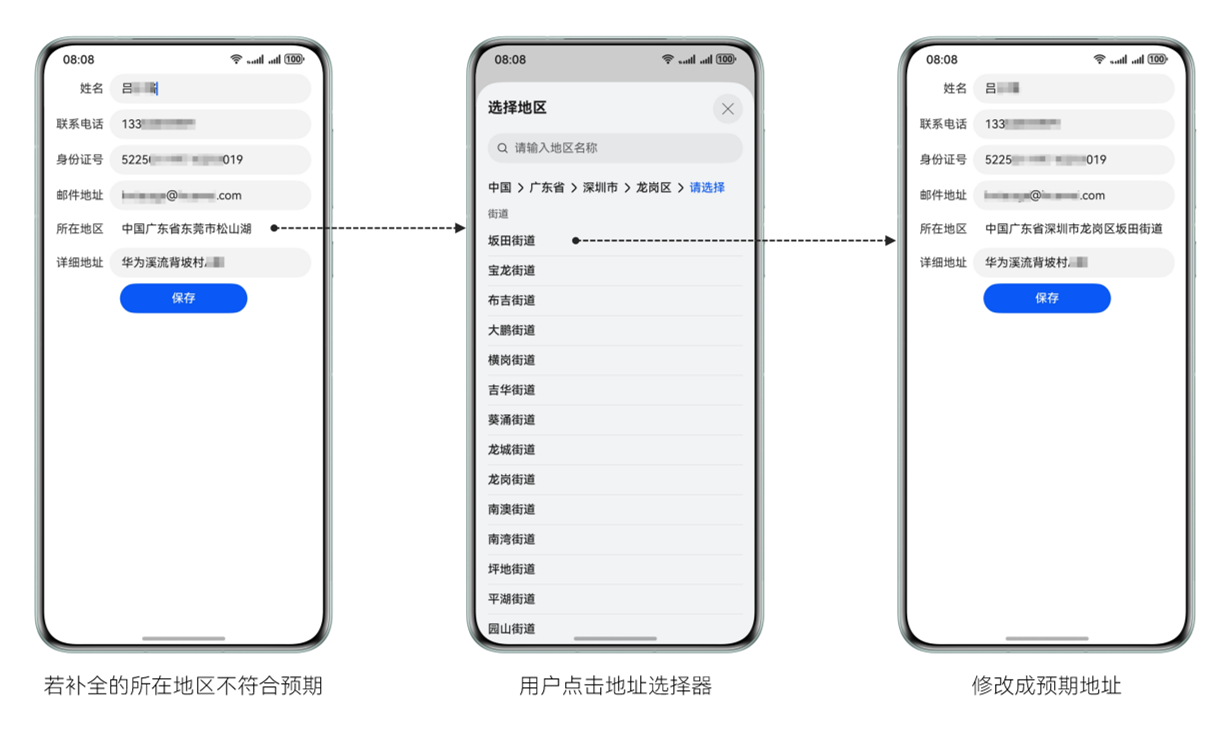
下面,本文将详细讲解,如何对表单中的地址字段进行开发,实现自动补全地址表单所在地区。
开发准备
首先,我们需要在module.json5文件中设置模糊位置权限:ohos.permission.APPROXIMATELY_LOCATION,允许应用获取设备模糊位置信息。
其次,所在地区地址选择器需要开通地图服务。
最后,还需要配置应用签名证书指纹,可参见配置Client ID。
开发步骤
我们以北京天安门的经纬度为例进行讲解,在获得相关授权后调用获取位置信息的API,然后根据数据源中现有地址信息遍历当前地址的行政区划层级,自动补全地址表单所在地区,在填写完毕后将表单信息保存到历史表单输入。
1 2 3 4 5 6 7 8 9 10 11 12 13 14 15 16 17 18 19 20 21 22 23 24 25 26 27 28 29 30 31 32 33 34 35 36 37 38 39 40 41 42 43 44 45 46 47 48 49 50 51 52 53 54 55 56 57 58 59 60 61 62 63 64 65 66 67 68 69 70 71 72 73 74 75 76 77 78 79 80 81 82 83 84 85 86 87 88 89 90 91 92 93 94 95 96 97 98 99 100 101 102 103 104 105 106 107 108 109 110 111 112 113 114 115 116 117 118 119 120 121 122 123 124 125 126 127 128 129 130 131 132 133 134 135 136 137 138 139 140 141 142 143 144 145 146 147 148 149 150 151 152 153 154 155 156 157 158 159 160 161 162 163 164 165 166 167 168 169 170 171 172 173 174 175 176 177 178 179 180 181 182 183 184 185 186 187 188 189 190 191 192 193 194 195 196 197 198 199 200 201 202 203 204 205 206 207 208 209 210 211 212 213 214 215 216 217 218 219 220 221 222 223 224 225 226 227 228 229 230 231 232 233 234 235 236 237 238 239 240 241 242 243 244 245 246 247 248 249 250 251 252 253 254 255 256 257 258 259 260 261 262 263 264 265 266 267 268 269 270 271 272 273 274 275 276 277 278 279 280 281 282 283 284 285 286 | import { util } from '@kit.ArkTS';import { i18n } from '@kit.LocalizationKit';import { sceneMap, site } from '@kit.MapKit';import { hilog } from '@kit.PerformanceAnalysisKit';import { BusinessError } from '@kit.BasicServicesKit';import { geoLocationManager } from '@kit.LocationKit';import { abilityAccessCtrl, autoFillManager, common, PermissionRequestResult, Permissions } from '@kit.AbilityKit';const AUTHED = 0;const TIME_OUT = 100;// Default longitude and latitude. The following uses the longitude and latitude of Tiananmen, Beijing as an example.const INIT_LAT = 39.5;const INIT_LON = 116.2;const ENGLISH = 'en';const SIMPLIFIED_CHINESE = 'zh_CN';const PERMISSIONS: Array<Permissions> = ['ohos.permission.APPROXIMATELY_LOCATION'];const ADMINISTRATIVE_REGION: Array<string> = ['countryName', 'adminLevel1', 'adminLevel2', 'adminLevel3', 'adminLevel4'];interface PersonInfo { name?: string; phone?: string; email?: string; idCard?: string; region?: string; stressAddress?: string;}interface RequestParam { requestTag: string; requestText: string;}interface Location { latitude: number; longitude: number;}// Display the authorization pop-up.async function reqPermissionsFromUser(permissions: Array<Permissions>, context: common.UIAbilityContext): Promise<PermissionRequestResult> { let atManager: abilityAccessCtrl.AtManager = abilityAccessCtrl.createAtManager(); return await atManager.requestPermissionsFromUser(context, permissions);}// Throttle function.function debounce(func: () => void, wait: number = TIME_OUT): Function { let timeout: number | null = null; return () => { timeout && clearTimeout(timeout); timeout = setTimeout(() => { func(); clearTimeout(timeout); }, wait); };}@Extend(Text)function textStyle() { .width(64) .textAlign(TextAlign.End)}@Entry@Componentstruct Index { @State personInfo: PersonInfo = {}; @State isClicked: boolean = false; // Whether the user has triggered information input. private isUserInput: boolean = false; private location: Location = { latitude: INIT_LAT, longitude: INIT_LON, }; private currentRequestTag: string = ''; private handleAddressChange = (request: RequestParam) => { return debounce(async () => { this.autoCompleteAddress(request); }); }; aboutToAppear() { reqPermissionsFromUser(PERMISSIONS, getContext(this) as common.UIAbilityContext) .then((permissionRequestResult: PermissionRequestResult) => { if (permissionRequestResult.authResults[0] === AUTHED) { // The API for obtaining location information can be called only under authorization. geoLocationManager.getCurrentLocation((err, location: geoLocationManager.Location) => { if (err) { hilog.error(0x0000, 'testTag', `Failed to get location, code: ${err?.code}, message: ${err?.message}`); return; } hilog.info(0x0000, 'testTag', `Succeeded in obtaining the current location of the user`); this.location.latitude = location.latitude; this.location.longitude = location.longitude; }) } }) .catch((err: BusinessError) => { hilog.error(0x0000, 'testTag', `Failed request permissions, code: ${err?.code}, message: ${err?.message}`); }) } public isUsLanguage(): boolean { let result: string = ''; try { result = i18n.System.getSystemLanguage(); } catch (error) { hilog.error(0x0000, 'testTag', 'Failed to get system language'); } return result.toLowerCase() === 'en-latn-us'; } async autoCompleteAddress(request: RequestParam): Promise<void> { try { let params: site.SearchByTextParams = { query: request.requestText, // Longitude and latitude to which search results need to be biased. location: { latitude: this.location.latitude, longitude: this.location.longitude }, language: this.isUsLanguage() ? ENGLISH : SIMPLIFIED_CHINESE, isChildren: true }; const result = await site.searchByText(params); if (result.sites) { let region: string = ''; let addressComponent = result.sites[0].addressComponent; // Traverse the administrative region level of the current address. for (let item of ADMINISTRATIVE_REGION) { if (addressComponent[item] === undefined) { break; } region += addressComponent[item]; } // Prevent repeated searches that may lead to inconsistent results. if (request.requestTag === this.currentRequestTag) { this.personInfo.region = region; } } } catch (error) { hilog.error(0x0000, 'testTag', `Failed to search location, code: ${error.code}, message: ${error.message}`); } hilog.info(0x0000, 'testTag', 'Succeeded in searching location'); } onRegionClick(): void { // After a user selects an administrative region, display only search results from the selected region to prevent prolonged queries. this.currentRequestTag = util.generateRandomUUID(); let districtSelectOptions: sceneMap.DistrictSelectOptions = { countryCode: 'CN', }; sceneMap.selectDistrict(getContext(this), districtSelectOptions).then((data) => { hilog.info(0x0000, 'testTag', 'SelectDistrict', 'Succeeded in selecting district.'); let region = ''; for (let i = 0; i < data?.districts?.length; i++) { region += data.districts[i].name; } this.personInfo.region = region; }).catch((err: BusinessError) => { hilog.error(0x0000, 'testTag', `Failed to select district, code: ${err.code}, message: ${err.message}`); }); } searchRegionByAddress(val: string): void { let tag: string = util.generateRandomUUID(); this.currentRequestTag = tag; let param: RequestParam = { requestTag: tag, requestText: val } // For the manual user input scenario, dithering processing is required. For the automatic input scenario of SmartFill, only the query processing is required. if (this.isUserInput) { this.handleAddressChange(param)(); } else { this.autoCompleteAddress(param); } } build() { Column({ space: 8 }) { Row({ space: 8 }) { Text('姓名').textStyle() TextInput({ text: this.personInfo.name, placeholder: '姓名' }) .layoutWeight(1) .contentType(ContentType.PERSON_FULL_NAME) .onChange((val: string) => { this.personInfo.name = val; }) } Row({ space: 8 }) { Text('联系电话').textStyle() TextInput({ text: this.personInfo.phone, placeholder: '手机号码' }) .layoutWeight(1) .contentType(ContentType.PHONE_NUMBER) .onChange((val: string) => { this.personInfo.phone = val; }) } Row({ space: 8 }) { Text('身份证号').textStyle() TextInput({ text: this.personInfo.idCard, placeholder: '身份证信息' }) .layoutWeight(1) .contentType(ContentType.ID_CARD_NUMBER) .onChange((val: string) => { this.personInfo.idCard = val; }) } Row({ space: 8 }) { Text('邮件地址').textStyle() TextInput({ text: this.personInfo.email, placeholder: '电子邮件信息' }) .layoutWeight(1) .contentType(ContentType.EMAIL_ADDRESS) .onChange((val: string) => { this.personInfo.email = val; }) } Row({ space: 8 }) { Text('所在地区').textStyle() TextArea({ text: this.personInfo.region, placeholder: '地区信息' }) .layoutWeight(1) .backgroundColor($r('sys.color.ohos_id_color_card_bg')) .placeholderColor($r('sys.color.ohos_id_color_text_secondary')) .fontSize($r('sys.float.ohos_id_text_size_body1')) .fontColor($r('sys.color.ohos_id_color_text_primary')) .onClick(() => this.onRegionClick()) .focusable(false) } Row({ space: 8 }) { Text('详细地址').textStyle() TextInput({ text: this.personInfo.stressAddress, placeholder: '小区门牌信息' }) .layoutWeight(1) .contentType(ContentType.DETAIL_INFO_WITHOUT_STREET) .onDidInsert(() => { // Triggered when a user inputs data through an input method. this.isUserInput = true; }) .onDidDelete((val: DeleteValue) => { // Triggered when a user deletes data through an input method. if (val?.deleteValue?.length > 0) { this.isUserInput = true; } }) .onChange((val: string) => { this.personInfo.stressAddress = val; if (val && val.trim().length > 0) { this.searchRegionByAddress(val); } else { this.currentRequestTag = util.generateRandomUUID(); this.personInfo.region = ''; } this.isUserInput = false; }) } Button('保存') .width('50%') .onClick(() => { if (!this.isClicked) { this.isClicked = true; autoFillManager.requestAutoSave(this.getUIContext(), { onSuccess: () => { hilog.info(0x0000, 'testTag', 'Succeeded in saving request'); }, onFailure: () => { hilog.info(0x0000, 'testTag', 'Failed to save request'); } }); setTimeout(() => { this.isClicked = false; }, 2000); } }) } .padding({ left: 16, right: 16 }) .backgroundColor($r('sys.color.ohos_id_color_list_card_bg')) .alignItems(HorizontalAlign.Center) .height('100%') .width('100%') }} |
了解更多详情>>
赞赏
|
|
|---|---|

|
|

他的文章


赞赏
雪币:
留言:

