-
-
[原创]车牌号智能填充快人一步,告别繁琐输入
-
发表于: 2025-10-17 14:20 1877
-


在汽车出行场景中,车主时常在停车缴费口因记不住车牌而堵成长龙;在车险理赔过程中需要输入车牌号时,也要通过翻照片或行驶证才能找到车牌号信息;尤其在车主名下有多辆车的情况下,车牌号信息记忆难度倍增,输入环节便成了效率瓶颈。
为解决这一难题,HarmonyOS SDK融合场景服务(Scenario Fusion Kit)智能填充服务的推荐车牌号场景能力基于本地安全沙箱,实时比对登录设备的账号信息,实名姓名+手机号或邮箱信息,与历史表单输入中的车牌号信息做匹配。匹配成功即在用户填写车牌号表单时提供输入建议,点击即可一键填入,无需联网查询,也无需第三方授权。
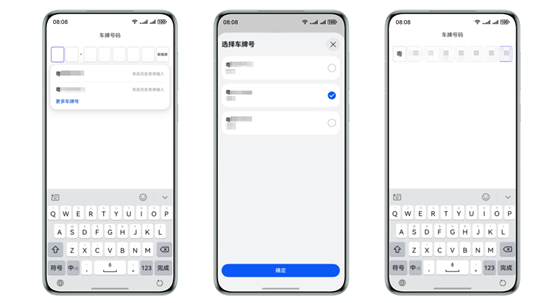
使用智能填充服务能力填写车牌号信息
能力优势
● 一键速填
自动匹配车主实名账号下的历史车牌,无需手动输入,停车缴费、理赔申报秒级完成。
● 零记忆成本
本地加密存储,换车、增车自动同步,彻底告别翻照片、查行驶证。
● 零误差保障
只呈现与登录身份一致的专属车牌候选项,杜绝输错或他人车牌混入。
开发步骤
1 2 3 4 5 6 7 8 9 10 11 12 13 14 15 16 17 18 19 20 21 22 23 24 25 26 27 28 29 30 31 32 33 34 35 36 37 38 39 40 41 42 43 44 45 46 47 48 49 50 51 52 53 54 55 56 57 58 59 60 61 62 63 64 65 66 67 68 69 70 71 72 73 74 75 76 77 78 79 80 81 82 83 84 85 86 87 88 89 90 91 92 93 94 95 96 97 98 99 100 101 102 103 104 105 106 107 108 109 110 111 112 113 114 115 116 117 118 119 120 121 122 123 124 125 126 127 128 129 130 131 132 133 134 135 136 137 138 139 140 141 142 143 144 145 146 147 148 149 150 151 152 153 154 155 156 157 158 159 160 161 162 163 164 165 166 167 168 169 170 171 172 173 174 175 176 177 178 179 180 181 182 183 184 185 186 187 188 189 190 191 192 193 194 195 196 197 198 199 200 201 202 203 204 | import { display } from '@kit.ArkUI';const NEW_ENERGY_TEXT = '新能源';@Extend(Text)function extendStyles(value: string, width: number, height: number, active: boolean) { .fontSize(value === NEW_ENERGY_TEXT ? 10 : 18) .fontWeight(FontWeight.Medium) .textAlign(TextAlign.Center) .width(width) .height(height) .borderWidth('3px') .borderColor(active ? Color.Blue : '#ccc') .borderRadius(5)}@Entry@Componentstruct LicensePlate { // 车牌号输入框的数量。 private length = 8; private licenseItemId = '_license_item'; @State licensePlateVal: string[] = []; @State activeIndex: number = -1; @State itemWidth: number = 30; @State itemHeight: number = 30; @State inputText: string = ''; // 用户是否已经触发输入。 @State isUserInput: boolean = false; // 匹配历史输入的上一个输入框的值 private beforeValue: string = ''; aboutToAppear(): void { this.licensePlateVal = new Array(this.length).fill(''); let displayClass = display.getDefaultDisplaySync(); let width = displayClass.width; // 每个框的宽度根据屏幕宽度计算。 this.itemWidth = this.getUIContext().px2vp(width) / (this.length + 1) - 4; this.itemHeight = this.itemWidth * 1.2; } setValue(val: string): void { if (!this.isUserInput) { // 根据SmartFill填写车牌号输入框。 this.handleAutoFill(val); this.beforeValue = val; return; } if (!val || val.length === 0 || this.beforeValue.length > val.length) { let licensePlate = this.getLicensePlate(); if (licensePlate.length > 0) { this.inputText = licensePlate; } this.beforeValue = this.inputText; return; } let inputData = val.substring(this.beforeValue.length); if (inputData.length > this.length) { inputData = inputData.substring(0, this.length); } // 用户输入仅替换选定的输入框,而SmartFill则替换所有输入框中的所有值。 this.handleUserInput(inputData); this.beforeValue = val; } getLicensePlate(): string { return this.licensePlateVal.join(''); } handleUserInput(val: string): void { if (val.length > this.length - this.activeIndex) { val = val.substring(0, this.length - this.activeIndex); } for (let i = 0; i < val.length; i++) { this.licensePlateVal[this.activeIndex] = val[i]; this.activeIndex = Math.min(this.activeIndex + 1, this.length - 1); } } handleAutoFill(val: string): void { let value = val.split(''); this.licensePlateVal.fill(''); for (let i = 0; i < this.length; i++) { this.licensePlateVal[i] = i < value.length ? value[i] : this.licensePlateVal[i]; } this.activeIndex = Math.min(value.length + 1, this.length - 1); } handleDelete() { if (!this.licensePlateVal[this.activeIndex]) { this.licensePlateVal[this.activeIndex - 1] = ''; } else { this.licensePlateVal[this.activeIndex] = ''; } this.activeIndex = Math.max(0, this.activeIndex - 1); } getValue(index: number): string { return (index === this.length - 1 && !this.licensePlateVal[index]) ? NEW_ENERGY_TEXT : this.licensePlateVal[index]; } handleLicenseClick(screenX: number) { for(let index = 0; index <= 7; index++) { let id = index + this.licenseItemId; let position = this.getUIContext().getComponentUtils().getRectangleById(id); // 相对于屏幕的位置信息,单位px let left = position?.screenOffset?.x ?? 0; let right = left + (position?.size?.width ?? 0); if (screenX >= left && screenX <= right) { this.activeIndex = index; } } } @Builder displayItem(index: number) { Column() { Text(this.getValue(index)) .extendStyles(this.getValue(index), this.itemWidth, this.itemHeight, this.activeIndex === index) } .id(index + this.licenseItemId) .padding({ left: 2, right: 2 }) } @Builder buildLicensePlateNumber() { Flex({ direction: FlexDirection.Row, alignItems: ItemAlign.Center, justifyContent: FlexAlign.SpaceBetween }) { Column() { Row() { Text("车牌号码") }.height(30) Stack({ alignContent: Alignment.BottomStart }) { Row() { this.displayItem(0) this.displayItem(1) Text('·') .fontSize(22) .fontWeight(600) .height(this.itemHeight) this.displayItem(2) this.displayItem(3) this.displayItem(4) this.displayItem(5) this.displayItem(6) this.displayItem(7) } TextInput({ text: $$this.inputText }) .width('100%') .height('100%') .opacity(0) .contentType(ContentType.LICENSE_PLATE) .onClick((event) => { // 相对于屏幕的X轴坐标,单位px let displayX = this.getUIContext().vp2px(event.displayX); this.handleLicenseClick(displayX); if (this.activeIndex < 0) { this.activeIndex = 0; } }) .onChange((val: string) => { if (val === this.beforeValue) { return; } this.setValue(val); this.isUserInput = false; }) .onDidInsert(() => { // 当使用输入法输入数据时触发。如果输入法是自定义的,则在用户输入数据时将isUserInput设置为true。 this.isUserInput = true; }) .onDidDelete((val: DeleteValue) => { // 当使用输入方法删除数据时触发。如果输入方法是自定义的,当用户删除数据时,将`isUserInput`设置为`true`,并调用相应的处理函数。 if (val?.deleteValue?.length > 0) { this.isUserInput = true; } this.handleDelete(); }) } .height(this.itemHeight) .margin({ top: 20 }) } } .backgroundColor(Color.White) .height(50) .margin({ left: 15, right: 15 }) .id("customInput") .defaultFocus(false) } build() { Column() { this.buildLicensePlateNumber() } }} |
了解更多详情>>
赞赏
|
|
|---|---|

|
|

他的文章


赞赏
雪币:
留言:

